The integration with Trimble Maps provides Trip Management functionality for use with the Fleet Management module in the TMS. Trip routing and notifications may be managed with driver availability to more efficiently manage Fleet operations.
Setup
The Trimble integration requires an API key to enable the features for Fleet Management. Contact a Revenova representative or open a support case to request a Trimble API Key after completing the External Client App set up.
Complete the External Client App setup described in the linked documentation before opening a support case with Revenova. Include the following information in the support case when requesting the Trimble API key.
Consumer Key
Consumer Secret
18-character Organization ID
Organization Login URL
Navigate to TMS Admin → Configuration, Global Settings.
Confirm the Trimble box is Checked for Use Platform Events For.
Trimble does not provide the Departure Date/Time field for the last Leg in a Segment. Set the Delivered Load Trigger field based on the following recommendations. The Trip Plan Leg Departure Date/Time logic is distinct for each integration.
Catena: Set the Delivered Load Trigger to Last Stop Arrival Date to set the Load Status as Delivered when the Driver arrives at the last Stop on a Trip Plan Segment.
This setting automatically updates the Departure Date/Time field on the last Leg on the Segment.
If another trigger is selected, the Departure Date/Time field on the last Leg of a Segment must be set manually to update the Segment Status to Pending Final, and the Load Status to Delivered.
Samsara/FMJ3: Set the Delivered Load Trigger to Last Stop Departure Date.
The Samsara integration updates the Departure Date/Time field when the Driver leaves the final Stop.
Scroll to the Fleet Management section.
Check the Enable Routing Consolidate Locations field to consolidate duplicated Stop locations as one single Stop location. When Checked and the Segment contains Legs with consecutive End Stops/Locations of the same location, those locations are sent to Trimble as a single location. When inbound arrival/departure events are received from Trimble, they are applied to both Trip Plan Legs.
This only applies to defined location Accounts and not general addresses or geolocations.
Users must inform Drivers that multiple pickup/delivery events occur at a single location.
Enter Credentials
Enable the Trimble integration by completing the following steps.
Navigate to TMS Admin.
Select Credentials.
Select the Global Services tab.
Find Trimble in the list and open the card.
Check the Enabled box.
Enter a User ID (Revenova) and Password 1 (API Key) into the text fields.
Click the Save button when finished.
Valid credentials are required from all applicable ELD provider subscriptions. See examples in the table below.
User ID | Password 1 | Password 2 | Customer Number |
|---|---|---|---|
Revenova | API Key |
Trimble accounts have a “Stop Resequencing” setting that can update the Stop order when making changes to Trip Plans. It is recommended to disable this setting in the Trimble account. Contact Trimble for more information.
Remote Site Settings
Upgrading from previous versions of the TMS may have outdated information.
Click the Setup gear icon in the top right corner.
From the drop-down, click Setup.
In the Quick Find Toolbar type Remote Site Settings and click the link.
From the list of remote sites find Trimble and click the Edit link.
Update the Remote Site URLs to match the Service URLs below.
Service URL: https://tripmanagement.alk.com
Test Service URL: https://tripmanagement.alk.com
Setup External Client App/API user
The Trimble Maps integration requires an External Client App and an API User. See the External Client App Setup information to complete the setup for an App and an API User.
See Salesforce documentation for additional information on creating API Users.
Follow the steps to complete the Trimble Maps integration setup by opening a case with Revenova Support. Include the following values in the support case.
Consumer Key
Consumer Secret
18-character Organization ID
Organization Login URL.
Transportation Profile Setup
Configure the Transportation Profiles for Fleet Carriers and Stop locations to automatically insert default values when creating Trip Plans. Fields may be configured and changed on the Trip Plan without updating the default values set on the Transportation Profiles.
Carrier Transportation Profile
Manage the frequency for Trip Events by Notification for each Carrier from the Transportation Profile. Set the following fields as necessary for each Carrier in the Fleet to manage when Trip Events are generated. Trip Management Alerts appear on Trip Plans based on the Transportation Profile populated in the Fleet Asset Company/Division field.
Choose the desired alert types to generate Trip Events in the Fleet Management Console.
Trimble Trip Management Alerts
PTA
PTA Alerts (Projected Time of Arrival - Early, On Time, or Late) are based on the Trip Plan Leg Appointment Date, Appointment Start Time, and Appointment End Time fields.
Stop Status
Weather
Out of Corridor
Out of Route
Traffic Incidents
Approaching
Dwell Exceeded
Unplanned Stops
Enter a number of minutes in the Alert Suspension Minutes field to pause a Notification Type after it is received. Any Trip Notifications received from Trimble after the first notification within this time period do not generate a Trip Event. Use this field to limit the number of Trip Events that are generated for the listed Alert Types in the Fleet Management Console.
Alert Suspension Minutes
PTA
Weather
Out of Route
Out of Corridor
Traffic
The following Alert Types cannot be suspended.
Stop Status
Approaching Stop
Dwell Exceeded
Unplanned Stop
The following Trip Events may be turned on, off, or suspended at the individual Trip Plan Segment. See Trip Plan Segment documentation for more information.
PTA
Stop Status (cannot be suspended)
Weather
Traffic Incidents
Approaching Stop (cannot be suspended)
Dwell Exceeded (cannot be suspended)
Customer Transportation Profile
Monitor the status of cargo and expected dwell times for Stop locations by entering default values on the Transportation Profile. Enter default times (in minutes) into the following fields to populate from the Transportation Profile into the Stop Detail component when creating Loads. These fields automatically are entered into the Trip Plan Leg when the Load is added to a Trip Plan Leg.
Transportation Profile → Stop Detail (Load) → Trip Plan Leg
Planned Duration Pickup Preloaded
Planned Duration Pickup Live Load
Planned Duration Delivery Drop
Planned Duration Delivery Live Unload
Set the default Cargo Status for a Stop location on the Transportation Profile as necessary.
Default Cargo Status Pickup
Preloaded
Live Load
Default Cargo Status Delivery
Live Unload
Drop
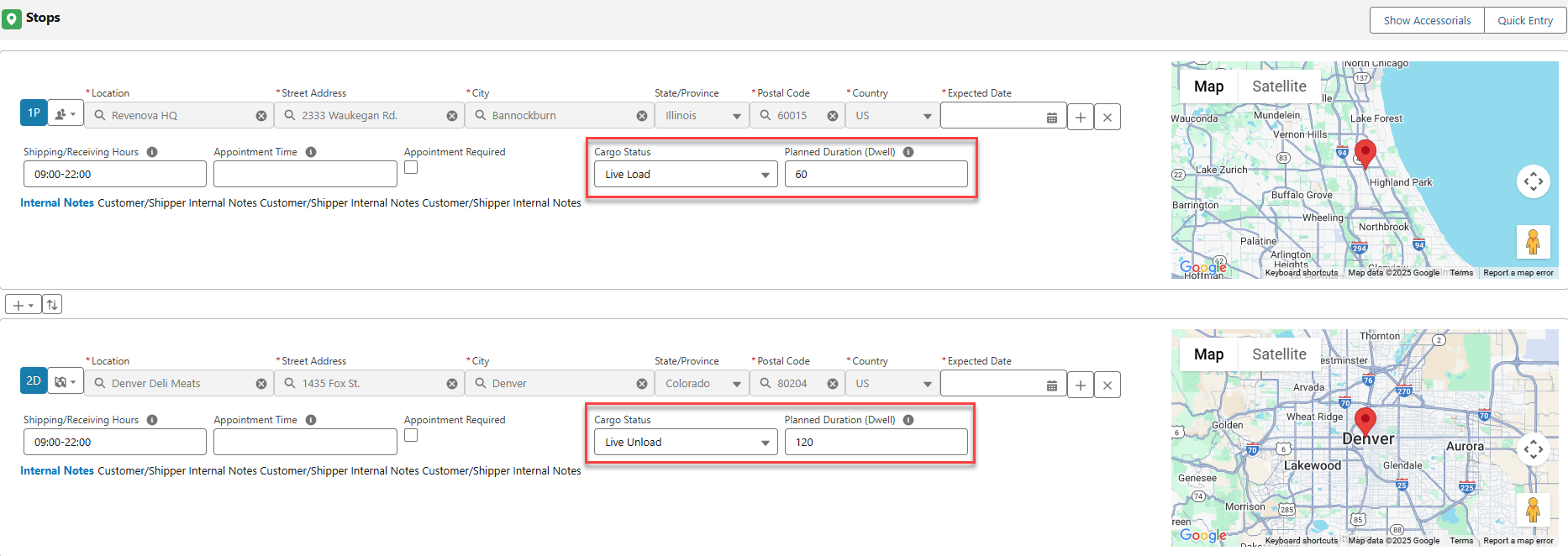
Stop location fields are available when configuring the Load by adding the Cargo Status and Planned Duration (Dwell) fields to the Stop Field Sets TMS1 and TMS3.
The Stop TMS1 field set is available on the Load Detail Entry component shown below. Fields are populated based on the Stop type (pickup or delivery).
The Stop TMS3 field set is available on the Stop Detail component shown below. When a Cargo Status value is entered on the Stop Detail LWC, the appropriate Planned Duration field is populated from the Transportation Profile.
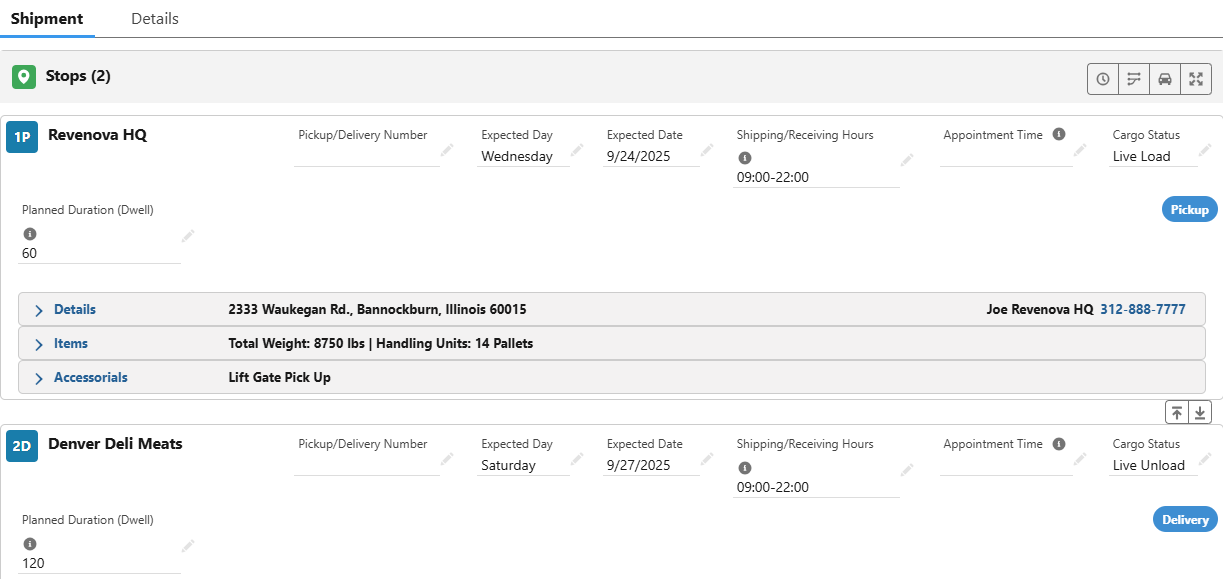
These fields may be manually adjusted during Load creation and configuration without changing the default values on the Transportation Profile.
As Loads containing Stops are added to Trip Plans, the Stop values are added to the Trip Plan.
Trip Planning
When Loads are added to a Trip Plan, the following fields automatically populate into the Trip Plan. Load fields are meant to show planned or anticipated values, and Trip Plans are meant to show actual values as Fleet movements are executed. The following rules control field information from the Load into the Trip Plan.
Stop fields are set based on the default value set on the corresponding Transportation Profile and the Stop type (Pickup or Delivery).
Once a Load is added to the Trip Plan, field changes on the Load record are not updated to the Trip Plan.
When the Cargo Status is changed for the Load Stop, the Trip Plan does not update. However, removing the Fleet Asset (trailer, container, chassis) from the Trip Plan does update the Cargo Status field. When the new Fleet Asset is added to the Trip Plan, the current Cargo Status field value from the Load Stop is added to the Trip Plan.
Control when notifications from Trimble generate Trip Events by setting Alert Suspensions and Appointment fields.
Change fields on the Trip Plan as necessary. Updating fields on the Trip Plan does not change the Load field values or default values on the Transportation Profile.
Stop
Appointment Time
Cargo Status
Due Out Date
In the local date of the Stop.
Due Out Time
In the local time of the Stop.
Planned Duration
Transportation Profile
Alert Suspension Minutes
Planned Duration
Once added to the Trip Plan, this field is no longer updated based on Load field changes.E
Default Cargo Status
Value determined by Stop type.
Trimble Trip Management Alerts
Alerts may be set for individual Trip Plan Segments.
Check the Transportation Profile Pickup Appointment Required or Delivery Appointment Required fields to require Stop appointments.
The Appointment Time Grace Period fields are used in the Fleet Management Console to determine when the Trip Plan Leg ETA Date and Time fields are within the Appointment Time window. ETA Event notifications are generated when the ETA for a Trip Plan is outside of the appointment window. Enter field values in minutes before and after the Appointment Time to set the pickup or delivery appointment window.
Appointment Time Grace Period (Before)
Appointment Time Grace Period (After)
When Appointment Time Grace Period fields have no value entered, they are treated as 0.
The Location Hours Grace Period (Before) and (After) fields do not impact the Fleet Management Console.
When the Trip Plan Leg Appointment Date, Appointment Time, or Appointment End Time fields do not have a value, all PTA notifications are considered “outside” of the appointment window and generate Trip Events. Turn off PTA Events in this scenario or add an Appointment Date and Time to avoid creating many Trip Events.
If Appointment Time Grace Period (Before) or Appointment Grace Period (After) Transportation Profile fields do not have a value, they function with a value of 0.
Trimble API Calls
Performing actions in the Fleet Management Console initiates calls to the Trimble end points. See individual call information below for information required to send in each API call.
The Trimble integration calls are handled as Platform Events and Queued Transactions. Trimble errors are included in the error message emails sent by the Fleet Management Jobs. Trimble errors may also be monitored for both Queued Transaction and Platform Events. View Trimble Platform Event errors from the App Launcher → Error Logs and find any Trimble errors. Find Trimble Queued Transaction errors from the App Launcher → Queued Transactions and view the Error Detail field.
Plan Trip
The Trimble Plan Trip API end point provides routing information based on the stop locations for a Fleet Trip Plan. Calling the Trimble Plan Trip endpoint creates a Trip Plan within the Trimble system. The call is made when the Trip Plan Segment Status is set to Configured. Trimble returns an ID for referencing the route in other calls.
TMS Operation | Trimble Endpoint | Request Type | Response |
|---|---|---|---|
Trip Plan Segment Status set to Configured | Plan Trip | POST | 200: Success |
TMS Fields Sent in Plan Trip call
All Trip Plan Segment Stops are included in the Plan Trip call. The location, sequence, and appointment information (when present) is included for each Stop. Each Stop location MUST have either geolocation or address information.
Trip Plan Segments that have Trip Plan Legs with consecutive End Stops/Locations with the same location may be consolidated. Check the Consolidate Same Locations When Routing field on the Trip Plan Segment to prevent arrival and departure issues for pickups and deliveries at a single location.
When multiple pickup and/or delivery events occur at a single location, this information is not included in the call to Trimble. Users must inform Drivers that multiple pickup/delivery events occur at a single location.
Object | Field | Type | Trimble Field |
|---|---|---|---|
Driver | Cycle Time Remaining | Number(3, 2) | RemainingCycleDutyTime |
Driver | Drive Time Remaining | Number(3, 2) | RemainingDriveTime |
Driver | SFID | SFID | tspDriverId |
Driver | Time Until Break | Number(3, 2) | **RemainingDriveTimeUntilBreak |
Trip Plan | Name | Auto Number | *name |
“Work” | stopType | ||
Number | *stopSequence | ||
Trip Plan Leg | Appointment Date | Date | earliestArrivalTime, latestArrivalTime |
Trip Plan Leg | Appointment End Time | Time | latestArrivalTime |
Trip Plan Leg | Planned Duration (Dwell) | Number(4, 0) | plannedDuration |
Trip Plan Leg | Appointment Start Time | Time | earliestArrivalTime |
Trip Plan Leg | Due Out Date | Date | plannedStartTime, plannedDepartureTime |
Trip Plan Leg | Due Out Time | Time | plannedStartTime, plannedDepartureTime |
Trip Plan Leg | Start Geolocation | Geolocation | lat, lon |
Trip Plan Leg | Start City | Text(40) | city |
Trip Plan Leg | Start Postal Code | Text(20) | zip |
Trip Plan Leg | Start State/Province | Picklist | state |
Trip Plan Leg | Start Street Address | Text(100) | street address |
Trip Plan Segment | Load | Lookup(Load) | *externalOrderIds |
Trip Plan Segment | Name | Text(80) | *name |
Trip Plan Segment | Power Unit | Lookup(Fleet Asset) | tspVehicleId |
Trip Plan Segment | SFID | SFID | *tmsTripId |
*Fields marked with an asterisk are required.
**The Driver Time Until Break field is only sent if two drivers are present.
The ID for Driver 1 is sent when two drivers are included in a Trip Plan. The Cycle Time Remaining, Drive Time Remaining, and Time Until Break fields are sent for both drivers.
Sample Plan Trip Request Payload
{
  "name": "Trip-Name",
  "tmsTripId":"TMS-Trip-Identifier",
  "plannedStartLocation": {
    "Coords":{
        "Lat": "42.364551",
        "Lon": "-71.180604"
        }
    },
  "stops": [
    {
      "Location": {
      "Coords": {
          "Lat": "42.346689",
          "Lon": "-71.098860"
            },
        "Label": "Fenway Park"
      },
      "earliestArrivalTime":"2023-09-19T16:45:00",
      "latestArrivalTime":"2023-09-19T18:00:00",
      "stopType":"Origin",
      "stopSequence":0,
      "plannedDuration":60
    },
    {
      "Location": {
        "Address": {
          "StreetAddress": "116 Federal Street",
          "City": "Pittsburgh",
          "State": "PA",
          "Zip": "15212",
          "County": "Allegheny"
        },
        "Label": "PNC Park"
      },
      "earliestArrivalTime":"2023-09-20T17:00:00",
      "latestArrivalTime":"2023-09-20T18:00:00",
      "atRiskThreshold":30,
      "stopType":"Work",
      "stopSequence":0,
      "plannedDuration":120
    },
    {
      "Location": {
        "Address": {
          "StreetAddress": "4900 Marie P Debartolo Way",
          "City": "Santa Clara",
          "State": "CA",
          "Zip": "95054"
        },
        "Label": "Levi's Stadium"
      },
      "earliestArrivalTime":"2023-09-20T23:00:00",
      "latestArrivalTime":"2023-09-21T06:00:00",
      "atRiskThreshold":30,
      "stopType":"Destination",
      "stopSequence":0
    }
  ],
  "tmsId":1,
  "hosSolution":2,
  "costPerMile":1.725,
  "vehicle": {
    "tspVehicleId":"Documentation 1"
  },
  "driverHoursOfService": {
    "enabled":true,
    "hosRuleType":"USFed607LH"
  }
}
Sample Plan Trip Response Payload
{
    "tripStatus": "Planned",
    "modifiedOn": "2023-11-24T14:41:42+00:00",
    "tripDistance": 3177.805,
    "tripDriveDuration": 2938.7,
    "tripDuration": 5638.7,
    "hoursOfServiceRemaining": {
        "enabled": true,
        "remainingDriveTimeUntilBreak": 1440.0,
        "remainingDriveTime": 12240.0,
        "remainingOnDutyTime": 23040.0,
        "hoSRuleType": "USFed607LH",
        "remainingCycleDutyTime": 28800.0,
        "cycleTimeGains": [
            0.0,
            0.0,
            36000.0,
            37680.0,
            36780.0,
            38520.0
        ],
        "lastCycleResetDateTime": null,
        "last24HourBreakDateTime": null,
        "remainingCanadaOnDutyTime": 23040.0,
        "remainingDriveTimeUntilBreakDriver2": null,
        "remainingDriveTimeDriver2": null,
        "remainingOnDutyTimeDriver2": null,
        "remainingCycleDutyTimeDriver2": null,
        "cycleTimeGainsDriver2": null,
        "lastCycleResetDateTimeDriver2": null,
        "last24HourBreakDateTimeDriver2": null,
        "remainingCanadaOnDutyTimeDriver2": null,
        "alternateHoSRuleType": null,
        "remainingTimeUntilFullDayBreak": 0.0,
        "remainingTimeUntilFullDayBreakDriver2": null,
        "remainingDrivingTimeInWeek": 0.0,
        "remainingOnDutyTimeInDay": 0.0,
        "remainingConsecutiveDrivingTime": 0.0,
        "remainingFortnightlyTime": 0.0,
        "currentOffDutyTime": null,
        "currentOffDutyTimeDriver2": null
    },
    "url": "https://tripmanagement.alk.com/trip-viewer/token/ejvhhgguyf45m7tbdcgubmpsixfh5a3tycj3yci3ep/details/96301560?region=NA",
    "tripCost": 5481.714,
    "tripTolls": 0.0,
    "remainingLegDistance": 0.0,
    "remainingLegDriveDuration": 0.0,
    "tmsTripId": "TMS-Trip-Identifier",
    "name": "Trip-Name",
    "stops": [
        {
            "plannedETA": "2023-11-24T09:59:23-05:00",
            "currentETA": "2023-11-24T09:59:23-05:00",
            "currentETD": "2023-11-24T10:59:23-05:00",
            "earliestArrivalTime": "2023-09-19T16:45:00-05:00",
            "latestArrivalTime": "2023-09-19T18:00:00-05:00",
            "plannedDuration": 60.0,
            "actualDuration": 0.0,
            "plannedDepartureTime": "2023-11-24T10:59:23-05:00",
            "legDistance": 5.298,
            "legDriveDuration": 17.683,
            "activeDriver": 1,
            "stopId": 1044395852,
            "location": {
                "address": {
                    "streetAddress": "26 Jersey Street",
                    "city": "Boston",
                    "state": "MA",
                    "zip": "02215",
                    "county": "Suffolk",
                    "country": null
                },
                "coords": {
                    "lat": "42.346689",
                    "lon": "-71.09886"
                },
                "label": "Fenway Park"
            },
            "waypoint": false,
            "stopSequence": 0,
            "stopType": "Origin"
        },
        {
            "plannedETA": "2023-11-24T18:54:15-05:00",
            "currentETA": "2023-11-24T18:54:15-05:00",
            "currentETD": "2023-11-24T19:24:15-05:00",
            "earliestArrivalTime": "2023-11-24T18:39:15-05:00",
            "latestArrivalTime": "2023-11-24T19:09:15-05:00",
            "plannedDuration": 30.0,
            "actualDuration": 0.0,
            "plannedDepartureTime": "2023-11-24T19:24:15-05:00",
            "legDistance": 499.976,
            "legDriveDuration": 474.867,
            "activeDriver": 1,
            "stopId": 1044395853,
            "location": {
                "address": {
                    "streetAddress": "4057 Admiral Peary Highway",
                    "city": "Ebensburg",
                    "state": "PA",
                    "zip": "15931",
                    "county": null,
                    "country": "United States"
                },
                "coords": {
                    "lat": "40.460145",
                    "lon": "-78.769005"
                },
                "label": "@Martin General Store"
            },
            "waypoint": false,
            "stopSequence": 1,
            "stopType": "RestStopShort"
        },
        {
            "plannedETA": "2023-11-24T20:45:27-05:00",
            "currentETA": "2023-11-24T20:45:27-05:00",
            "currentETD": "2023-11-24T22:45:27-05:00",
            "earliestArrivalTime": "2023-09-20T17:00:00-05:00",
            "latestArrivalTime": "2023-09-20T18:00:00-05:00",
            "plannedDuration": 120.0,
            "actualDuration": 0.0,
            "plannedDepartureTime": "2023-11-24T22:45:27-05:00",
            "legDistance": 70.134,
            "legDriveDuration": 81.2,
            "activeDriver": 1,
            "stopId": 1044395854,
            "location": {
                "address": {
                    "streetAddress": "116 Federal Street",
                    "city": "Pittsburgh",
                    "state": "PA",
                    "zip": "15212",
                    "county": "Allegheny",
                    "country": null
                },
                "coords": {
                    "lat": "40.44797",
                    "lon": "-80.003972"
                },
                "label": "PNC Park"
            },
            "waypoint": false,
            "stopSequence": 2,
            "stopType": "Work"
        },
        {
            "plannedETA": "2023-11-24T23:10:49-05:00",
            "currentETA": "2023-11-24T23:10:49-05:00",
            "currentETD": "2023-11-25T09:10:49-05:00",
            "earliestArrivalTime": "2023-11-24T22:55:49-05:00",
            "latestArrivalTime": "2023-11-24T23:25:49-05:00",
            "plannedDuration": 600.0,
            "actualDuration": 0.0,
            "plannedDepartureTime": "2023-11-25T09:10:49-05:00",
            "activeDriver": 1,
            "stopId": 1044395855,
            "location": {
                "address": {
                    "streetAddress": "Pennsylvania Turnpike  (I-76)",
                    "city": "New Brighton",
                    "state": "PA",
                    "zip": "15066",
                    "county": "Beaver",
                    "country": "United States"
                },
                "coords": {
                    "lat": "40.749895",
                    "lon": "-80.207553"
                },
                "label": "Rest Stop"
            },
            "waypoint": false,
            "stopSequence": 3,
            "stopType": "RestStopLong"
        },
        {
            "plannedETA": "2023-11-25T15:58:41-06:00",
            "currentETA": "2023-11-25T15:58:41-06:00",
            "currentETD": "2023-11-25T16:28:41-06:00",
            "earliestArrivalTime": "2023-11-25T15:43:41-06:00",
            "latestArrivalTime": "2023-11-25T16:13:41-06:00",
            "plannedDuration": 30.0,
            "actualDuration": 0.0,
            "plannedDepartureTime": "2023-11-25T16:28:41-06:00",
            "legDistance": 502.913,
            "legDriveDuration": 467.867,
            "activeDriver": 1,
            "stopId": 1044395856,
            "location": {
                "address": {
                    "streetAddress": "3130 May Road",
                    "city": "Peru",
                    "state": "IL",
                    "zip": "61354",
                    "county": null,
                    "country": "United States"
                },
                "coords": {
                    "lat": "41.366681",
                    "lon": "-89.151536"
                },
                "label": "@Sapp Bros. Peru"
            },
            "waypoint": false,
            "stopSequence": 4,
            "stopType": "RestStopShort"
        },
        {
            "plannedETA": "2023-11-25T19:08:53-06:00",
            "currentETA": "2023-11-25T19:08:53-06:00",
            "currentETD": "2023-11-26T05:08:53-06:00",
            "earliestArrivalTime": "2023-11-25T18:53:53-06:00",
            "latestArrivalTime": "2023-11-25T19:23:53-06:00",
            "plannedDuration": 600.0,
            "actualDuration": 0.0,
            "plannedDepartureTime": "2023-11-26T05:08:53-06:00",
            "legDistance": 178.514,
            "legDriveDuration": 160.2,
            "activeDriver": 1,
            "stopId": 1044395857,
            "location": {
                "address": {
                    "streetAddress": "4126 Hwy 21",
                    "city": "Brooklyn",
                    "state": "IA",
                    "zip": "52211",
                    "county": null,
                    "country": "United States"
                },
                "coords": {
                    "lat": "41.698446",
                    "lon": "-92.359026"
                },
                "label": "@Pilot Travel Center #495"
            },
            "waypoint": false,
            "stopSequence": 5,
            "stopType": "RestStopLong"
        },
        {
            "plannedETA": "2023-11-26T11:56:07-07:00",
            "currentETA": "2023-11-26T11:56:07-07:00",
            "currentETD": "2023-11-26T12:26:07-07:00",
            "earliestArrivalTime": "2023-11-26T11:41:07-07:00",
            "latestArrivalTime": "2023-11-26T12:11:07-07:00",
            "plannedDuration": 30.0,
            "actualDuration": 0.0,
            "plannedDepartureTime": "2023-11-26T12:26:07-07:00",
            "legDistance": 529.301,
            "legDriveDuration": 467.233,
            "activeDriver": 1,
            "stopId": 1044395858,
            "location": {
                "address": {
                    "streetAddress": "103 Prospector Drive",
                    "city": "Ogallala",
                    "state": "NE",
                    "zip": "69153",
                    "county": null,
                    "country": "United States"
                },
                "coords": {
                    "lat": "41.113633",
                    "lon": "-101.712174"
                },
                "label": "@TA-Ogallala #90"
            },
            "waypoint": false,
            "stopSequence": 6,
            "stopType": "RestStopShort"
        },
        {
            "plannedETA": "2023-11-26T14:52:10-07:00",
            "currentETA": "2023-11-26T14:52:10-07:00",
            "currentETD": "2023-11-27T00:52:10-07:00",
            "earliestArrivalTime": "2023-11-26T14:37:10-07:00",
            "latestArrivalTime": "2023-11-26T15:07:10-07:00",
            "plannedDuration": 600.0,
            "actualDuration": 0.0,
            "plannedDepartureTime": "2023-11-27T00:52:10-07:00",
            "legDistance": 162.261,
            "activeDriver": 1,
            "location": {
                "address": {
                    "streetAddress": "8020 Campstool Road",
                    "city": "Cheyenne",
                    "state": "WY",
                    "zip": "82007",
                    "county": null,
                    "country": "United States"
                },
                "coords": {
                    "lat": "41.136222",
                    "lon": "-104.707177"
                },
                "label": "@Pilot Travel Center #402"
            },
            "waypoint": false,
            "stopSequence": 7,
            "stopType": "RestStopLong"
        },
    "tspDriverId": null,
    "vehicle": {
        "tspVehicleId": "Documentation 1",
        "isHighValue": false
    },
    "plannedStartTime": "2023-11-24T14:41:40+00:00",
    "plannedStartLocation": {
        "address": {
            "streetAddress": "42 North Beacon Street  (US-20)",
            "city": "Watertown",
            "state": "MA",
            "zip": "02472",
            "county": "Middlesex",
            "country": "United States"
        },
        "coords": {
            "lat": "42.364551",
            "lon": "-71.180604"
        },
    },
    "costPerMile": 1.725,
    "tripOptions": [],
    "region": "NA",
    "externalOrderIds": [],
    "alkTripId": 96301560
}
TMS Field Updates
Object | Field | Type | Trimble Field |
|---|---|---|---|
Trip Plan Segment | API Trip Id | Text(40) (External ID) | alkTripId |
See additional Trimble Plan Trip documentation here.
Modify Trip
Changes may be made to existing Fleet Trip Plans that are already created in the Trimble system. The Modify Trip endpoint is called whenever any of the following information is updated in the Fleet Management Console.
Changing the Power Unit assigned to a Trip Plan Segment.
Assigning a different Load to a Trip Plan Segment.
A Trip Plan Leg is added to a Trip Plan Segment.
A Trip Plan Leg is deleted from a Trip Plan Segment.
Changing a Trip Plan Leg Start or End Location.
Changing the Appointment Start or End Time or the Due Out Dates or Times.
Changing the Planned Duration (Dwell) time.
Trimble returns a successful response or an error code.
Once a Trip is dispatched, the Leg 1 Start Location cannot be modified.
Calling the Trimble Modify Trip endpoint changes the Trip Plan within the Trimble system but does not change the status.
TMS Operation | Trimble Endpoint | Request Type | Response |
|---|---|---|---|
Multiple TMS actions | Modify Trip | PUT | 200: Success |
TMS Fields Sent in Modify Trip call
All Trip Plan Segment Stops are included in the Modify Trip call. The location, sequence, and appointment information (when present) is included for each Stop. Each Stop location MUST have either geolocation or address information. For consolidated locations, Undispatch and Redispatch the Segment when changing Stop consolidation.
Object | Field | Type | Trimble Field |
|---|---|---|---|
Driver | Cycle Time Remaining | Number(3, 2) | RemainingCycleDutyTime |
Driver | Drive Time Remaining | Number(3, 2) | RemainingDriveTime |
Driver | SFID | SFID | tspDriverId |
Driver | Time Until Break | Number(3, 2) | **RemainingDriveTimeUntilBreak |
Trip Plan | Name | Auto Number | *name |
“Work” | stopType | ||
Number | *stopSequence | ||
Trip Plan Leg | Appointment Date | Date | earliestArrivalTime, latestArrivalTime |
Trip Plan Leg | Appointment End Time | Time | latestArrivalTime |
Trip Plan Leg | Planned Duration (Dwell) | Number(4, 0) | plannedDuration |
Trip Plan Leg | Appointment Start Time | Time | earliestArrivalTime |
Trip Plan Leg | Due Out Date | Date | plannedStartTime, plannedDepartureTime |
Trip Plan Leg | Due Out Time | Time | plannedStartTime, plannedDepartureTime |
Trip Plan Leg | Start Geolocation | Geolocation | lat, lon |
Trip Plan Leg | Start City | Text(40) | city |
Trip Plan Leg | Start Postal Code | Text(20) | zip |
Trip Plan Leg | Start State/Province | Picklist | state |
Trip Plan Leg | Start Street Address | Text(100) | street address |
Trip Plan Segment | Load | Lookup(Load) | *externalOrderIds |
Trip Plan Segment | Name | Text(80) | *name |
Trip Plan Segment | Power Unit | Lookup(Fleet Asset) | tspVehicleId |
Trip Plan Segment | SFID | SFID | *tmsTripId |
*Fields marked with an asterisk are required.
**The Driver Time Until Break field is only sent if two drivers are present.
The ID for Driver 1 is sent when two drivers are included in a Trip Plan. The Cycle Time Remaining, Drive Time Remaining, and Time Until Break fields are sent for both drivers.
Sample Modify Trip Request Payload
{
  "tripId": "136",
  "plannedStartTime": "2017-09-21T14:11:52.522Z",
  "plannedStartLocation": {
    "Coords": {
      "Lat": "42.346619",
      "Lon": "-71.096961"
    }
  },
  "externalOrderIds": ["123", "abc", "123+abc"],
  "stops": [
    {
      "Location": {
        "Address": {
          "StreetAddress": "4 Yawkey Way",
          "City": "Boston",
          "State": "MA",
          "Zip": "02215",
          "County": "Suffolk"
        },
        "Label": "Fenway Park"
      },
      "earliestArrivalTime": "2017-09-21T14:11:52.522Z",
      "latestArrivalTime": "2017-09-21T15:11:52.522Z",
  	  "actualDepartureTime":"2017-09-21T14:11:52.522Z",
      "stopStatus": "Completed",
      "stopType": "Origin",
      "stopSequence": 0
    },
    {
      "Location": {
        "Address": {
          "StreetAddress": "1000 Ballpark Way",
          "City": "Arlington",
          "State": "TX",
          "Zip": "76011"
        },
        "Label": "Globe Life Park"
      },
      "earliestArrivalTime": "2017-09-21T14:11:52.522Z",
      "latestArrivalTime": "2017-09-21T15:11:52.522Z",
      "atRiskThreshold": 30,
      "stopType": "Work",
      "stopSequence": 1
    },
    {
      "Location": {
        "Address": {
          "StreetAddress": "100 Park Blvd",
          "City": "San Diego",
          "State": "CA",
          "Zip": "92101"
        },
        "Label": "Petco Park"
      },
      "earliestArrivalTime": "2017-09-21T14:11:52.522Z",
      "latestArrivalTime": "2017-09-21T15:11:52.522Z",
      "atRiskThreshold": 30,
      "stopType": "Destination",
      "stopSequence": 2
    }
  ],
}
Sample Modify Trip Response Payload
{
  "success": true,
  "message": null
}
No TMS Field Updates
See additional Trimble documentation here.
Update Trip Status
Calls to the Update Trip Status end point change the Trimble route based on the Status of the Fleet Trip Plan Segment. The call is first made when a Trip Plan Segment Status is moved from Dispatched to In Progress. If changes are made to the Trip Plan Segment Status field, the call is made to update the status in the Trimble environment.
TMS Trip Plan Segment Status | Trimble Route Status Value | Trimble Route Status |
|---|---|---|
Dispatched | 1 | Accepted |
Completed | 2 | Completed |
Configured | 4 | Received |
TMS Operation | Trimble Endpoint | Request Type | Response |
|---|---|---|---|
Trip Plan Segment Status set to Dispatched | Update Trip Status | POST | 200: Success |
The Update Trip Status call is made to update the Trimble Trip Plan.
The call is made to the Update Trip Status end point when a Trip Plan Segment Status field is set to Dispatched. The Trimble Trip Plan is updated to a status of In Progress.
Fleet Assets must have a Geolocation. An Error Log record is created if a Fleet Asset does not have a Geolocation.
TMS Fields Sent in Update Trip Status call
Object | Field | Type | Trimble Field |
|---|---|---|---|
User Date/Time | timeStamp | ||
Fleet Asset | Geolocation | Geolocation | *lat, lon |
Trip Plan Segment | API Trip Id | Text(40) (External ID) | *tripId |
Trip Plan Segment | Status | Picklist | *status |
*Fields marked with an asterisk are required.
Sample Update Trip Status Request Payload
{
  "tripId": 12345,
  "status": 2,
  "timeStamp": "2018-03-20T15:00:42.624Z",
  "loc": {
    "Coords": {
      "Lat": "42.364551",
      "Lon": "-71.180604"
    }
  }
}
Sample Update Trip Status Response Payload
{
  "success": true,
  "errorCode": 0
}
No TMS Field Updates
Update Trip Status Error Codes
Error Code | Description |
|---|---|
-1 | Trip can’t be found. |
-3 | Trip last modification happened after the timestamp of this request. |
See additional Trimble documentation here.
Get Trip
Trimble provides the initial values for the expected date and time of arrival for each Trip Plan Leg. Once a Trip Plan Segment Status field is Dispatched, the Get Trip end point is called and returns and stores each Trip Plan Leg PTA Date and Time fields on the Trip Plan Segment.
TMS Operation | Trimble Endpoint | Request Type | Response |
|---|---|---|---|
Trip Plan Segment is Dispatched | Get Trip | GET | 200: Success |
TMS Fields Sent in Get Trip call
Object | Field | Type | Trimble Field |
|---|---|---|---|
Trip Plan Segment | API Trip Id | Text(40) (External ID) | *tripId |
*Fields marked with an asterisk are required.
TMS Field Updates
Object | Field | Type | Trimble Field |
|---|---|---|---|
Trip Plan Leg | PTA Date | Date | currentETA |
Trip Plan Leg | PTA Time | Time | currentETA |
Sample Get Trip Request Payload
{
  "tripId": "12345",
}
Sample Get Trip Response Payload
{
  "tripStatus": "Planned",
  "modifiedOn": "2019-01-22T18:08:46+00:00",
  "tripDistance": 3123.933,
  "tripDriveDuration": 3282,
  "tripDuration": 3282,
  "hoursOfServiceRemaining": null,
  "url": "https://trip-viewer.trimblemaps.com/trip-viewer/token/7pjpf0xirx81aessnfgg97q/details/203697073?region=NA",
  "tripCost": 6302.57,
  "tripTolls": 0,
  "tmsTripId": "ALK1234",
  "name": "Boston to San Diego",
  "stops": [
    {
      "plannedETA": "2017-09-21T10:20:53-04:00",
      "currentETA": "2017-09-21T10:20:53-04:00",
      "earliestArrivalTime": "2017-09-21T10:11:52-04:00",
      "latestArrivalTime": "2017-09-21T11:11:52-04:00",
      "plannedDuration": 0,
      "actualDuration": 0,
      "plannedDepartureTime": "2017-09-21T10:20:53-04:00",
      "stopStatus": "Open",
      "stopArrivalStatus": "OnTime",
      "atRiskThreshold": 15,
      "tooEarlyThreshold": null,
      "legDistance": 2.247,
      "legDriveDuration": 9,
      "metadata": null,
      "amenities": null,
      "truckServices": false,
      "alternateRestStops": null,
      "poiId": 0,
      "setId": 0,
      "persistentId": 0,
      "activeDriver": 1,
      "location": {
        "address": {
          "streetAddress": "4 Hawley Place",
          "city": "Boston",
          "state": "MA",
          "zip": "02110",
          "county": "Suffolk",
          "country": null,
          "stateName": null,
          "stateAbbreviation": null,
          "countryAbbreviation": null
        },
        "coords": {
          "lat": "42.356016",
          "lon": "-71.058228"
        },
        "label": "Fenway Park"
      },
      "stopSequence": 0,
      "stopType": "Origin"
    },
    {
      "plannedETA": "2017-09-22T08:44:46-05:00",
      "currentETA": "2017-09-22T08:44:46-05:00",
      "earliestArrivalTime": "2017-09-21T09:11:52-05:00",
      "latestArrivalTime": "2017-09-21T10:11:52-05:00",
      "plannedDuration": 0,
      "actualDuration": 0,
      "plannedDepartureTime": "2017-09-22T08:44:46-05:00",
      "stopStatus": "Open",
      "stopArrivalStatus": "Late",
      "atRiskThreshold": 30,
      "tooEarlyThreshold": null,
      "legDistance": 1310.714,
      "legDriveDuration": 1403,
      "metadata": null,
      "amenities": null,
      "truckServices": false,
      "alternateRestStops": null,
      "poiId": 0,
      "setId": 0,
      "persistentId": 0,
      "activeDriver": 1,
      "location": {
        "address": {
          "streetAddress": "200 Union Avenue",
          "city": "Memphis",
          "state": "TN",
          "zip": "38103",
          "county": "Shelby",
          "country": null,
          "stateName": null,
          "stateAbbreviation": null,
          "countryAbbreviation": null
        },
        "coords": {
          "lat": "35.142195",
          "lon": "-90.049621"
        },
        "label": "AutoZone Park"
      },
      "stopSequence": 1,
      "stopType": "Work"
    },
    {
      "plannedETA": "2017-09-22T17:03:13-05:00",
      "currentETA": "2017-09-22T17:03:13-05:00",
      "earliestArrivalTime": "2017-09-21T09:11:52-05:00",
      "latestArrivalTime": "2017-09-21T10:11:52-05:00",
      "plannedDuration": 0,
      "actualDuration": 0,
      "plannedDepartureTime": "2017-09-22T17:03:13-05:00",
      "stopStatus": "Open",
      "stopArrivalStatus": "Late",
      "atRiskThreshold": 30,
      "tooEarlyThreshold": null,
      "legDistance": 470,
      "legDriveDuration": 498,
      "metadata": null,
      "amenities": null,
      "truckServices": false,
      "alternateRestStops": null,
      "poiId": 0,
      "setId": 0,
      "persistentId": 0,
      "activeDriver": 1,
      "location": {
        "address": {
          "streetAddress": "1000 Ballpark Way",
          "city": "Arlington",
          "state": "TX",
          "zip": "76011",
          "county": "Tarrant",
          "country": null,
          "stateName": null,
          "stateAbbreviation": null,
          "countryAbbreviation": null
        },
        "coords": {
          "lat": "32.750284",
          "lon": "-97.08119"
        },
        "label": "Globe Life Park"
      },
      "stopSequence": 2,
      "stopType": "Work"
    },
  ],
  "tspDriverId": "fred",
  "vehicle": {
    "tspVehicleId": "111111",
    "isHighValue": false
  },
  "plannedStartTime": "2017-09-21T10:11:52-04:00",
  "plannedStartLocation": {
    "address": {
      "streetAddress": "22 Lansdowne Street",
      "city": "Boston",
      "state": "MA",
      "zip": "02215",
      "county": "Suffolk",
      "country": "United States",
      "stateName": null,
      "stateAbbreviation": null,
      "countryAbbreviation": null
    },
    "coords": {
      "lat": "42.346619",
      "lon": "-71.096961"
    },
    "label": null
  },
  "allowDriverToDeclineTrip": true,
  "oocThreshold": 1,
  "hosSolution": "ALK",
  "sendOptions": null,
  "driverHoursOfService": {
    "useCycleReset": false,
    "enabled": false,
    "terminalDayStartTime": "12:00:00-4:00",
    "remainingDriveTimeUntilBreak": 28800,
    "useCustomPlaces": true,
    "remainingDriveTime": 39600,
    "teamDriving": false,
    "remainingOnDutyTime": 50400,
    "customBreakDurations": {
      "shortBreakDuration": 3600,
      "endOfDutyBreakDuration": 43200,
      "cycleResetBreakDuration": 144000,
      "driverSwitchBreakDuration": 300,
      "borderCrossingWaitDuration": 7200
    },
  },
  "afSetIds": null,
  "afSetNames": null,
  "alkTripId": 136
}
See additional Trimble documentation here.
Get Trip URL
Trimble provides a map with routing information that is available for viewing in the TMS. Once a Trip Plan Segment Status field is Configured, the View Trip button in the Fleet Management Console is used to view the map and route. An assigned driver is not required to view the make the Get Trip URL call.
TMS Operation | Trimble Endpoint | Request Type | Response |
|---|---|---|---|
View Trip button | Get Trip URL | GET | 200: Success |
TMS Fields Sent in Get Trip call
Object | Field | Type | Trimble Field |
|---|---|---|---|
Trip Plan Segment | API Trip Id | Text(40) (External ID) | *tripId |
*Fields marked with an asterisk are required.
TMS Field Updates
URL opens the Trimble Trip View UI. This URL is not stored in the TMS.
Sample Get Trip URL Request Payload
{
    "url": "https://tripmanagement.trimblemaps.com/api/trip/96201560/viewer/url"
}
Sample Get Trip URL Response Payload
{
    "url": "https://tripmanagement.alk.com/trip-viewer/token/wctjgpjk4qk0hjxl47vw7trqnc4hrf0dfo8zerfwqm/details/256968273?region=NA"
}
No TMS Field Updates from Trimble Response
See additional Trimble documentation here.
Cancel Trip
The Trimble Cancel Trip end point is called to cancel an existing route within the Trimble system. This end point is called when a Trip Plan Segment or Trip Plan is deleted in the Fleet Management Console. The call is also made when a Trip Plan Segment is Undispatched or a Trip Plan Segment is manually changed from Dispatched to Planned or Configured. When a Driver is Undispatched from the Trip Plan Segment and an error is received from Trimble, an error is displayed to the user.
A trip must exist before the Cancel Trip call can be made.
TMS Operation | Trimble Endpoint | Request Type | Response |
|---|---|---|---|
Trip Plan Segment deleted or set to Undispatched | Cancel Trip | POST | 200: Success |
TMS Fields Sent in Cancel Trip call
Object | Field | Type | Trimble Field |
|---|---|---|---|
Trip Plan Segment | API Trip Id | Text(40) (External ID) | *tripId |
*Fields marked with an asterisk are required.
Sample Cancel Trip Request Payload
{
  "tripId": "Trip Plan Segment",
}
Sample Cancel Trip Response Payload
{
  "success": true,
  "message": null
}
TMS Field Updates
Object | Field | Type | Field Update |
|---|---|---|---|
Trip Plan Segment | API Trip Id | Text(40) (External ID) | Set to null |
See additional Trimble documentation here.
Update Stop Status
The Trimble Update StopStatus end point is called to update the status of a given Stop in a route.
Stops are added with the default Trimble value “Open” when creating Trip Plans in the Fleet Management Console. The TMS calls the Update StopStatus when the Arrival Date and Arrival Time or Departure Date and Departure Time are added to a Trip Plan Leg.
Adding the Arrival Date and Time sends them with the “Arrived” Stop Status value to Trimble.
Arrival and Departure Dates and Times cannot be changed once received by Trimble. Arrival and Departure Dates and Times may be updated in the TMS, but changing the values does not send the values to Trimble.
If both the Arrival and Departure Dates and Times are saved at the same time, the Departure Date and Time are sent. Trimble auto-populates the Stop arrival time to be the same as the departure time.
Adding the Departure Date and Time sends the Departure Date and Time with the “Completed/Departed” Stop Status value to Trimble.
Trimble updates the Trip Plan status to “Completed” when the last Stop value is “Arrived.”
TMS Operation | Trimble Endpoint | Request Type | Response |
|---|---|---|---|
Add the Arrival Date and Time, OR Departure Date and Time for a Trip Plan Leg | Update StopStatus | PUT | 200: Success |
TMS Logic
Each time the Trip Plan is saved, the Trip Plan Leg Status is recalculated.
When an Appointment Date and Time is populated, the Trip Plan Leg is set to Configured.
When a Trip Plan Status is Dispatched and the Due Out Date and Time is before the current date and time or the Arrival Date is present, the Trip Plan Status is set to Dispatched.
Arrival and Departure Date/Times are set by a combination of Fleet Management Job 3, Trimble notifications, and manual steps.
Catena: Trimble does not update the Trip Plan Departure Date/Time field on the last Leg in the Segment. Trimble marks the Trip complete in the Trimble system when the Driver arrives at the final destination.
The Leg Status is not automatically set to Completed, and therefore does not set the Segment Status to Completed.
Catena users should manually set the Departure Date/Time field on the final Trip Plan Leg and update the Segment Status to Completed to close out that Segment of the Trip Plan. OR
Under TMS Admin → Configuration, the Delivered Load Trigger may be set to Last Stop Arrival Date to set the Load Status as Delivered when the Driver arrives at the last Stop on a Trip Plan Segment.
Samsara/FMJ3: The Departure Date/Time field is updated automatically by the Samsara integration.
TMS Fields Sent in Update Stop Status call
Object | Field | Type | Trimble Field |
|---|---|---|---|
Stop Status API Value | *arrivalStatus | ||
**DateTimeNow() | *actualArrivalTime, actualDepartureTime | ||
Trip Plan Leg | Status | Picklist | *stopState |
Trip Plan Segment | API Trip Id | Text(40) (External ID) | *tripId |
Trip Plan Segment | SFID | SFID | *tmsTripId |
*Fields marked with an asterisk are required.
**If the Arrival Date and Time or Departure Date and Time are present, these fields are sent. The current date and time are only sent if those values are not set.
Arrival Status | Calculation | API Value |
|---|---|---|
Early | Arrival Time < Appointment Begin Time | 4 |
OnTime | Appointment Begin Time < Arrival Time < Appointment End Time (On Time) | 1 |
Late | Arrival Time > Appointment End Time (Late) | 3 |
Trip Plan Leg Status | Stop Status | API Value |
|---|---|---|
Dispatched | Arrived | 1 |
Completed | Completed/Departed | 2 |
Changes to the Trip Plan Leg | Reopen | 4 |
Sample Update StopStatus Request Payload
{
  "tripId": 136,
  "stopId": 0,
  "stopState": 2,
  "actualDepartureTime": "2017-09-06T19:37:16+00:00",
  "stopDuration": 32
}
Sample Update Stop Status Response Payload
{
  "success": true,
  "message": null
}
No TMS Field Updates
A success is returned to the TMS.
See additional Trimble Update StopStatus documentation here.
Update Positions
The Trimble Update Positions end point is called to update the location of a Fleet Asset traveling a route. The Update Positions call is made to update Fleet Asset locations when running the Fleet Management jobs. This call is only made when the Fleet Asset belongs to a Trip Plan Segment and the Trip Plan Segment Status is Dispatched.
TMS Operation | Trimble Endpoint | Request Type | Response |
|---|---|---|---|
| Update Positions | POST | 200: Success |
TMS Fields sent in Update Positions call
Object | Field | Type | Trimble Field |
|---|---|---|---|
Fleet Asset | **ELD Last Update | Date/Time | deviceDt |
Fleet Asset | Geolocation | Geolocation | *Lat, Lon |
Fleet Asset | Heading (Degrees) | Number(3, 2) | heading |
Fleet Asset | Speed (kph), Speed (mph) | Number(10, 2) | speed |
Trip Plan Segment | API Trip Id | Text(40) (External ID) | *tripId |
*Fields marked with an asterisk are required.
**If this field does not have a value the current date and time is sent.
Sample Update Positions Request Payload
{
  "tripId": "136",
  "locations": [
    {
      "coords": {
        "lat": "40.058447",
        "lon": "-78.081017"
      },
      "speed": 45,
      "heading": 26,
      "altitude": 1000,
      "deviceDT": "2017-09-06T19:05:16+00:00"
    },
    {
      "coords": {
        "lat": "40.061247",
        "lon": "-78.099054"
      },
      "deviceDT": "2017-09-07T01:05:16-04:00"
    }
  ]
}
Sample Update Positions Response Payload
{
  "success": true,
  "message": null
}
No TMS Field Updates
See Trimble Update Positions documentation here.
Inbound Trip Notifications Service
The TMS integration with Trimble provides real-time notifications for several possible alert types received over the course of a trip. These alerts are delivered by Trimble and processed and stored in the TMS.
The TMS listens for notifications sent from Trimble and updates Trip records according to the notification type. The following notifications are received from Trimble and stored in the TMS.
Trip Plan Notifications only generate an alert  visible in the Fleet Management Console when the notification is received.
The time period, distance, interval, and update frequency settings for receiving notifications into the TMS are set per Trimble account. To change these settings, contact Trimble support.
The ability to pause alerts for a set amount of time to prevent receiving too many Trip Event notifications is also included.
ETA Event
An ETA Event alert is sent whenever the GPS position for a trip impacts the current ETA. Trimble sends an ETA Event when the ETA changes based on the following trip scenarios.
The ETA of a Stop is outside the TMS Appointment Date and Time fields sent in the Plan Trip call.
A single Appointment Date/Time (for example, 8:00 AM) or no Appointment Time is included in the Plan Trip call. An ETA Event alert is generated when the current ETA for a Trip Plan Leg is after the Appointment Date/Time.
Trip Event notifications are generated if no Appointment Date or Time is included on a Trip Plan Leg. The PTA fields on the Trip Plan Leg are not highlighted in this scenario.

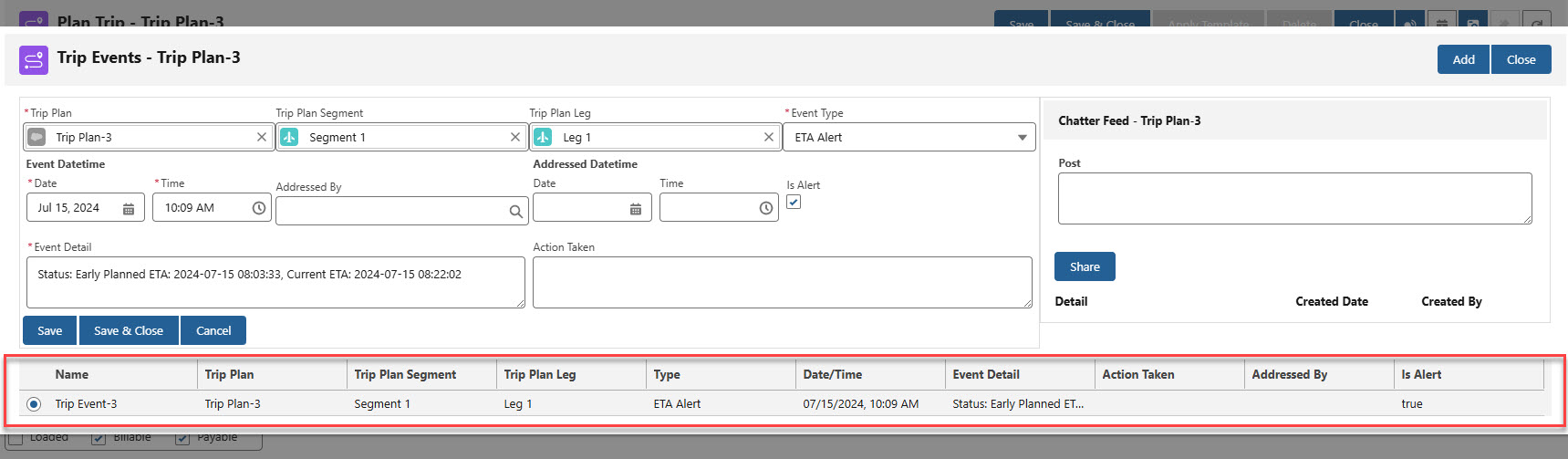
Field updates are shown in the Trip Planner component. See Trip Planner information for examples.
TMS Field Updates from an ETA Event Notification
Object | Field | Type | Trimble Field |
|---|---|---|---|
Trip Event | Event Datetime | Date/Time | publishedOn |
Trip Event | Event Detail | Long Text Area(2000) | stopArrivalStatus + currentETA + plannedETA |
Trip Event | Event Type | Picklist | notificationType - set to ETA Alert by the TMS |
Trip Event | Is Alert | Checkbox | Field not sent by Trimble - set to Checked by the TMS |
Trip Plan Leg | PTA Date | Date | currentETA |
Trip Plan Leg | PTA Time | Time | currentETA |
Sample ETA EVENT Notification Payload
{
  "properties": {
    "tripId": 140859211,
    "tripStatus": "InProgress",
    "tspDriverId": "Trimble_user@trimble.com",
    "notificationType": "eta",
    "estimatedArrivalInfo": {
      "stopInfo": {
        "plannedETA": "2022-06-01T12:03:33-04:00",
        "currentETA": "2022-06-01T12:22:02-04:00",
        "earliestArrivalTime": "2022-06-01T11:30:00-04:00",
        "latestArrivalTime": "2022-06-01T12:15:00-04:00",
        "stopId": 1270094413,
        "stopArrivalStatus": "Late",
        "location": {
          "address": {
            "streetAddress": "762 Hylan Boulevard",
            "city": "Staten Island",
            "state": "NY",
            "zip": "10305",
            "county": "Richmond",
            "country": null
          },
          "coords": {
            "lat": "40.601683",
            "lon": "-74.07256"
          },
          "label": "StopLabel"
        },
        "stopSequence": 4,
        "stopType": "Work"
      },
      "publishedOn": "06/01/2022 15:09:27+00:00",
      "deviceDT": "2022-06-01T15:09:25+00:00"
    }
  }
}
Stop Status Update
Updates to a Stop status generates a Stop Status Update notification that is sent to the TMS. Updates are processed and stored in the TMS as Arrival or Departed.
When an Arrival or Departure status is received, the corresponding Arrival Date and Time or Departure Date and Time fields are added to the Trip Plan Leg.
Arrival and Departure fields are updated on the Trip Plan Leg whenever notifications are received. If Stop Status notifications are not enabled, no Trip Event is generated.
TMS Field Updates from Stop Status Update Notification
Object | Field | Type | Trimble Field |
|---|---|---|---|
Trip Event | Event Datetime | Date/Time | publishedOn |
Trip Event | Event Detail | Long Text Area(2000) | stopLocation ("Stop Status Update: " + address.streetAddress + address.city + address.state + address.zip) |
Trip Event | Event Type | Picklist | eventType (Arrival/Departed) |
Trip Plan Leg | Arrival Date | Date | publishedOn (ArrivedAtStop) |
Trip Plan Leg | Arrival Time | Time | publishedOn (ArrivedAtStop) |
Trip Plan Leg | Departure Date | Date | publishedOn (DepartedStop) |
Trip Plan Leg | Departure Time | Time | publishedOn (DepartedStop) |
Sample Stop Status Update Notification Payload
{
  "properties": {
    "tripId": 140859022,
    "tripStatus": "InProgress",
    "tspDriverId": "fred",
    "notificationType": "stop_status_update",
    "stopStatusEvents": {
      "stopId": 1270093363,
      "stopSequence": 1,
      "eventType": "DepartedStop",
      "stopLocation": {
        "address": {
          "streetAddress": "976 South Union Avenue",
          "city": "Los Angeles",
          "state": "CA",
          "zip": "90015",
          "county": "Los Angeles",
          "country": "United States"
        },
        "coords": {
          "lat": "34.049881",
          "lon": "-118.273503"
        },
        "label": "StopLabel"
      },
      "publishedOn": "06-01-2022T15:09:27+00:00",
      "deviceDT": "2022-06-01T15:09:25+00:00"
    }
  }
}
Weather
Weather alert notifications are sent to the TMS when the Trimble service determines a Trip will experience weather. Active Trips are analyzed to determine if they will encounter a weather alert. The weather is checked by Trimble on a regular basis and notifications are sent when necessary.
As Weather alert notifications are received in the TMS, they are matched to the corresponding Trip Plan Leg based on the Event Datetime field. If the Event Datetime field does not fall between the Start Date/Time and End Date/Time value for a Leg, the Event is not matched to a Leg. Events also do not match to a Leg when the Trip Plan Leg Start Date/Time and End Date/Time fields have no value. As a result, Fleet Assets of type Chassis, Container, or Trailer do not have associated Weather Trip Event notifications.
TMS Field Updates from Weather Notification
Object | Field | Type | Trimble Field |
|---|---|---|---|
Trip Event | Event Datetime | Date/Time | publishedOn |
Trip Event | Event Detail | Long Text Area(2000) | alertEvent + title + summary |
Trip Event | Event Type | Picklist | notificationType - set to Weather Alert by the TMS |
Trip Event | Is Alert | Checkbox | Field not sent by Trimble - set to Checked by the TMS |
Sample Weather Notification Payload
{
  "properties": {
    "tripId": "140858769",
    "tripStatus": "InProgress",
    "tspDriverId": "Trimble_User@trimble.com",
    "notificationType": "weather",
    "weatherInfo": {
      "enterTime": "2022-06-01T15:04:41+00:00",
      "exitTime": "2022-06-01T15:45:35+00:00",
      "enterLocation": {
        "address": {
          "streetAddress": "Kingman Road Northeast",
          "city": "Nashville",
          "state": "KS",
          "zip": "67112",
          "county": "Kingman",
          "country": "United States"
        },
        "coords": {
          "lat": "37.38",
          "lon": "-98.46"
        },
        "label": null
      },
      "weatherAlert": {
        "id": "https://alerts.weather.gov/cap/wwacapget.php?x=KS1263F9BDB374.FloodWarning.1263F9EC6CC8KS.ICTFLWICT.73f3167bd92c0295cc9d75692944123d",
        "dispUpdated": "2022-05-31T21:13:00-05:00",
        "dispPublished": "2022-05-31T21:13:00-05:00",
        "title": "Flood Warning issued May 31 at 9:13PM CDT until June 04 at 3:34AM CDT by NWS",
        "summary": "...FLOOD WARNING IN EFFECT UNTIL 915 AM CDT WEDNESDAY... * WHAT...Flooding caused by excessive rainfall is expected. * WHERE...A portion of South Central Kansas, including the following counties, Butler, Harvey, Kingman and Sedgwick. * WHEN...Until 915 AM CDT Wednesday. * IMPACTS...Flooding of rivers, creeks, streams, and other low-lying",
        "alertEvent": "Flood Warning",
        "dispEffective": "2022-05-31T21:13:00-05:00",
        "dispExpires": "2022-06-04T03:34:00-05:00",
        "status": "Actual",
        "category": "Met",
        "urgency": "Expected",
        "severity": "Moderate",
        "certainty": "Likely",
        "areaDesc": "Sedgwick",
        "countryCode": "US"
      },
      "publishedOn": "06-01-2022T15:05:37+00:00"
    }
  }
}
Out of Route
The Out of Route notification is sent when the total mileage of a completed Trip is different from the original planned mileage. The mileage threshold is determined as a Trimble account setting.
Out of Route notifications are sent once at the end of a Trip.
When an Out of Route notification is received in the TMS, it is matched to the corresponding Trip Plan Leg based on the Event Datetime field. If the Event Datetime field does not fall between the Start Date/Time and End Date/Time value for a Leg, the Event is not matched to a Leg. Events also do not match to a Leg when the Trip Plan Leg Start Date/Time and End Date/Time fields have no value. As a result, Fleet Assets of type Chassis, Container, or Trailer do not have associated Out of Route Event notifications.
TMS Field Updates from Out of Route Notification
Object | Field | Type | Trimble Field |
|---|---|---|---|
Trip Event | Event Datetime | Date/Time | publishedOn |
Trip Event | Event Detail | Long Text Area(2000) | oorDistance |
Trip Event | Event Type | Picklist | notificationType - set to Out of Route Alert by the TMS |
Trip Event | Is Alert | Checkbox | Field not sent by Trimble - set to Checked by the TMS |
Sample Out of Route Notification Payload
{
  "properties": {
    "tripId": "4039704",
    "tripStatus": "Completed",
    "notificationType": "OutOfRoute",
    "outOfRouteInfo": {
      "driverId": "Driver1",
      "oorDistance": 2158.64,
      "publishedOn": "2024-07-16T16:20:13+00:00"
    }
  }
}
Out of Corridor
The Out of Corridor notification is sent when a Trip deviates from a planned route beyond a certain mileage threshold.
Out of Corridor notifications are sent each time the GPS position is detected outside of the mileage threshold. The mileage threshold is determined as a Trimble account setting.
TMS Field Updates from Out of Corridor Notification
Object | Field | Type | Trimble Field |
|---|---|---|---|
Trip Event | Event Datetime | Date/Time | publishedOn |
Trip Event | Event Detail | Long Text Area(2000) | oocDistance + status |
Trip Event | Event Type | Picklist | notificationType - set to Out of Corridor Alert by the TMS |
Trip Event | Is Alert | Checkbox | Field not sent by Trimble - set to Checked by the TMS |
Sample Out of Corridor Notification Payload
{
  "properties": {
    "tripId": 140858769,
    "tripStatus": "InProgress",
    "tspDriverId": "test_driver@trimble.com",
    "notificationType": "out_of_corridor",
    "outOfCorridorInfo": {
      "coords": {
        "lat": "37.57476",
        "lon": "-98.3625"
      },
      "oocDistance": 211.38,
      "status": "LeftRoute",
      "publishedOn": "2022-06-01T15:40:41+00:00",
      "deviceDT": "2022-06-01T15:40:41+00:00"
    }
  }
}
Traffic
Traffic alert notifications are sent to the TMS when the Trimble service detects a Trip will be impacted by traffic. Active Trips are analyzed to determine if they will encounter a Traffic alert.
Traffic Incidents that trigger a notification send to the TMS.
Construction
Road Closures
Congestion
Accidents
The Trimble service checks for traffic incidents when the following occurs.
The Trip is Planned.
Every 12 hours for all Planned Trips.
When the tripStatus field changes to In Progress. The field is set to In Progress when the following occurs.
The first stop is completed.
The first GPS position is received for the Trip.
When an ETA Event alert is detected.
When an arrival or departure is detected for any Stops in a Trip.
When a Traffic notification is received in the TMS, it is matched to the corresponding Trip Plan Leg based on the Event Datetime field. If the Event Datetime field does not fall between the Start Date/Time and End Date/Time value for a Leg, the Event is not matched to a Leg. Events also do not match to a Leg when the Trip Plan Leg Start Date/Time and End Date/Time fields have no value. As a result, Fleet Assets of type Chassis, Container, or Trailer do not have associated Traffic notifications.
TMS Field Updates from Traffic Notification
Object | Field | Type | Trimble Field |
|---|---|---|---|
Trip Event | Event Datetime | Date/Time | publishedOn |
Trip Event | Event Detail | Long Text Area(2000) | shortDesc |
Trip Event | Event Type | Picklist | notificationType - set to Traffic Alert by the TMS |
Trip Event | Is Alert | Checkbox | Field not sent by Trimble - set to Checked by the TMS |
Sample Traffic Notification Payload
{
  "properties": {
    "tripId": 6879052,
    "tripStatus": "Planned",
    "driverId": "Trimble_user@trimble.com",
    "notificationType": "traffic_incident_planned",
    "trafficIncidentInfo": {
      "incidentId": -2091160570,
      "shortDesc": "I-70: paving repairs from I-70 Exits 11 / IN-46 to Exit 1 National Ave",
      "address": {
        "streetAddress": "I-70, US-40",
        "city": "West Terre Haute",
        "state": "IN",
        "zip": null,
        "county": "Vigo",
        "country": "United States"
      },
      "coords": {
        "lat": 39441256,
        "lon": -87512693
      },
      "publishedOn": "08/30/2024 20:00:11 +00:00"
    }
  }
}
Approaching Stop
Approaching Stop notifications are sent to the TMS when a Fleet Asset is within 15 minutes of the Stop. The notification includes the number of minutes the Asset is away from the Stop, as well. This notification is sent separately from the Update Stop Status notification.
The Approaching Stop notifications are matched to a Trip Plan Leg based on the stopSequence value in the notification payload.
TMS Field Updates from Approaching Stop Notification
Object | Field | Type | Trimble Field |
|---|---|---|---|
Trip Event | Event Datetime | Date/Time | publishedOn |
Trip Event | Event Detail | Long Text Area(2000) | message |
Trip Event | Event Type | Picklist | notificationType - set to Approaching by the TMS |
Trip Event | Is Alert | Checkbox | Field not sent by Trimble - set to Checked by the TMS |
Sample Approaching Stop Notification Payload
{
  "properties": {
    "message": "Asset {tspDriverId} is approaching Stop {stopLabel} and is currently {xx} minutes away",
    "tripId": 140859022,
    "tspDriverId": "fred",
    "notificationType": "approachingStop",
    "stopDetails": {
      "stopId": 1270093363,
      "stopSequence": 1,
      "stopArrivalStatus": "OnTime",
      "currentETA": "2022-06-01T15:00:00+00:00",
      "stopLocation": {
        "address": {
          "streetAddress": "976 South Union Avenue",
          "city": "Los Angeles",
          "state": "CA",
          "zip": "90015",
          "county": "Los Angeles",
          "country": "United States"
        },
        "coords": {
          "lat": "34.049881",
          "lon": "-118.273503"
        },
        "label": "StopLabel"
      },
      "publishedDateTime": "06-01-2022T15:09:27+00:00",
      "deviceDateTime": "06-01-2022T15:09:26+00:00"
    }
  }
}
Excessive Dwell
The Excessive Dwell notification is sent when a Stop dwell time is greater than 10% of the plannedDuration time field. The plannedDuration field value is the Trip Plan Leg Planned Duration (Dwell) field that is sent during the Plan Trip and Modify Trip API calls.
The Excessive Dwell notifications are matched to a Trip Plan Leg based on the stopSequence value in the notification payload.
TMS Field Updates from Excessive Dwell Notification
Object | Field | Type | Trimble Field |
|---|---|---|---|
Trip Event | Event Datetime | Date/Time | publishedOn |
Trip Event | Event Detail | Long Text Area(2000) | message + plannedDuration + currentDuration + plannedETA |
Trip Event | Event Type | Picklist | notificationType - set to Dwell Exceeded Alert by the TMS |
Trip Event | Is Alert | Checkbox | Field not sent by Trimble - set to Checked by the TMS |
Sample Excessive Dwell Notification Payload
{
  "properties": {
    "message": "{tspDriverId} has exceeded the planned Dwell time for {stopLabel}",
    "tripId": 140859211,
    "tspDriverId": "Trimble_user@trimble.com",
    "notificationType": "excessiveDwell",
    "stopDetails": {
      "plannedETA": "2022-06-01T12:03:33-04:00",
      "actualArrivalTime": "2022-06-01T12:13:33-04:00",
      "plannedDuration": 30,
      "currentDuration": 45,
      "stopId": 1270094413,
      "stopArrivalStatus": "Late",
      "stopType": "Work",
      "location": {
        "address": {
          "streetAddress": "762 Hylan Boulevard",
          "city": "Staten Island",
          "state": "NY",
          "zip": "10305",
          "county": "Richmond",
          "country": null
        },
        "coords": {
          "lat": "40.601683",
          "lon": "-74.07256"
        },
        "label": "StopLabel"
      },
      "stopSequence": 4
    },
    "publishedOn": "06/01/2022 15:09:27+00:00",
    "deviceDT": "2022-06-01T15:09:25+00:00"
  }
}
Unplanned Stop
An Unplanned Stop alert is received when the Driver or Fleet Asset stops at a location that is not part of the Trip Plan. An Unplanned Stop occurs when the GPS location is recorded for a Driver or Fleet Asset within the same location for a set amount of time.
Multiple values may be set in the Trimble Portal to control when Unplanned Stop alerts are sent to the TMS.
Set the Unplanned Stop alert to on or off.
Set the amount of time to threshold necessary to send the alert.
The default time is 30 minutes.
Add Unplanned Stops to the Trip Plan to prevent locations from sending alerts.
Unplanned Stops added to the Trip are named as Unplanned Stops.
When an Unplanned Stop notification is received in the TMS, it is matched to the corresponding Trip Plan Leg based on the Event Datetime field. If the Event Datetime field does not fall between the Start Date/Time and End Date/Time value for a Leg, the Event is not matched to a Leg. Events also do not match to a Leg when the Trip Plan Leg Start Date/Time and End Date/Time fields have no value. As a result, Fleet Assets of type Chassis, Container, or Trailer do not have associated Unplanned Stop Event notifications.
TMS Field Updates from Unplanned Stop
Object | Field | Type | Trimble Field |
|---|---|---|---|
Trip Event | Event Datetime | Date/Time | publishedOn |
Trip Event | Event Detail | Long Text Area(2000) | label + Stop Address (from PC Miler) + lat, lon coords |
Trip Event | Event Type | Picklist | notificationType - set to Unplanned Stop Alert by the TMS |
Trip Event | Is Alert | Checkbox | Field not sent by Trimble - set to Checked by the TMS |
Sample Unplanned Stop Notification Payload
{
    "type": 1,
    "target": "notificationMessage",
    "arguments": [
        {
            "properties": {
                "tripId": 9721566,
                "tmsTripId": "SO398483",
                "tripStatus": "InProgress",
                "tspDriverId": "fred",
                "tspDriverId2": null,
                "notificationType": "unplanned_stop_update",
                "unplannedStopInfo": {
                    "eventId": 9614,
                    "stopInfo": {
                        "coords": {
                            "lat": "38.232870",
                            "lon": "-80.239645"
                        },
                        "label": "Unplanned Stop",
                        "stopId": 92004285,
                        "stopSequence": 1
                    },
                    "publishedOn": "2024-11-21T16:08:47+00:00"
                }
            }
        }
    ]
}
See Trimble Notification documentation here.
IFTA State Reporting
The Trimble Maps integration provides mileage information for generating State reports for IFTA reporting. A set of geolocation coordinates from the Fleet Asset history are sent to Trimble. A list of State Report Lines with the miles traveled in a given state/country are returned to generate reports.
See IFTA documentation for more information.
A list of Fleet Asset history geolocation coordinates is sent to Trimble. These coordinates are received from the Catena or Samsara ELD integrations.
TMS Operation | Trimble Maps Endpoint | Request Type | Response |
|---|---|---|---|
IFTAStateReportJob runs at midnight for qualifying Trip Plan Segments | Derived Route | POST | 201: Success |
Sample Trimble Derived Route Request
{
  "HighwayOnly": false,
  "OffRouteMiles": 0.03,
  "Region": 4,
  "ReportType": {
    "__type": "StateReportType:http://pcmiler.alk.com/APIs/v1.0",
    "THoursWithSeconds": false
  },
  "RoutePings": [
    {
      "Lat": "45.53193",
      "Lon": "-73.49907"
    },
    {
      "Lat": "46.502240",
      "Lon": "-89.891292"
    },
    {
      "Lat": "47.48052",
      "Lon": "-94.91900"
    },
    {
      "Lat": "53.54627",
      "Lon": "-113.49637"
    }
  ],
  "RoutingOptions": {
    "AFSetIDs": null,
    "BordersOpen": true,
    "DistanceUnits": 0,
    "ElevLimit": null,
    "FerryDiscourage": false,
    "FuelRoute": false,
    "HazMatType": 0,
    "HazMatTpes": 0,
    "HighwayOnly": false,
    "HoSOptions": null,
    "HubRouting": false,
    "OverrideRestrict": false,
    "RouteOptimization": 0,
    "RoutingType": 0,
    "TollDiscourage": false,
    "UseAvoidsAndFavors": false,
    "VehicleType": 0,
    "SideOfStreetAdherence": 0
  }
}
Trimble Sample Derived Route Response
{
  "Reports": [
    {
      "__type": "StateReport:http://pcmiler.alk.com/APIs/v1.0",
      "RouteID": null,
      "MileageReportLines": [
        {
          "Stop": {
            "Address": {
              "StreetAddress": "875 Rue Guilbault",
              "City": "Longueuil",
              "State": "QC",
              "Zip": "J4H 2V7",
              "County": "",
              "Country": "Canada",
              "SPLC": null,
              "CountryPostalFilter": 0,
              "AbbreviationFormat": 0,
              "StateName": "Quebec",
              "StateAbbreviation": "QC",
              "CountryAbbreviation": "CA"
            },
            "Coords": {
              "Lat": "45.531930",
              "Lon": "-73.499070"
            },
            "Region": 4,
            "Label": "",
            "PlaceName": "",
            "TimeZone": "EDT",
            "Errors": null,
            "SpeedLimitInfo": null,
            "ConfidenceLevel": null,
            "DistanceFromRoad": null,
            "CrossStreet": null,
            "TimeZoneOffset": "GMT-4:00",
            "TimeZoneAbbreviation": "EDT",
            "IsDST": true
          },
          "LMiles": "0.000",
          "TMiles": "0.000",
          "LCostMile": "0.00",
          "TCostMile": "0.00",
          "LHours": "0:00",
          "THours": "0:00",
          "LTolls": "0.00",
          "TTolls": "0.00",
          "LEstghg": "0.0",
          "TEstghg": "0.0",
          "EtaEtd": null
        },
        {
          "Stop": {
            "Address": {
              "StreetAddress": "",
              "City": "",
              "State": "",
              "Zip": "",
              "County": "",
              "Country": "",
              "SPLC": null,
              "CountryPostalFilter": 0,
              "AbbreviationFormat": 0,
              "StateName": "",
              "StateAbbreviation": "",
              "CountryAbbreviation": ""
            },
            "Coords": {
              "Lat": "47.480520",
              "Lon": "-94.919000"
            },
            "Region": 4,
            "Label": "",
            "PlaceName": "",
            "TimeZone": "-6:00",
            "Errors": null,
            "SpeedLimitInfo": null,
            "ConfidenceLevel": null,
            "DistanceFromRoad": null,
            "CrossStreet": null,
            "TimeZoneOffset": "GMT-6:00",
            "TimeZoneAbbreviation": "CST",
            "IsDST": false
          },
          "LMiles": "1189.912",
          "TMiles": "1189.912",
          "LCostMile": "2456.75",
          "TCostMile": "2456.75",
          "LHours": "27:04",
          "THours": "27:04",
          "LTolls": "26.50",
          "TTolls": "26.50",
          "LEstghg": "3954.6",
          "TEstghg": "3954.6",
          "EtaEtd": null
        },
        {
          "Stop": {
            "Address": {
              "StreetAddress": "104 Avenue Northwest",
              "City": "Edmonton",
              "State": "AB",
              "Zip": "T5J 0K1",
              "County": "",
              "Country": "Canada",
              "SPLC": null,
              "CountryPostalFilter": 0,
              "AbbreviationFormat": 0,
              "StateName": "Alberta",
              "StateAbbreviation": "AB",
              "CountryAbbreviation": "CA"
            },
            "Coords": {
              "Lat": "53.546270",
              "Lon": "-113.496370"
            },
            "Region": 4,
            "Label": "",
            "PlaceName": "",
            "TimeZone": "MDT",
            "Errors": null,
            "SpeedLimitInfo": null,
            "ConfidenceLevel": null,
            "DistanceFromRoad": null,
            "CrossStreet": null,
            "TimeZoneOffset": "GMT-6:00",
            "TimeZoneAbbreviation": "MDT",
            "IsDST": true
          },
          "LMiles": "1092.804",
          "TMiles": "2282.716",
          "LCostMile": "2093.87",
          "TCostMile": "4550.62",
          "LHours": "22:18",
          "THours": "49:22",
          "LTolls": "0.00",
          "TTolls": "26.50",
          "LEstghg": "3631.9",
          "TEstghg": "7586.5",
          "EtaEtd": null
        }
      ],
      "StateReportLines": [
        {
          "StCntry": "MI",
          "Total": "309.039",
          "Toll": "1.517",
          "Free": "307.522",
          "Ferry": "0.000",
          "Loaded": "309.039",
          "Empty": "0.000",
          "Tolls": "26.50",
          "Energy": "0.000"
        },
        {
          "StCntry": "MN",
          "Total": "262.343",
          "Toll": "0.000",
          "Free": "262.343",
          "Ferry": "0.000",
          "Loaded": "262.343",
          "Empty": "0.000",
          "Tolls": "0.00",
          "Energy": "0.000"
        },
        {
          "StCntry": "ND",
          "Total": "77.478",
          "Toll": "0.000",
          "Free": "77.478",
          "Ferry": "0.000",
          "Loaded": "77.478",
          "Empty": "0.000",
          "Tolls": "0.00",
          "Energy": "0.000"
        },
        {
          "StCntry": "WI",
          "Total": "104.036",
          "Toll": "0.000",
          "Free": "104.036",
          "Ferry": "0.000",
          "Loaded": "104.036",
          "Empty": "0.000",
          "Tolls": "0.00",
          "Energy": "0.000"
        },
        {
          "StCntry": "US",
          "Total": "752.896",
          "Toll": "1.517",
          "Free": "751.379",
          "Ferry": "0.000",
          "Loaded": "752.896",
          "Empty": "0.000",
          "Tolls": "26.50",
          "Energy": "0.000"
        },
        {
          "StCntry": "AB",
          "Total": "155.383",
          "Toll": "0.000",
          "Free": "155.383",
          "Ferry": "0.000",
          "Loaded": "155.383",
          "Empty": "0.000",
          "Tolls": "0.00",
          "Energy": "0.000"
        },
        {
          "StCntry": "MB",
          "Total": "270.469",
          "Toll": "0.000",
          "Free": "270.469",
          "Ferry": "0.000",
          "Loaded": "270.469",
          "Empty": "0.000",
          "Tolls": "0.00",
          "Energy": "0.000"
        },
        {
          "StCntry": "ON",
          "Total": "570.448",
          "Toll": "1.104",
          "Free": "569.344",
          "Ferry": "0.000",
          "Loaded": "570.448",
          "Empty": "0.000",
          "Tolls": "0.00",
          "Energy": "0.000"
        },
        {
          "StCntry": "QC",
          "Total": "55.156",
          "Toll": "0.000",
          "Free": "55.156",
          "Ferry": "0.000",
          "Loaded": "55.156",
          "Empty": "0.000",
          "Tolls": "0.00",
          "Energy": "0.000"
        },
        {
          "StCntry": "SK",
          "Total": "478.364",
          "Toll": "0.000",
          "Free": "478.364",
          "Ferry": "0.000",
          "Loaded": "478.364",
          "Empty": "0.000",
          "Tolls": "0.00",
          "Energy": "0.000"
        },
        {
          "StCntry": "Canada",
          "Total": "1529.820",
          "Toll": "1.104",
          "Free": "1528.716",
          "Ferry": "0.000",
          "Loaded": "1529.820",
          "Empty": "0.000",
          "Tolls": "0.00",
          "Energy": "0.000"
        },
        {
          "StCntry": "TOTAL",
          "Total": "2282.716",
          "Toll": "2.621",
          "Free": "2280.095",
          "Ferry": "0.000",
          "Loaded": "2282.716",
          "Empty": "0.000",
          "Tolls": "26.50",
          "Energy": "0.000"
        }
      ]
    }
  ]
}
Field Reference Table
The following table relates TMS fields with the equivalent Trimble fields included in Trimble API calls.
Object | Field | Type | Trimble Field |
|---|---|---|---|
Driver | Cycle Time Remaining | Number(3, 2) | RemainingCycleDutyTime |
Driver | Drive Time Remaining | Number(3, 2) | RemainingDriveTime |
Driver | SFID | SFID | tspDriverId |
Driver | Time Until Break | Number(3, 2) | RemainingDriveTimeUntilBreak |
DateTimeNow() | actualArrivalTime, actualDepartureTime | ||
Number | stopSequence | ||
Stop Status API Value | arrivalStatus | ||
User Date/Time | timeStamp | ||
“Work” | stopType | ||
Fleet Asset | ELD Last Update | Date/Time | deviceDt |
Fleet Asset | Geolocation | Geolocation | Lat, Lon |
Fleet Asset | Heading (Degrees) | Number(3, 2) | heading |
Fleet Asset | Speed (kph), Speed (mph) | Number(10, 2) | speed |
Trip Event | Event Datetime | Date/Time | publishedOn |
Trip Event | Event Detail | Long Text Area(2000) | alertEvent + title + summary |
Trip Event | Event Detail | Long Text Area(2000) | message |
Trip Event | Event Detail | Long Text Area(2000) | message + plannedDuration + currentDuration + plannedETA |
Trip Event | Event Detail | Long Text Area(2000) | oocDistance + status |
Trip Event | Event Detail | Long Text Area(2000) | oorDistance |
Trip Event | Event Detail | Long Text Area(2000) | shortDesc |
Trip Event | Event Detail | Long Text Area(2000) | stopLocation ("Stop Status Update: " + address.streetAddress + address.city + address.state + address.zip) |
Trip Event | Event Detail | Long Text Area(2000) | stopArrivalStatus + currentETA + plannedETA |
Trip Event | Event Type | Picklist | eventType (Arrival/Departed) |
Trip Event | Event Type | Picklist | notificationType - set to Approaching by the TMS |
Trip Event | Event Type | Picklist | notificationType - set to Dwell Exceeded Alert by the TMS |
Trip Event | Event Type | Picklist | notificationType - set to ETA Alert by the TMS |
Trip Event | Event Type | Picklist | notificationType - set to Out of Corridor Alert by the TMS |
Trip Event | Event Type | Picklist | notificationType - set to Out of Route Alert by the TMS |
Trip Event | Event Type | Picklist | notificationType - set to Traffic Alert by the TMS |
Trip Event | Event Type | Picklist | notificationType - set to Weather Alert by the TMS |
Trip Event | Is Alert | Checkbox | |
Trip Plan | Name | Auto Number | name |
Trip Plan Leg | Appointment Date | Date | earliestArrivalTime, latestArrivalTime |
Trip Plan Leg | Appointment End Time | Time | latestArrivalTime |
Trip Plan Leg | Planned Duration (Dwell) | Number(4, 0) | plannedDuration |
Trip Plan Leg | Appointment Start Time | Time | earliestArrivalTime |
Trip Plan Leg | Arrival Date | Date | publishedOn |
Trip Plan Leg | Arrival Time | Time | publishedOn |
Trip Plan Leg | Due Out Date | Date | plannedStartTime, plannedDepartureTime |
Trip Plan Leg | Due Out Time | Time | plannedStartTime, plannedDepartureTime |
Trip Plan Leg | PTA Date | Date | currentETA |
Trip Plan Leg | PTA Time | Time | currentETA |
Trip Plan Leg | Start City | Text(40) | city |
Trip Plan Leg | Start Geolocation | Geolocation | lat, lon |
Trip Plan Leg | Start Postal Code | Text(20) | zip |
Trip Plan Leg | Start State/Province | Picklist | state |
Trip Plan Leg | Start Street Address | Text(100) | street address |
Trip Plan Leg | Status | Picklist | stopState |
Trip Plan Segment | API Trip Id | Text(40) (External ID) | tripId |
Trip Plan Segment | SFID | SFID | tmsTripId |
Trip Plan Segment | Load | Lookup(Load) | externalOrderIds |
Trip Plan Segment | Name | Text(80) | name |
Trip Plan Segment | Power Unit | Lookup(Fleet Asset) | tspVehicleId |
Trip Plan Segment | Status | Picklist | status |