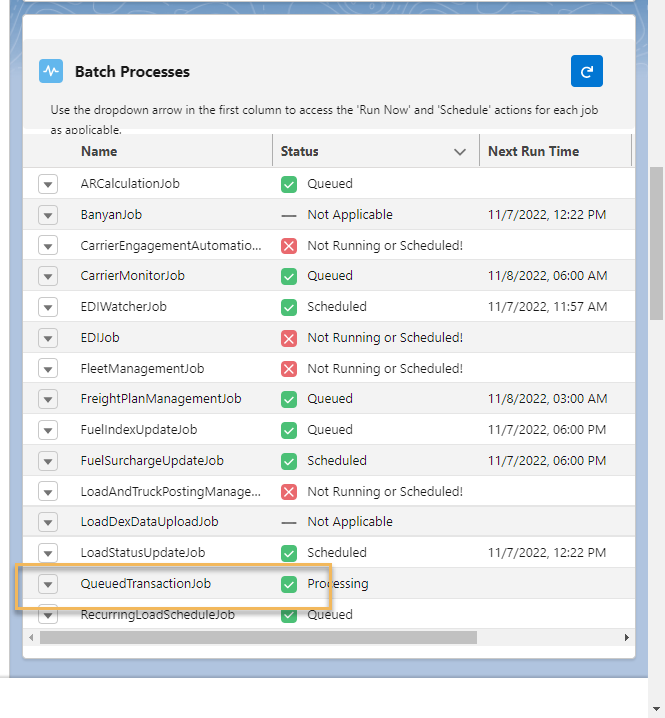
Access the status of key TMS batch processes from the Job Monitor Lightning Web Component (LWC), which is typically located on the Home Page, but can also be placed on custom Lightning App Pages.
Note: If a particular job is shown as 'Not Applicable' in the Status column, either the Credentials for the corresponding API are not enabled or the TMS Configuration setting that controls the job is not enabled.
When Batch Processes encounter an error and do not display an error toast to the User, the errors are stored in Error Logs. Navigate to the App Manager and search for Error Logs to view the list of Error Log records.
Note: Scheduled action times are set by the time zone of the User scheduling the job.
Batch Job | Purpose | Run Now Action | Schedule Action | ‘Not Applicable’ Status Condition | Configuration Location |
|---|---|---|---|---|---|
AppointmentRequestJob | Automates sending Appointment Request emails to shippers/consignees. | Active - runs job immediately | Inactive - schedules itself upon completion | ALWAYS APPLICABLE | TMS Admin → Configuration → Appointment Request Email Frequency |
Calculates A/R balances and credit limits. Note: A/R Calculate Balances and A/R Calculated Shared Credit Limit calculations are processed as Platform Events. | Active - runs job immediately | Active - schedules job for 5 am | Customer Credit Limits not enforced | TMS Admin → Configuration → Enforce Customer Credit Limits Checkbox | |
BanyanJob | Retrieves load status and documents for Banyan loads. Only 1 document is processed per pass. Additional documents are retrieved by a platform event that is created when other documents are available. Note: The TMS does not process packets from Banyan that are larger than 12 MB. | Inactive - invoked by LoadStatusUpdateJob | Inactive - invoked by LoadStatusUpdateJob | Banyan API credentials inactive | TMS Admin → Credentials → Banyan credential Enabled checkbox |
CarrierEngagementAutomationJob | Processes auto-tender loads. | Active - runs job immediately | |||
CarrierMonitorHighwayJob |
See more specific Highway integration information. | Active - runs job immediately | Inactive - schedules itself upon completion | Highway API credentials inactive | TMS Admin → Credentials → Highway credential Enabled checkbox |
CarrierMonitorJob |
| Active - runs job immediately | Active - schedules job for 6 am | SaferWatch API credentials inactive | TMS Admin → Credentials → SaferWatch credential Enabled checkbox |
CarrierMonitorMCPJob | See details of the MyCarrierPortal batch job in the MyCarrierPortal article. | Active - runs job immediately | Inactive - schedules itself upon completion | MyCarrierPortal API credentials inactive | TMS Admin → Credentials → MyCarrierPortal credential Enabled checkbox |
CarrierMonitorRMISJob | RMIS download of new Carriers and changed Carriers. | Active - runs job immediately | Inactive - schedules itself upon completion | RMIS API credentials inactive | TMS Admin → Credentials → RMIS credential Enabled checkbox |
DataCleanupJob | Deletes EDI Transaction records.
Also deletes Trip Plan Validation Log and Fleet Notification Log records not modified in the last 30 days. | Active - runs job immediately | Active - schedules job for 4 am | EDI Transaction records not deleted | TMS Admin → Configuration → EDI Setup, transaction type expiration fields. |
EDIWatcherJob | Monitors the EDIJob and restarts if it fails. | Active - runs job immediately | Inactive - schedules itself upon completion | Deprecated: All EDI credentials inactive | Deprecated: TMS Admin → Credentials → Kleinschmidt, Cleo or Custom EDI credential Enabled checkbox |
EDIJob |
| Inactive - initiated by EDIWatcherJob | Inactive - schedules itself upon completion | Deprecated: All EDI credentials inactive | TMS Admin → Configuration → Use REST API for EDI Checked. |
Manages all Fleet Management functions while using Samsara. | Active - runs job immediately | Inactive - schedules itself upon completion | ALWAYS APPLICABLE | TMS Admin → Configuration → Fleet Management Enabled box Checked and Fleet Management Job selected. | |
Manages all Fleet Management functions for the Catena integration. Fleet Management Job 2 is deprecated in the Spring ‘26 release. Run Fleet Management Job 4 to complete these actions. | Active - runs job immediately | Inactive - schedules itself upon completion | ALWAYS APPLICABLE | TMS Admin → Configuration → Fleet Management Enabled box Checked and Fleet Management Job 2 selected. | |
Manages all Fleet Management functions for the Samsara integration.
| Active - runs job immediately | Inactive - schedules itself upon completion | ALWAYS APPLICABLE | TMS Admin → Configuration → Fleet Management Enabled box Checked and Fleet Management Job 3 selected. | |
Manages all Fleet Management functions for the Catena integration.
| Active - runs job immediately | Inactive - schedules itself upon completion | ALWAYS APPLICABLE | TMS Admin → Configuration → Fleet Management Enabled box Checked and Fleet Management Job 4 selected. | |
FreightPlanManagementJob | Calculates Freight Plan cost allocations and status. | Active - runs job immediately | Active - schedules job for 5 pm | Freight Plans not enabled | TMS Admin → Configuration → Freight Plans Enabled checkbox |
FuelCardJob |
| Active - see Fuel Card Management | Active - runs job (self-scheduling, 3 hours after the previous job finishes) | ||
FuelIndexUpdateJob | Downloads fuel index updates from the EIA and then runs the FuelSurchargeUpdateJob. | Active - runs job immediately | Active - schedules job for 6 pm | EIA API credentials inactive | TMS Admin → Credentials → EIA credential Enabled checkbox |
FuelSurchargeUpdateJob | Updates fuel surcharges on quotes and invoices based on changes to fuel indexes and Breakthrough Fuel API calls. | Inactive - initiated by FuelIndexUpdateJob | Inactive - initiated by FuelIndexUpdateJob | EIA API credentials inactive | TMS Admin → Credentials → EIA credential Enabled checkbox |
IFTAStateReportJob |
| Active - runs job immediately | Active - schedules job for 12 am | IFTA Mileage Reporting not enabled | TMS Admin → Configuration → IFTA Mileage Reporting Enabled Checked |
HubTranDataLoadJob | Loads 60 days of Carrier and Load data to “seed” data into TriumphPay Audit. | ||||
LoadAndTruckPostingManagementJob | Creates, updates, and deletes Load and Truck Postings and uploads Book it Now Carriers to Truckstop. **This job is deprecated in the TMS Fall ‘24 release. The LoadAndTruckPostingManagementJob2 controls Load Board and Truck Postings. Values of the Load Posting Refresh Interval are set on TMS Admin → Configuration. Setting values of 15 or 30 minutes are refreshed every 60 minutes instead when running this job. | Active - runs job immediately | Inactive - initiated by itself upon completion | All Load Board API credentials inactive | TMS Admin → Credentials → DAT, ITS, PE, or LoadLink credential Enabled checkbox |
LoadAndTruckPostingManagementJob2 | Creates, updates, and deletes Load and Truck Postings and uploads Book it Now Carriers to Load Boards. The job batch size is 10. Load Postings are refreshed according to the Load Posting Refresh Interval (Minutes) field. Truck Postings are removed according to the Truck Posting Retention Period (Days) field. | Active - runs job immediately | Inactive - initiated by itself upon completion Runs every 15 minutes | All Load Board API credentials inactive | TMS Admin → Credentials → DAT, ITS, PE, or LoadLink credential Enabled checkbox |
LoadDexDataUploadJob | Uploads load lane/revenue/cost information to LoadDex. | Active - runs job immediately | Active - schedules job for 7 pm | LoadDex API credentials inactive | TMS Admin → Credentials → LoadDex credential Enabled checkbox |
LoadStatusUpdateJob | Requests load status updates from API and email Carriers. | Active - runs job immediately | Inactive - initiated by itself upon completion | Load Status API Frequency and Load Status Email Frequency set to blank | TMS Admin → Configuration → Load Status API Frequency (Hrs) and Load Status Email Frequency Hrs picklists |
QueuedTransactioJob | Processes queued inbound and outbound transactions. Jobs run in parallel with volume. | Active - runs job immediately | Inactive - initiated by itself upon completion | ALWAYS APPLICABLE | |
RecurringLoadScheduleJob | Clones recurring loads and freight plans based on creation schedules. | Active - runs job immediately | Active - schedules job for 4 am | No Recurring Load Schedules exist | TMS Admin → Recurring Load Schedules |
SMC3EVAJob | Initiates tracking and document sessions for a Load one day prior to the Expected Ship Date when tracking via the SMC3 EVA integration. Runs twice a day, 12 hours apart. Tendering to a Carrier runs the job once, scheduling the job, as well. | Active - runs job immediately | Inactive - schedules itself upon completion | SMC3 EVA API credentials inactive | TMS Admin → Credentials → SMC3 EVA credential Enabled checkbox |
AR Balance Calculation Performance
A configuration field on TMS Admin → Configuration is available for customers with a large number of customer Transportation Profile, Load, Customer Quote, or Customer Invoice records. The Use Queueables for: AR Calculate Balances field improves performance scalability by offloading some of the processing completed by the ARCalculationJob to a Salesforce Queueable Apex process to minimize congestion in the Platform Event processor.
This field should only be enabled when experiencing performance degradation or processing delays when running the ARCalculationJob. Contact Revenova Support before enabling this feature to determine if this process is necessary.
Review Salesforce Async Apex usage and limits before enabling this feature, as it increases Salesforce Daily Async Apex usage.
Estimated additional Daily Async Apex consumption is approximately:
Number of Customer Transportation Profiles ÷ 10, per ARCalculationJob run
For example, an organization with 60,000 Transportation Profiles for customer accounts consumes approximately 6,000 additional Async Apex executions each time the ARCalculationJob runs.
Operational Considerations
This feature increases Queueable jobs listed in Setup → Apex Jobs.
These jobs appear under the Apex class name InsertApiQuoteLogsJob.
This behavior is expected and does not indicate quote log processing activity.
This setting is not enabled by default. Only enable this feature to address AR calculation performance issues.
Automatic Processes
There are some batch processes not included in the monitor list that are run automatically by the TMS or started manually from button pushes. Those jobs are listed in the table below.
Batch Job | Purpose | How to Run | Suggested Run Time |
|---|---|---|---|
CarrierBulkRFQEmailJob | Bulk emails Carrier RFQ email requests. Note: Request for Quote emails are sent as an asynchronous Future Method. If a Future Method fails while processing the Request for Quote email send, a Queued Transaction record is created with a Failed status. The email send operation is retried as a Queued Transaction. See Salesforce documentation here. | Automatically by TMS | N/A |
CustomerInvoiceBulkGenerationJob | Creates PDF files for each customer invoice during bulk printing. | Automatically by TMS | N/A |
CustomerInvoiceGenerationJob | Bulk invoice generation and sending of customer invoices via email and EDI and updates status.
| Automatically by TMS | N/A |
HubTranDataLoadJob | Loads 60 days of Carrier and Load data to "seed" TriumphPay Audit. | HubTran Data Load button on TMS Admin → Configuration | N/A |
LoadImportUploadJob | Uploads Load file and creates loads for the LTL Pricing Workbench. | Upload Loads button on RFP records | N/A |
LoadPricingWorkbenchJob | Deletes all of the Loads associated with an RFP. | Delete Loads button on the LTL Pricing Workbench | N/A |
LoadPricingWorkbenchExportJob | Gets Carrier quotes for loads related to an RFP for the LTL Workbench and calculates margins/markups and customer totals. | Go button on the LTL Pricing Workbench | N/A |
PaymentProcessorBatchJob | Submits quick pay payables to TriumphPay and retrieves status. Note: For orgs with Accounting Seed installed. | TMS Accounting Admin | Runs Continuously |
RateEntryUploadJob | Uploads .CSV filed of Rate Entries for RFP Support. | Upload Rate Entries button on RFP records | N/A |
ReleaseUpdateJob | Updates data as needed during release upgrades. | Automatically by TMS | N/A |
NACHAEmailRemittanceBatchJob | Generates a NACHA file for vendor ACH payment. | Generate NACHA File button | N/A |
ACHEmailRemittanceBatchJob | Sends ACH remittances to factoring companies and vendors. | Send ACH Remittance button | N/A |
RateIQRateSourceJob | Bulk import/delete of RateIQRateSource records to support RateIQ custom data source. | Automatically by TMS | N/A |
UserCredentialUploadJob | Bulk insert Authorized Users/upsert User credential records/delete User credential records for DAT, Truckstop Load Posting, Truckstop Truck Search, Truckstop Rates, and/or LoadLink integrations. | Import User Credentials modal Upload Files button | N/A |
Restart Batch Processes
If the QueuedTransactionJob (or another scheduled batch job) has stopped, complete the following steps to restart the job.
Log in as the System Administrator user.
From Setup, search Scheduled Jobs. Is the current date/time past the schedule date/time?
If yes, click the Delete (Del) link.
Note: If the job is restarted without deleting, this job continues to stop at the scheduled date/time is in the past.

Check the Queued Transactions table for any Retry Failed or Failed transactions.
Are there any transactions set to Retry Failed or Failed? If yes, update these transactions to Pending.
From the home page, the Batch Processes LWC should be visible.
To the left of QueuedTransactionJob, click the action menu. Click Run.
Queued Transaction Job
TMS Admin
Set the Queued Transaction Retention Period field to 1 day (or as desired). Records that fall outside the retention period are deleted.
Set the Queued Transaction Maximum Process Count to “3” unless you have more available. Leave at least two for other batch processes.
Batch Processes
Start the QueuedTransactionJob. The job runs every minute and processes Queued Transaction records from push APIs.
The following transactions are queued in the Queued Transaction object and then processed by the QueuedTransactionJob. The job runs every minute.
Inbound Transactions
Email Loop transactions from customers, carriers, fleet, and appointment guests
Carrier App Update Transportation Profile
Carrier App Generate PDF
FourKites Load tracking updates
Processing Carrier packets from the Highway integration
Outbound Transactions
Load Posting removal for covered Loads
Requests for quotes (RFQ)
Changing the Driver Phone Number with the TextLocate integration
Artimus™ AI Customer Rate and Load Confirmation emails
Note: To reduce the footprint of this set of jobs, some traffic is sent to the Queued Transaction Event as asynchronous non-batch processing.