For EDI REST: See additional documentation for payload examples and other endpoint information.
For EDI SOAP (deprecated): See the EDI Specification Guide for examples of EDI 204/404 transaction payloads.
EDI 204 and EDI 404 are the initial Load Tender transactions: 204 for freight and 404 for rail.
Outbound 204 Load Tender transactions are sent to Carriers from the TMS in the Carrier Flow process.
EDI Load Tender transactions are populated with EDI Response Deadline date/time field values 2 hours after the Tender is sent. 990 Tender Responses received after the EDI Response Deadline are processed by the TMS.
A Quote/Contract Id is typically required for carrier quotes tendered via EDI.
For Carriers that receive EDI 204 tenders and send EDI 990 Accepts/Declines, make sure the Carrier Service Tender Method field is set to EDI and that the EDI Provider field is also set.
EDI 204 Inbound
Inbound Load Tenders create new Load records with an EDI Status field value of Pending. The Load EDI Provider field value contains the EDI Provider sending sent the inbound 204 EDI Transaction. Line Item information is not required in the EDI 204 transaction.
Manage inbound EDI 204 update transactions on the EDI Order Update Console Lightning Web Component (LWC). The TMS supports EDI 204 transactions for a single Load that contains multiple Stops for the same location.
Note: EDI 204/404 transactions support the following date formats:
YYYY-MM-DD
MM/DD/YYYY
MMDDYYYY
YYYYMMDD
If a date does not following one of the following formats an error email is generated and sent with the payload for troubleshooting.
Load References
Load Reference records store Load and Stop EDI reference numbers received in EDI 204 transactions. The information that populates in Load Reference records is passed back to the EDI VAN in outbound transactions from the TMS.
Load References are populated from inbound transactions and are accessible (read-only) via a related list on the Load Detail page. Load Reference records are always included on outbound EDI transactions.

EDI Load References
Reference fields from inbound EDI transactions may be set for certain Load, Stop, or Line Item fields for each EDI Location. See the EDI Locations documentation for creating these field mapping rules.
EDI Load Reference records take priority over the “standard” transaction value received in the EDI 204 transaction. The PO Number field does not follow this same logic and is described below.
EDI Load Reference records may update TMS fields and/or be included on outbound EDI transactions.
The TMS is able to process Order Number values from Load References contained in the EDI transaction. In order to process these payload values, complete the following setup to process Load Tender Order Number values for inbound EDI 204/404 transactions.
Navigate to Setup → Object Manager.
Choose the EDI Load Reference object and select the Fields & Relationships tab.
Find and choose the TMS Field picklist field.
Scroll to the Values section and click the New button.
Enter Order Number in the box and click Save.
From the list of values, find the new Order Number value and click the Edit link.
Enter Order_Number__c in the API Name box.
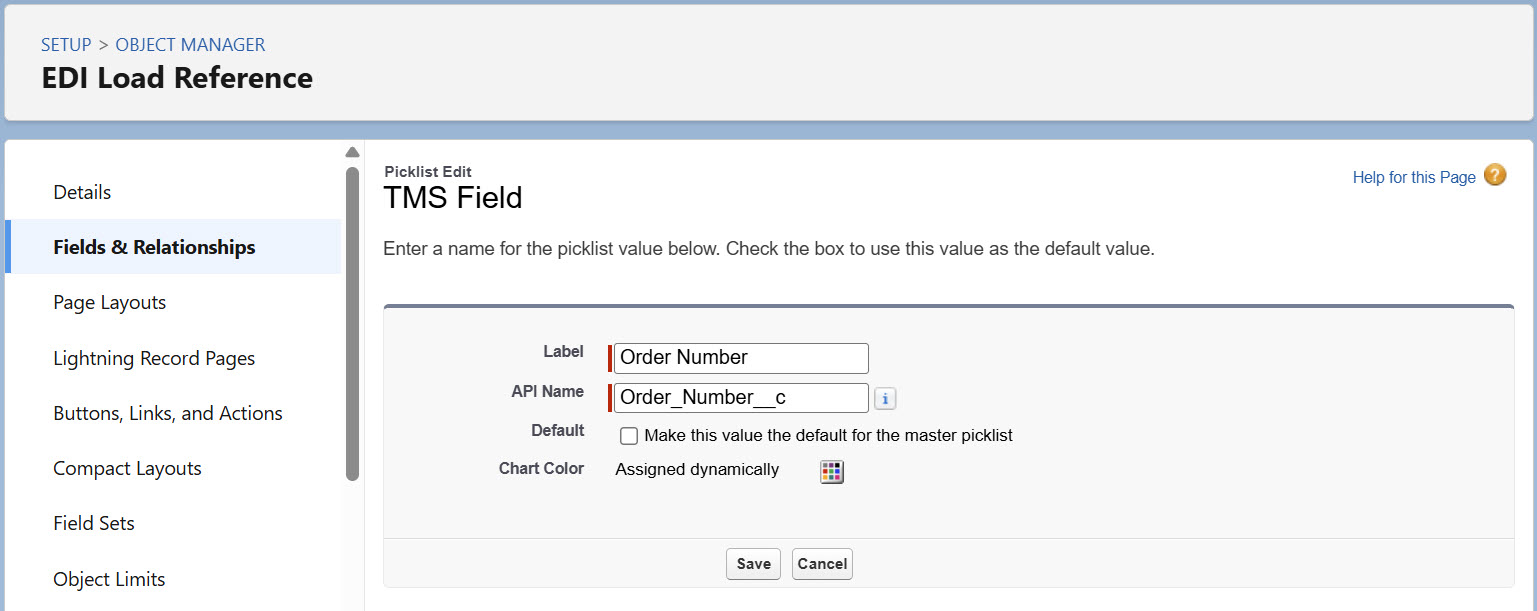
Click Save.
Scroll to the Picklist Options section.
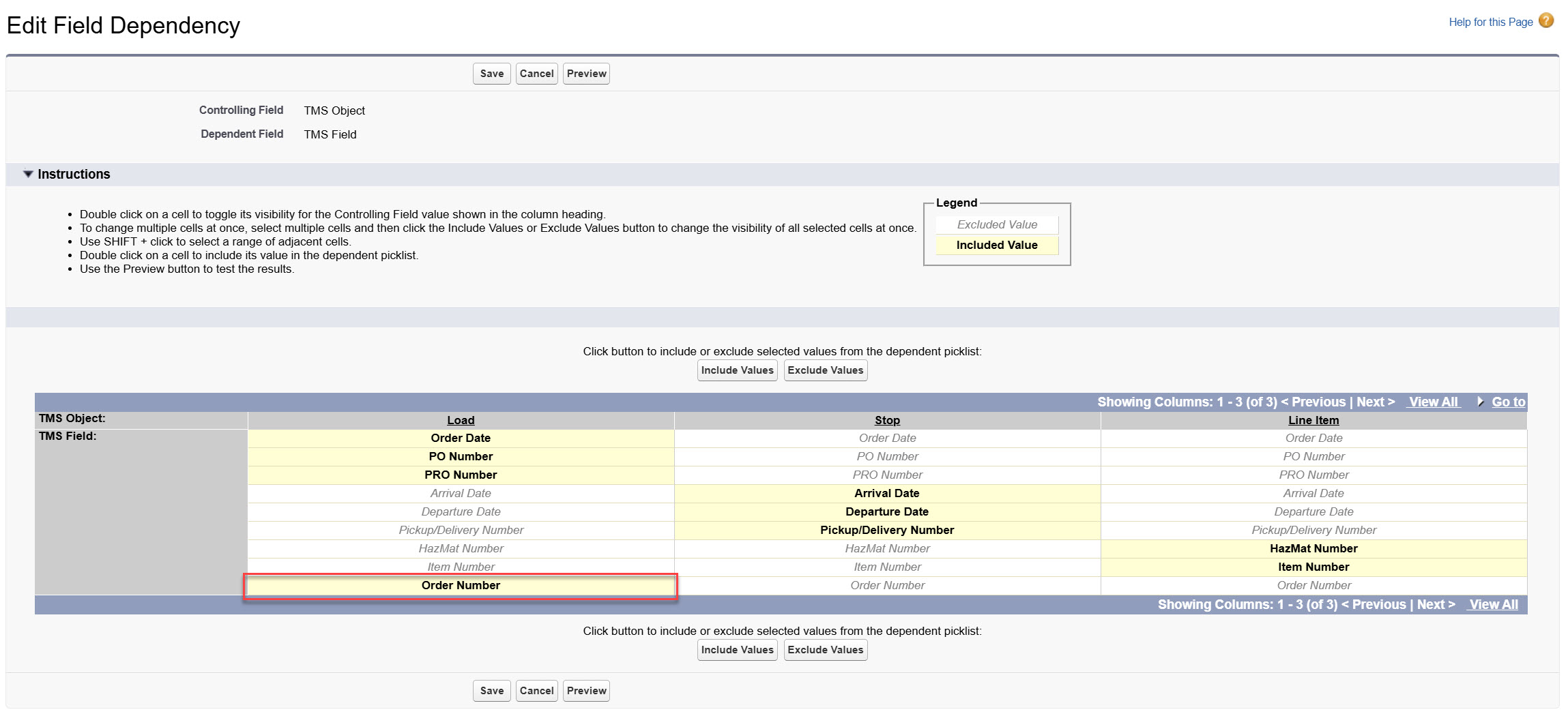
Find the Controlling field value (TMS Object) and click the Change link.
Find the TMS Object Load column, and select Order Number.
Click the Include Values button.
Click Save.
Multiple PO Numbers
The TMS supports multiple PO Numbers for inbound EDI 204 transactions.
PO Numbers are combined from the Load References field and from the standard PO Number (poNum) in the 204 transaction to populate the Load PO Number field. The following rules are enforced when processing PO Number field values.
The field is limited to 100 characters and stops adding values once the limit is reached.
Repeated values are only saved once. Capital letters and spaces that differ are treated as separate values and saved.
Multiple values are separated by semicolon.
EDI Load References are saved first, followed by additional values.
EDI 204 Updates replace the list of PO Number values. They do not add/include the new values.
Select Outbound or Both for the EDI Load Reference Direction field. The Load Reference populates and contains the PO Number values. This allows all PO Numbers received in the 204 transaction to be used, even when more than 100 characters are received.
The same reference type is sent in a single outbound EDI 204 transaction. Multiple combined PO Number references are sent.
EDI Load Reference values are combined with any existing Load, Line Item, or Stop field value.
The formatting places EDI Load References first, followed by the named field.
Fields may be updated automatically based on any EDI Update Setting records.
Duplicates are removed before inserting into the field. If Load Reference data is mapped on the EDI Location record, the Load Reference is sent without checking for any duplicate information.
HazMat Contact
A Hazmat Contact must have a Name and a Phone or Email. When Hazmat contacts are received in an inbound EDI 204 transaction, the TMS searches for the Contact based on the following criteria:
The Stop Pickup and Delivery Account locations for the Hazmat Line Item are checked to see if the Contact exists:
The Phone Number and Email are compared. If a Contact is matched but the Name or Email does not match the inbound 204 Contact, the location Contact is updated. This matched Contact record is the Hazmat Contact.
When the Contact on either Stop Account exists but does not have the Hazmat Transportation Role, the Hazmat value is added to the Contact. The Contact is added for the Line Item with the updated Transportation Role.
When no Contact match exists on either Stop Account, a new Contact is created with the Hazmat Transportation Role.
The new Contact is added to the Pickup Stop for the Line Item.
If an updated EDI 204 transaction is received with a new Hazmat contact, the Hazmat Contact is changed to the new value.
When load tenders are received that include an existing Hazmat contact but does not contain a valid email address for that contact, the existing email is maintained.
Equipment Type
The TMS receives the Equipment Type in the 204 transaction and attempts to match it to an existing value in the TMS. The following rules define how the TMS attempts to match the Equipment Type:
Special characters are removed
Order of words (order is ignored)
Capitalization is matched
Note: Matches only occur on all words. Example:
The Equipment Type is “Dry Van 53’.” The equipment type matches on the following:
Van Dry 53’
53’ Dry Van
Dry 53’ Van
Does NOT match:
53’ Van
The Equipment Type of the Load is updated when an updated Equipment Type is received in an EDI 204 transaction.
If no Equipment Type match is found, the Equipment Type from the EDI Transaction populates in the Load Other Instructions field.
Order Number
For inbound EDI 204/404 tenders, the Load Order Number field may be populated by either the orderNum payload value or as an EDI Load Reference. If multiple Order Number values are included in the EDI 204/404 transaction, the following processing logic determines which value is saved to the Load Order Number field value.
EDI Load Reference Order Numbers, in the order they occur in the EDI 204 tender payload.
The EDI 204 tender
orderNumfrom the payload.
The first order number is compared (case-insensitive) to existing Load Order Number values to determine if there is a duplicate. If the Order Number value is already present on a Load record, the TMS skips it.
EDI 204 Update Transactions
Inbound EDI 204 Transactions with an Update Purpose value refresh a set of Load fields based on the following logic.
The TMS clears the following Load field values that are not included on the Update transaction.
Cargo Value (when the EDI Update Setting Action is set to Allow Updates for Cargo Value)
Set the Action field to Block Updates to prevent overwriting the field.
Container/Trailer Number
EDI Response Deadline
Insurance Amount
Payment Terms
Revenova recommends trading partners send all of the above values for every EDI 204 Update Transaction. This prevents overwriting original received values with no value.
The following list of Load fields are not impacted by inbound Update EDI 204 Transactions that contain no value. These fields are only updated when a new value (other than null) is included in the Update transaction.
EDI Load References that contain a new value.
Bill of Lading Number
Distance (Miles/Kilometers)
Order Number
PO Number
Auto-Accept EDI 204
Automatically send 990 Load Tender Accept transactions for both original EDI 204 and Update 204 transactions for each trading partner.

Both Auto-Accept Update 204 and Use EDI Order Update Console cannot be checked. Select one or the other.
Manually process inbound EDI 204 Update transactions from the EDI Order Update Console. The Console may be enabled for each trading partner. See the EDI Order Update Console LWC documentation for instructions on using the console.

EDI 404
Inbound Transactions
The following field values may be updated from inbound EDI 404 transactions.
When a Seal Number is included in the 404, that field is saved to the Load Seal Number field.
Adding a Load with a Seal Number to a Trip Plan Segment populates the Seal Number on the Trip Plan Leg Asset. The Load Seal Number does not overwrite an existing Trip Plan Leg Asset Seal Number.
Outbound Transactions
Additional fields support outbound 404 transactions.
TMS Value | TMS Web Service Element | TMS Field Mapping (Object → Fields) |
|---|---|---|
| billTo | Load → Carrier Bill To |
| carrierQuoteId | Carrier Quote → Quote/Contract ID |
| customerBillTo | Load → Customer Bill To |
| customsBroker | Load → Customs Broker (Account → Name, Shipping Street, Shipping City, Shipping State Code, Shipping Postal Code, Shipping Country Code) |
| destinationTerminalLocation | |
| movementType | Carrier Quote → Movement Type |
| notifyParty | Account → Name, Shipping Street, Shipping City, Shipping State Code, Shipping Postal Code, Shipping Country Code |
| originTerminalLocation | |
| ultimateConsignee | Stop → Appointment Required, Appointment Time, Expected Date, Shipping/Receiving Hours, Time Zone (LT) |
| ultimateShipper | Stop → Appointment Required, Appointment Time, Expected Date, Shipping/Receiving Hours, Time Zone (LT) |
Movement Type Codes
Code | Movement Type |
|---|---|
15 | Moto/Rail - Ramp to Ramp |
20 | Rail - Door to Door |
22 | Rail - Door to Destination Ramp |
25 | Rail - Ramp to Ramp |
27 | Rail - Origin Ramp to Door |
40 | Steamship/Stack Operator - Door to Door |
42 | Steamship/Stack Operator - Door to Destination Ramp |
45 | Steamship/Stack Operator - Ramp to Ramp |
47 | Steamship/Stack Operator - Origin Ramp to Door |
60 | Patron/Customer - Door to Door |
62 | Patron/Customer - Door to Destination Ramp |
65 | Patron/Customer - Ramp to Ramp |
67 | Patron/Customer - Origin Ramp to Door |
80 | Steamship/Stack Operator - International - Door to Door |
82 | Steamship/Stack Operator - International - Door to Destination Ramp |
85 | Steamship/Stack Operator - International Ramp to Ramp |
87 | Steamship/Stack Operator - International - Origin Ramp to Door |