Hazardous materials (HazMat) are dangerous goods, such as explosives, chemicals, and fuels, that require specific safety handling procedures to avoid harming people, property, or nature.
The TMS supports the creation and tracking of HazMat Loads, whether manually entered or via API integration. Additionally, HazMat accessorial charges in Load Line Items are automatically included in customer and Carrier quotes.
HazMat Loads may be configured to trigger Fleet Management validations. See the Fleet Management documentation for more information.
Hazardous Materials in the Load Configuration
There are multiple ways to populate related HazMat fields such as manually through the Load Configuration, inbound EDI Partners, or Customer Portals.
HazMat Loads can be created in the Load Configuration.
Navigate to App Launcher → Transportation → Loads.
Create a new Load and select the Detail Entry button.
In the Line Items section of the Load Configuration, enter information for the Load and ensure the HazMat box is checked.
Once the HazMat box is checked, there are 6 previously hidden fields that are now visible:
Field Name
Field Description
Field Type
Fields Available
HazMat Number Type
A string chemical code to determine international or domestic hazardous material Loads, either UN (United Nations) or NA (North American).
Picklist
UN
NA
HazMat Number
A numerical, four-digit chemical code that relates to international or domestic hazardous material Loads.
Text
HazMat Class/Division
A classification process with 9 classes determined by the Department of Transportation (DOT) to group handling and transport of hazardous materials.
Picklist
1.1
1.2
1.3
1.4
1.5
1.6
2.1
2.2
2.3
3
4.1
4.2
4.3
5.1
5.2
6.1
6.2
7
8
9
HazMat Packaging Group
A three-tier classification system used to determine the danger level of the hazardous materials.
Picklist
I
II
III
HazMat Contact
The contact information of the hazardous materials Load coordinator.
Lookup
HazMat Routing
The type of hazardous materials to be handled.
Picklist
General
Caustic
Explosives
Flammable
Inhalants
Radioactive
After entering information in the HazMat fields, click Save.
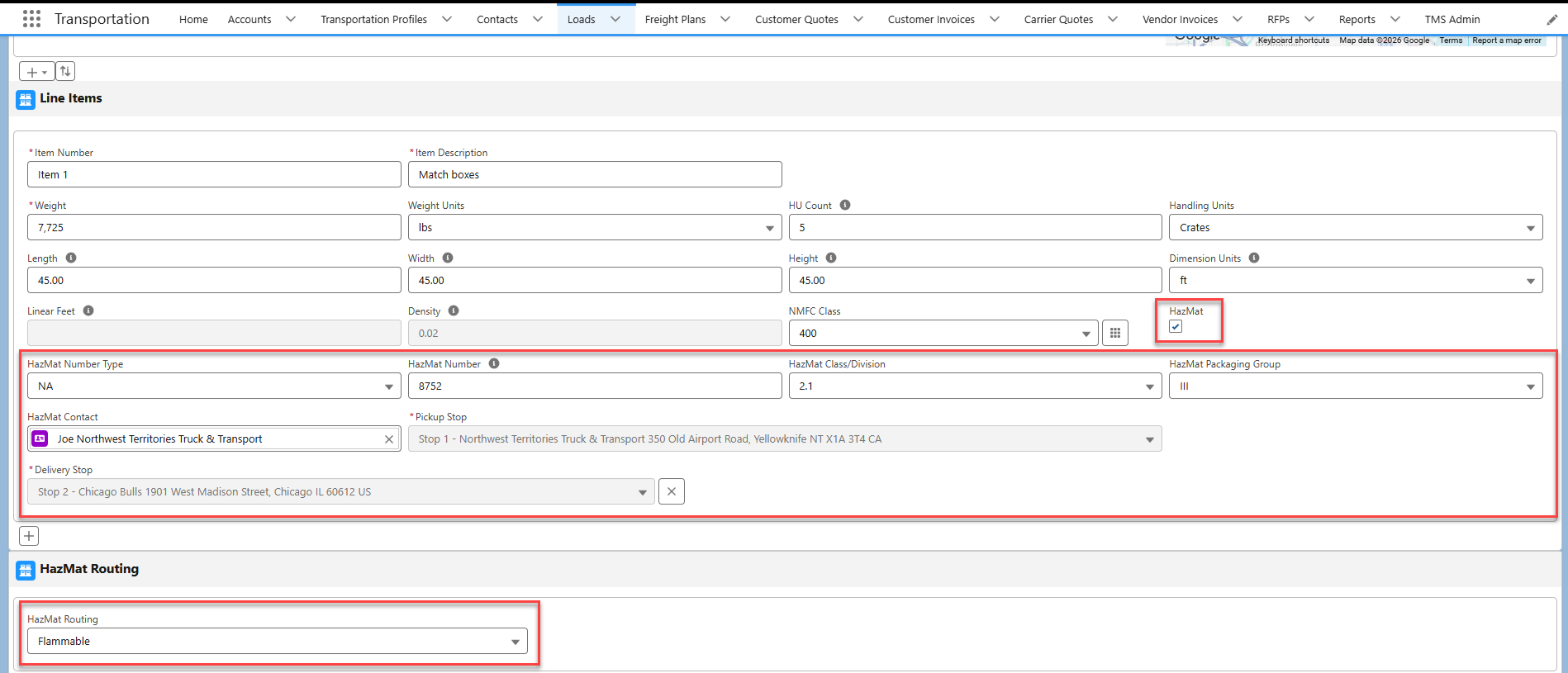
Note: When the HazMat box is manually checked on the Load Configuration, related HazMat fields aren’t required for Load creation. However, it’s recommended to enter all available details.
HazMat Loads can also be created using inbound EDI Partners or the Customer Portal.
For inbound EDI 204 transactions, it’s critical to include Line Items and HazMat contact information. Keep in mind that the HazMat contact should have an associated email address or phone number, so the TMS can match records based on the Transportation Role, TMS Type, and Stop location.
For Customer Portals, it’s also critical to include HazMat contact information. HazMat Loads created in Customer Portals should include relevant Line Items such as HazMat Number, HazMat Class/Division, and HazMat Packaging Group, among others.
Hazardous Materials in the Line Item Detail
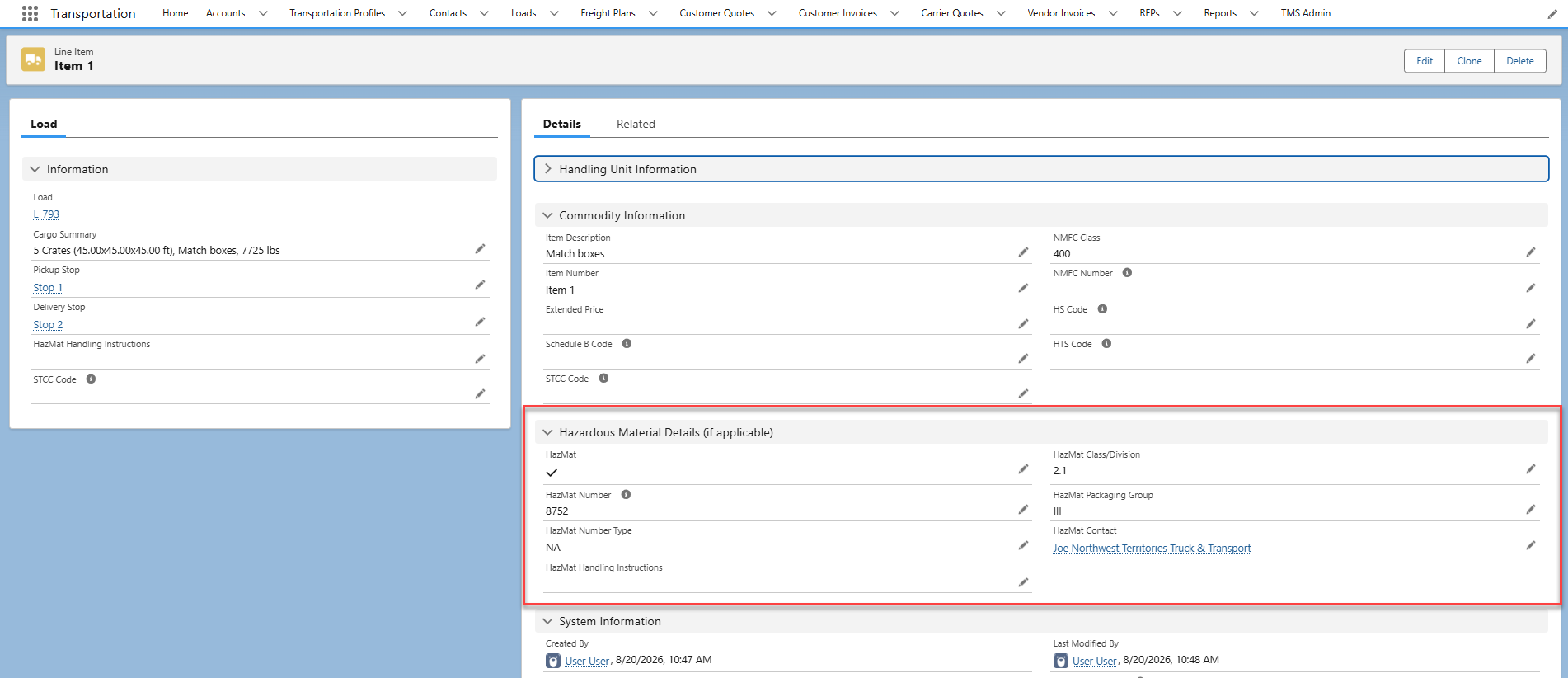
The HazMat checkbox field automatically rolls up to a Load-level field of the same name.
Find HazMat information for a Load on the Line Item Detail record. Add, edit, or update HazMat information in this section, including HazMat Handling Instructions if there are specific notes for the Pickup and Delivery Stops. Once the Load is created and is identified as HazMat, the Load is considered HazMat unless HazMat Line Items are removed.
Warning: HazMat Loads should be configured at the Line Item level. For example, if the HazMat checkbox on the Line Item is unchecked, the Load is still considered HazMat if there are HazMat Line Items associated with the Load.
Accessorial Charges
The TMS Admin settings have various lookup fields for accessorial charges, including the HazMat Accessorial. By default, the name is set to “Hazardous Material Handling.” Modify or update the name of the HazMat accessorial that appears on Loads by navigating to the TMS Admin → Configuration → Global Settings.
Note: To change the name of the HazMat Accessorial, add a New Accessorial. For more information on creating new accessorial charges, see the Accessorials article.
After setup, accessorial charges related to HazMat Loads are automatically applied to Customer and Carrier Quotes. The following quoting line item fields on either the Customer or Carrier Quote can be also edited on the HazMat Material Handling accessorial:
Type (select to apply to Load or a specific Stop)
Unit
Quantity (Qty)
Unit Price
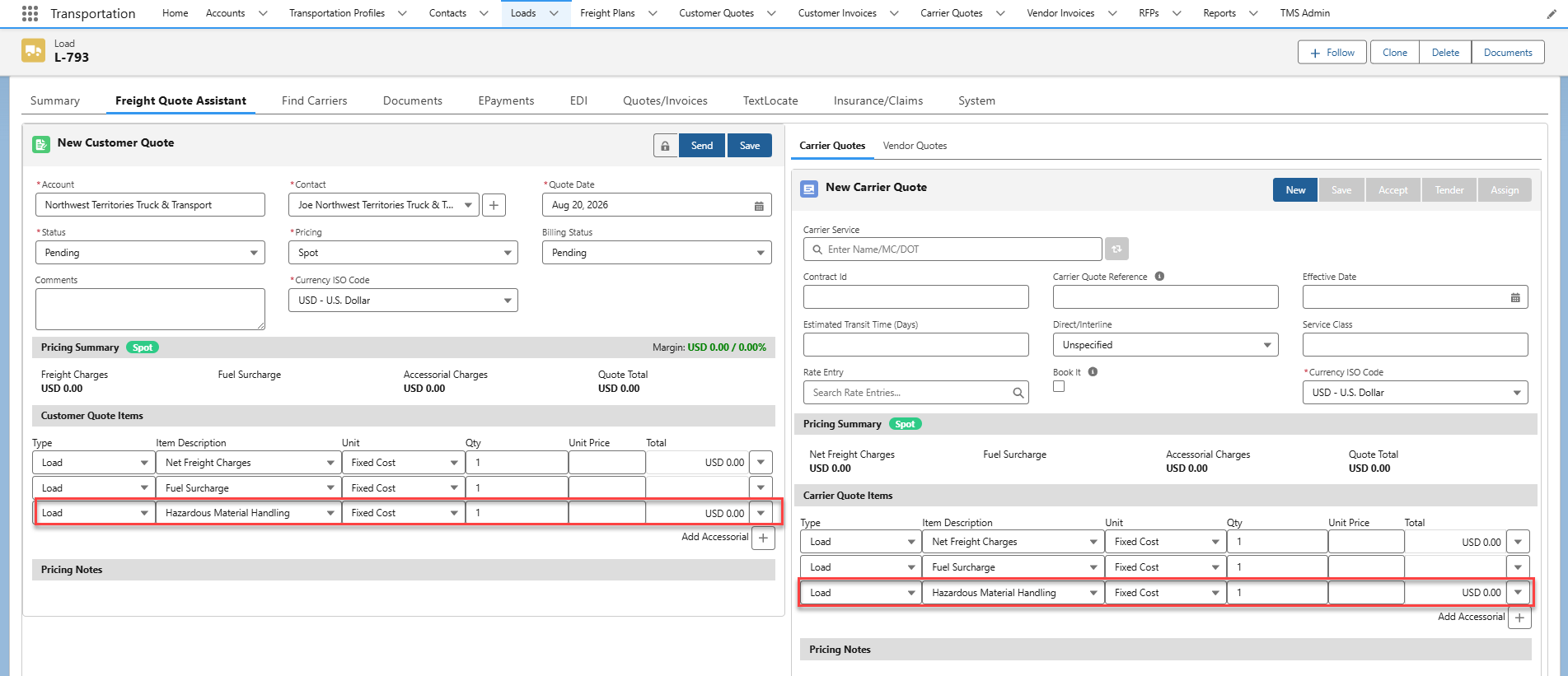
This accessorial can also be removed from either the Customer or Carrier Quote. Click the drop-down arrow (caret) on the right-hand side of the Line Item, and select Remove Item.
Vendor Quotes don’t populate HazMat accessorial charges. If a New Vendor Quote includes a HazMat accessorial charge, add this manually to the Vendor Quote.
API Provider Integrations
LTL integrations, such as Banyan, WWEX Speedship, Project44, and SMC3 EVA, support HazMat quoting and tendering. Details vary regarding what is released to the Carriers based on the integration.
For more information on how each API Provider handles HazMat Loads, see the Banyan, WWEX Speedship, Project44, and SMC3 EVA articles.