Clone recurring loads to reduce the amount of data entry. The Load Lightning Record Page contains the Clone button that opens the Load Clone Assistant Visualforce Page with clone options and settings.

The information cloned to the new Load records includes:
Stops
Line Items
Accessorial Charges
Load Clone Visualforce Page
Check the Customer Quote and Carrier Quote boxes to include them with the cloned Load record. Only Customer and Carrier Quotes with the Accepted status are cloned with the Load.
Note: Vendor Quotes are not cloned when the Carrier Quote box is selected when cloning Loads.
Enter a number of loads into the Number of Copies field and click the Create button. The number of Loads that may be cloned in a single action is limited to 50.
.png)
When the clone operation finishes, a success message appears, and the cloned Load records are added to the Loads table in the Visualforce page.
Note: The TMS supports cloning Loads that contain the same Stop location multiple times.
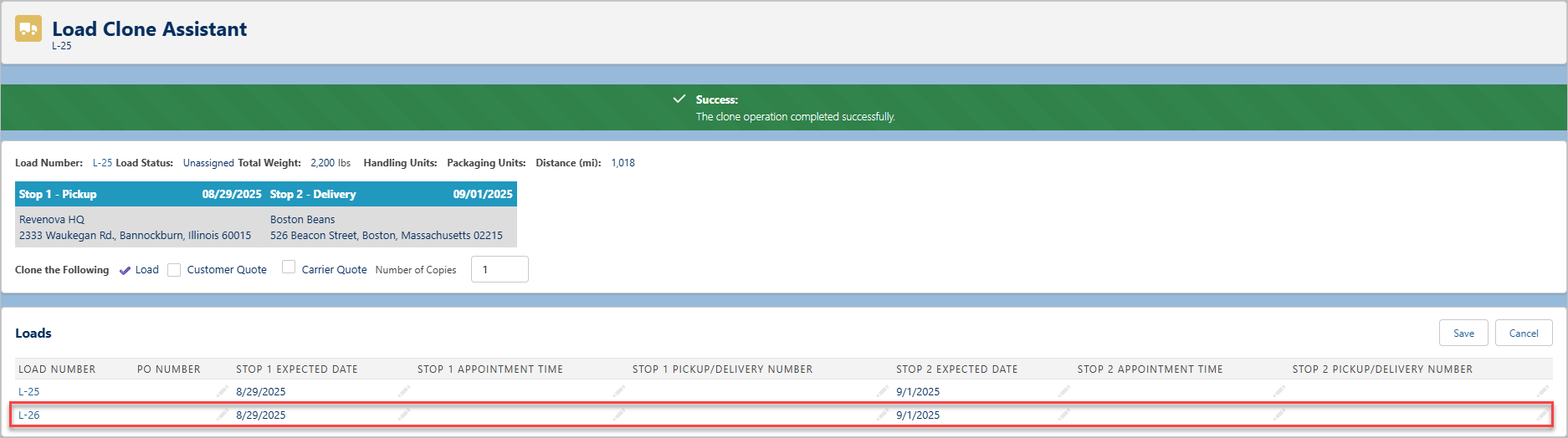
Edit the values for any of the new Loads and then click Save.
Field Sets
Multiple field sets allow additional fields to be cloned during the process. The following field sets clone additional fields from the Load, Stop, and Line Item objects, respectively:
Add fields to Load Field Set TMS6 and Stop Field Set TMS8 to include those fields as column headers. Change these column header fields for each load clone operation as desired. See the Field Set Summary article for more information.

Cloned Loads to not qualify for automatic Load Postings by default. In order to include cloned Loads in the automatic Load Posting workflow, add the Carrier Engagement Automation field to the Load TMS4 field set. This field must be Checked to qualify for the Load Posting workflow.
Auto-Generate Quotes on Cloned Loads
Automatically generate Customer and Carrier Quotes on cloned Loads by selecting the Save & Rate checkbox.
To enable the Save & Rate checkbox in the Load Clone Visualforce Page, do the following steps:
Go to TMS Admin → Configuration.
In the Global Settings section, check the Enable Save & Rate for Load Creation field.
Click Save.
Enter a number of copies and click the Create button.
Note:
Customer and Carrier Quotes are not included as part of the clone process when Save & Rate is checked.
Save & Rate is not available when an existing Customer or Carrier Quote is included in the clone process.
.png)
Warning: Loads that are cloned without a Mode do not automatically generate quotes. A message on the Freight Quote Assistant displays instructing to add a Mode to the load to generate quotes.
When the clone operation finishes, a success message appears, and the cloned Load records are added to the Loads table in the Visualforce page. Edit the values for any of the new Loads and then click Save.
The Customer and Carrier Quotes are generated automatically for each cloned Load.
Load Clone Fields Reference
The Cloned From field on the Load contains the original Load record name from which the cloned Loads are created. This field is not displayed by default. Set the field visibility filtering as needed in the Load Lightning Record Page.
The fields in the following table are cloned using the Load Clone function.
Note: Some fields are automatically cloned by default. Add additional fields to the appropriate Load, Stop, and Line Item field sets to include them in the Load Clone function.
Scenario/Action | Object | Field |
|---|---|---|
Multicurrency Orgs | Currency | |
Clone Load | Line Item | Item Description |
Clone Load | Line Item | Item Number |
Clone Load | Line Item | Weight |
Clone Load | Line Item | Weight Units |
Clone Load | Load | Area Units |
Clone Load | Load | Cargo Value |
Clone Load | Load | Carrier Bill To |
Clone Load | Load | Carrier Load |
Clone Load | Load | Carrier Portal |
Clone Load | Load | COD Amount |
Clone Load | Load | COD Payment Terms |
Clone Load | Load | COD Remit To |
Clone Load | Load | Commodity Condition |
Clone Load | Load | Customer |
Clone Load | Load | Customer Bill To |
Clone Load | Load | Customer Check Acceptable |
Clone Load | Load | Customer Load |
Clone Load | Load | Customer Sales Rep |
Clone Load | Load | Customs Broker |
Clone Load | Load | Distance (Kilometers) |
Clone Load | Load | Distance (Miles) |
Clone Load | Load | Document Options |
Clone Load | Load | EDI Provider |
Clone Load | Load | Equipment Type |
Clone Load | Load | Fleet |
Clone Load | Load | Freeze Distance |
Clone Load | Load | HazMat |
Clone Load | Load | Import/Export |
Clone Load | Load | Insurance Amount |
Clone Load | Load | Linear Feet |
Clone Load | Load | Load Posting Description |
Clone Load | Load | Mileage API Borders |
Clone Load | Load | Mode |
Clone Load | Load | Notify Party |
Clone Load | Load | Order Total |
Clone Load | Load | Other Carrier Capabilities |
Clone Load | Load | Other Instructions |
Clone Load | Load | Payment Terms |
Clone Load | Load | Receiving Agent |
Clone Load | Load | Relay |
Clone Load | Load | Service Level |
Clone Load | Load | Shipping & Handling |
Clone Load | Load | Shipping Agent |
Clone Load | Load | Tax Exempt |
Clone Load | Load | Team |
Clone Load | Load | Temperature Controlled |
Clone Load | Load | Temperature Run Type |
Clone Load | Load | Temperature Setting Maximum |
Clone Load | Load | Temperature Setting Minimum |
Clone Load | Load | Temperature Units |
Clone Load | Load | Total Area |
Clone Load | Load | Total Volume |
Clone Load | Load | Total Weight |
Clone Load | Load | Ultimate Consignee |
Clone Load | Load | Volume Units |
Clone Load | Load | Weight Units |
Clone Load | Stop | Appointment Required |
Clone Load | Stop | City |
Clone Load | Stop | Country |
Clone Load | Stop | Cumulative Miles |
Clone Load | Stop | Expected Date |
Clone Load | Stop | Geolocation (Latitude & Longitude) |
Clone Load | Stop | Is Dropoff |
Clone Load | Stop | Is Geolocation |
Clone Load | Stop | Is Pickup |
Clone Load | Stop | Location |
Clone Load | Stop | Number |
Clone Load | Stop | Postal Code |
Clone Load | Stop | Shipping/Receiving Contact |
Clone Load | Stop | Shipping/Receiving Hours |
Clone Load | Stop | State/Province |
Clone Load | Stop | Stop (Name) |
All fields in the Line Item TMS10_{Mode Name} | Line Item | TMS10 Field Set |
All fields in the Load TMS4_{Mode Name} | Load | TMS4 Field Set |
All fields in the Stop TMS6_{Mode Name} | Stop | TMS6 Field Set |
Fields Set Statically | Load | Load Status (set to Unassigned) |
Fields Set Statically | Load | Order Date (set to Date.today()) |
Fields Set Statically | Load | *Sales Status (set to Pending) |
Clone Includes Customer Quotes | Load | Customer Quote Tax Amount |
Clone Includes Customer Quotes | Load | Customer Quote Total |
Clone Includes Customer Quotes | Load | *Sales Status |
Clone Includes Carrier Quotes | Load | Carrier Quote Total |
Clone Includes Carrier Quotes | Load | Vendor Quote Total |
*If cloning loads include customer quotes, the Sales Status field is set by the customer quote value.