TriumphPay Audit (formerly HubTran) provides an AI-based vendor invoice parsing/reading capability that helps automate the quote/invoice reconciliation process.
TriumphPay Audit provides “push” status updates to the TMS via a sites-based web service. Inbound load status packets from TriumphPay Audit are processed by Platform Events.
.jpeg "HubTran - 1(1).jpeg")
Setup
The HubTranDataLoad batch process controls sending Load lane/revenue/cost information to TriumphPay Audit. The last 60 days of Carrier and Load data is sent to “seed” information in the TriumphPay Audit Portal.
Enter Credentials
Enable the TriumphPay Audit integration by completing the following steps.
Navigate to TMS Admin.
Select Credentials.
Select the Global Services tab.
Find HubTran in the list and open the card.
Check the Enabled box.
Enter the User ID, Password 1, and Password 2 into the text fields.
Click the Save button when finished.
TriumphPay Audit provides login credentials to users to access their web portal. Users logged into this portal can review and approve invoices, and manage exceptions related to the auto-parsing of invoices.
Credentials can be group-specific. Set the TriumphPay Audit Credentials Selector field to use group-based credentials and enter all the credentials from TMS Admin → Credentials.
See examples in the table below.
User ID | Password 1 | Password 2 | Customer Number |
|---|---|---|---|
Revenova | Revenova | API Token (Looks like bf5f267000ae8e8e6pe0ef656746588x) |
Do NOT enable the TriumphPay Audit integration in both production and sandbox environments together. Disable TriumphPay Audit credentials in the sandbox environment before using the integration in production. Identical Loads in production and any sandbox environments negatively impacts the data exchange between TriumphPay Audit and the TMS.
Inbound Packet IP Ranges: Any load status post-backs from TriumphPay Audit that do not originate from this IP mask are rejected as a security feature. Any changes to this range are provided by Revenova.
Remote Site Settings
Upgrading from previous versions of the TMS may have outdated information. Check that the Remote Site Settings for the TriumphPay Audit integration URL are up to date.
Click the Setup gear icon in the top right corner.
From the drop-down, click Setup.
In the Quick Find Toolbar type Remote Site Settings and click the link.
From the list of remote sites find HubTran and click the Edit link.
Update the Remote Site URLs to match the Service URL and Test Service URL below.
Service URL: https://api.audit.triumphpay.com
Test Service URL: https://api.audit.triumphpay.com
Experience Cloud Site Setup
The TriumphPay Audit integration requires a webhook to send tracking information to the TMS. Create an API Site to accept inbound API traffic.
Create a Salesforce Experience Cloud Site for API access.
Set the public access for the Site.
Activate and Publish the Site.
Enter the API URL into the field for Inbound API Community URL under TMS Admin, in the Configuration section.
Example: https://full-revesc1.cs64.force.com/api
Add the following extension to the end of the URL to match the example below: /services/apexrest/rtms/tmslistener?org=[18-character org id]&source=HubTran&pwd=[credentials code field]
{API Experience Cloud Site URL} /services/apexrest/rtms/tmslistener?org= {18-character org id} &source=HubTran&pwd= {credentials code field}
Example: https://revenova.my.site.com/API/services/apexrest/rtms/tmslistener?org= 00D180000008oA9EAI&source=HubTran&pwd=4wGFDgnT950Ovg1
The Salesforce-generated API Experience Cloud Site URL is case sensitive.
Send the post-back URL/webhook, the company name, and contact information to support@triumphpay.freshdesk.com.
TMS Admin
Configuration
The following field may be set under TMS Admin → Configuration to use as the group-based credentials when using TriumphPay Audit.
Confirm the boxes for TriumphPay Audit and Remote Documents are Checked. When Checked, push events are processed as Platform Events by the TMS.
TriumphPay Audit Credentials Selector: The picklist field on the Load object that determines which credentials to use.
Click the HubTran Data load button to pre-load Carriers and Loads into TriumphPay Audit. Only the Loads for participating Carriers are uploaded to TriumphPay Audit. This button may be pressed multiple times.
Field Sets
Four Field Sets are monitored by the TMS for changes. Any time a field value is changed in any of the following field sets, the TMS sends fields to TriumphPay Audit to update all of the field values for that Load. Add or remove fields from these field sets to control when the TMS sends updated information to TriumphPay Audit. The nested fields below are included in the field set by default.
Carrier Quote TMS11
No fields are included in the field set by default.
All Carrier Quote fields may be added to the field set EXCEPT FOR the following.
Order Number
Line Item TMS11
No fields are included in the field set by default.
All Line Item fields may be added to the field set.
Load TMS40
Carrier Invoice Total
Carrier Quote Total
Customer Invoice Total
Customer Quote Total
Distance (Kilometers)
Distance (Miles)
Load Total
Sales Status
Total Weight
All Load fields may be added to the field set EXCEPT FOR the following.
Delivery Status
Destination
Expected Delivery Date
Expected Ship Date
Mode Name
Origin
OTD Counter
Ship From Address
Ship Status
Ship To Address
Stop TMS14
No fields are included in the field set by default.
All Stop fields may be added to the field set EXCEPT FOR the following.
EDI Provider
Location Name
Tracking Provider (Customer)
Additional "Flex" reference fields may be added to 2 field sets and are sent to TriumphPay Audit with other Load information.
Transportation Profile
Set the following fields for each Carrier on their Transportation Profile.
Vendor Invoice Processor: For all participating Carriers, set this value to TriumphPay Audit.
Carrier Remit To: When this field is changed, the updated Carrier information is sent to TriumphPay Audit.
Payment Processor: For all participating Carriers, set to TriumphPay.
To maximize the performance of TriumphPay Audit, populate the SCAC, MC Number, US DOT Number, and Billing Address fields on all participating Carrier Transportation Profiles.
Confirm all Carriers have a Contact email address. Incorrect or outdated email addresses causes significant impact to routing and parsing invoices.
The TriumphPay Audit integration supports multiple stops for the same Account location.
Once invoices are approved in the TriumphPay Audit web portal, the documents are sent to the TMS. Documents are attached to the appropriate Load record. Once documents are processed, the Carrier Quote Settlement Status field is set to Pending. Set to Approved for Payment.
The Settlement Status field may be set a number of ways.
Individually from each Carrier Quote record.
Selecting one to many for the Carrier Quote list view.
Creating flows or other automation to auto-approve each quote.
When the quote is Approved, an invoice is generated.
Load
Multiple fields that may be populated by TriumphPay Audit.
Bill of Lading Number
Vendor Invoice Processor: Set this field to TriumphPay Audit. This field can also be set on Carrier Assignment.
Carrier Quote
Vendor quotes are not compatible with the TriumphPay Audit integration. Only Accepted Carrier Quotes for Loads are sent to TriumphPay Audit. Payloads that return from TriumphPay Audit only update the Accepted Carrier Quote for a Load.
Add the following fields to the Carrier Quote record page as Read-Only. TriumphPay Audit populates these fields.
Vendor Invoice Number
Vender Settlement Total
Vendor Settlement Variance
Vendor Invoice Date
Add all Carrier contact emails and ensure they are up to date. The email used for Carrier documents that is sent to TriumphPay Audit may cause issues in properly routing invoices to and from TriumphPay Audit.
The Carrier Quote Reference field is sent to TriumphPay Audit and is stored as the TriumphPay Audit quote_number field.
The document "fingerprint" data for a Load is maintained for 200 days to prevent duplicate documents saving to the Load.
Customer Invoice Documents
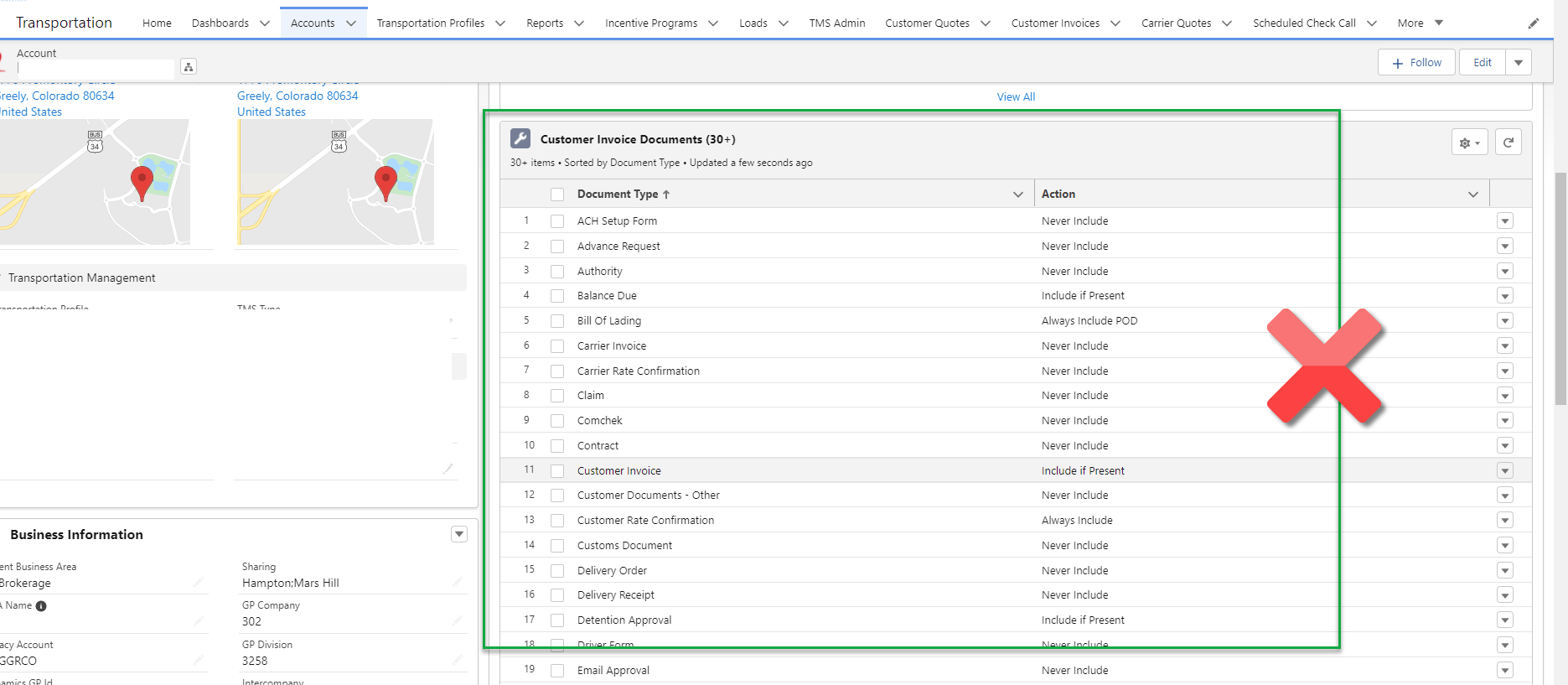
It is possible that when using the TriumphPay Audit integration that Customer Invoice documents are attached to the Load record. However, the Customer Invoice Documents Received checkbox is NOT checked.
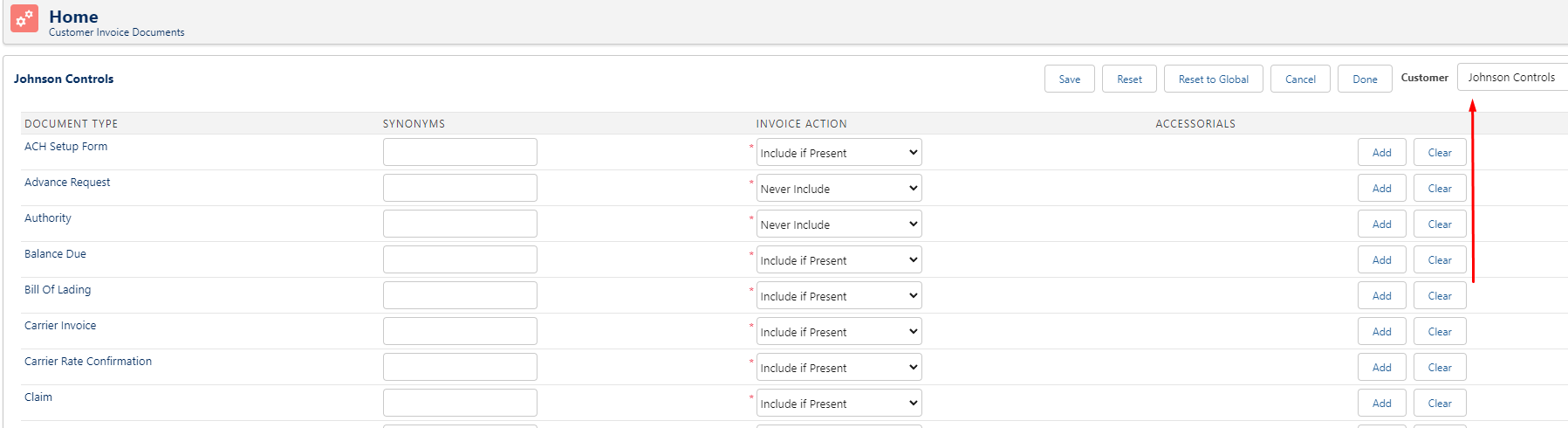
Customer Invoice Documents actions may be configured using the related list on the Account page layout. This can prevent the Customer Invoice Documents checkbox field on the Load from populating during TriumphPay Audit operation.
Review the customer Account page layout and search for the Customer Invoice Documents related list. If records are present in this list, there will be issues. Customer Invoice Documents should only be managed through TMS Admin, Customer Invoice Documents.
Document Processing
Documents sent from TriumphPay Audit to the TMS are sent as a list in a single payload. Each document is defined by the proof_of_delivery field in the payload. When this field value is True, the document is identified as a POD in the TMS.
When a payload is received, the TMS applies a name to each document. The name is generated according to the steps below.
Each document is named.
For files of the same type, an incremental counter is added to the end of the file name.
Example: “Bill Of Lading - 01”
Proof of Delivery documents have “-POD” added to the end of the file name.
Example: “Delivery Receipt - 01 - POD”
The file type is added to the end of the file name.
Example: “Delivery Receipt - 01 - POD.png”
PODs
Any documents associated with a specific Load that have the proof_of_delivery field value of True are processed according to the following logic.
The POD Received field on the associated Load(s) is Checked.
The field is Checked even when all Customer Invoice Document requirements are not yet met.
This field is not relevant to orgs using the Customer Invoice Documents functionality.
The Load Carrier Uploads field is set to POD.
This field is not relevant to orgs using the Customer Invoice Documents functionality.
Image files are added to Load records and evaluated to determine if all Customer Invoice Documents requirements are met.
The Customer Invoice Document settings for the Customer on the Load are checked.
If the Customer does not have any Customer Invoice Document settings, the Global Default is checked.
The following actions are taken based on the applicable Customer Invoice Documents settings.
If the action is Never Include, Include if Present, or Include if POD, nothing happens to the image.
The following scenarios result in an error.
When the action is Always Include, and the matching Document Type does not exist on the Load.
When the action is Always Include POD, and the matching Document Type with “-POD” does not exist on the Load.
When the action is Include if Accessorial Present, the specific Accessorial is on the Load, and the Document Type does not exist on the Load.
If an error occurs, the Customer Invoice Documents Received field is not Checked.
The Customer Invoice Documents Received field is Checked.
Freight Plans
A document is attached to both the Carrier Load and the Customer Load is the presence of zero-to-many related "shipments" associated with the document in the payload. The Carrier Load is the parent record when receiving payloads from TriumphPay Audit. Within that parent record is an array of document objects. Within each document object is an array of shipments that correspond to the Customer Load(s) Id(s). Those links are made when the Carrier Loads are sent to TriumphPay Audit. Any Customer Load that is moved by a Carrier Load is included in the shipments array sent with the Carrier Load transfer to TriumphPay Audit. Users may also link documents to Customer Loads in the TriumphPay Audit web portal. When a document is linked to one or more Customer Loads processed for the Carrier Load, those links are included in the payload sent to Revenova. When the payload is received in the TMS, the document is attached to the Carrier Load and any linked Customer Loads.
When viewing documents in the TriumphPay Audit web portal, do not attach Delivery Receipt documents to a shipment. Delivery receipts are not customer-facing documents. This setting is a default, but may be changed in the TriumphPay Audit visibility and required document settings.
In the TriumphPay Audit web web portal, navigate to Settings.
Click Document Types.
On the left side, set the value to Visible to Customer for the specific document, such as the Delivery Receipt.
Rerun Transactions
Rerun TriumphPay Audit transactions that did not process successfully.
Navigate to the Queued Transactions tab/object.
Select the transactions that that did not process successfully or set the Status to Retry Failed or Failed.
Set the transaction Status to Pending.
Save the list.
.jpeg "HubTran - 2(1).jpeg")
Is the Customer Invoice Documents Received field populated when all document requirements from the Customer Invoice Document required object are present on the load?
The Customer Invoice Documents field on the Load object is a TriumphPay Audit related enhancement that only responds properly if the documents are received from TriumphPay Audit. When TriumphPay Audit sends the Carrier invoice document with POD documents to Revenova, the TMS looks to see if all required POD documents were received. If all appropriate documents were received according to the customer's Customer Invoice Document Requirements setup, then the field on the Load is Checked.
API Calls
Send Loads to TriumphPay Audit
The TMS calls the Create / Update Load endpoint to send information to TriumphPay Audit and returns the details of the created or updated Load to the TMS. Add or remove fields to the appropriate field sets to control when to call TriumphPay Audit to send and update field values.
TMS Operation | TriumphPay Audit Endpoint | Request Type | Response |
|---|---|---|---|
Field value change to any field included in the following field sets:
| Create / Update Load | PUT | 200: Success 401: Authentication Error 422: Missing required fields 423: Record locked |
Sample Create Load Request Payload
{
    "load": {
        "load_id": "LD123",
        "external_id": "200230",
        "status": "delivered",
        "brokered": false,
        "tms_created_at": "2023-01-15 19:00:00 +0200",
        "tms_updated_at": "2023-02-01 19:00:00 +0200",
        "target_ship_start": "2023-01-30 12:00:00 +0200",
        "target_ship_end": "2023-02-04 14:00:00 +0200",
        "actual_shipped_at": "2023-01-30 13:00:00 +0200",
        "target_delivery_start": "2023-02-04 19:00:00 +0200",
        "target_delivery_end": "2023-02-04 19:00:00 +0200",
        "actual_delivered_at": "2023-02-04 19:00:00 +0200",
        "require_pod": false,
        "require_weight_ticket": false,
        "require_customer_rate_confirmation": false,
        "require_originals": false,
        "pro_number": "123123",
        "quantity": 1.0,
        "weight": 1000,
        "distance": 500,
        "mode": "truck",
        "freight_class": "201",
        "delivery_number": "1",
        "quote_number": "2",
        "load_note": "Check for the stamp",
        "payables_note": "Check for another stamp",
        "quickpay": true,
        "days_to_pay": 2,
        "office": "northwest",
        "sales_rep": "brian",
        "business_unit": "managed transportation",
        "priority": "Tier 1",
        "blind": false,
        "origin": {
            "name": "Warehouse A",
            "address_line_1": "13 Elmwood Blvd",
            "address_line_2": "Suite 300",
            "city": "Lancaster",
            "state": "PA",
            "postal_code": "17602",
            "country": "USA"
        },
        "destination": {
            "name": "Customer Receiving Office",
            "address_line_1": "200 E King Street",
            "address_line_2": "",
            "city": "York",
            "state": "PA",
            "postal_code": "17403",
            "country": "USA"
        },
        "carrier": {
            "name": "Horst Transport",
            "scac": "HTTT",
            "external_id": "111445",
            "dot_number": "35555",
            "mc_number": "062204"
        },
        "customer": {
            "external_id": "MSHIPPER",
            "name": "M Shipper",
            "account_number": "cMSHIPPER"
        },
        "shipments": [
            {
                "shipment_id": "SO123",
                "external_id": "1500013"
            }
        ],
        "charges": {
            "total": 1200.23,
            "currency": "USD",
            "customer_total": 1500.00
        },
        "picks": [
            {
                "external_id": "P2001",
                "name": "Warehouse A",
                "address_line_1": "13 Elmwood Blvd",
                "address_line_2": "Suite 300",
                "city": "Lancaster",
                "state": "PA",
                "postal_code": "17602",
                "country": "USA",
                "shipments": [
                    {
                        "external_id": "1500013"
                    }
                ]
            }
        ],
        "drops": [
            {
                "external_id": "D2001",
                "name": "Customer Receiving Office",
                "address_line_1": "200 E King Street",
                "address_line_2": "",
                "city": "York",
                "state": "PA",
                "postal_code": "17403",
                "country": "USA",
                "shipments": [
                    {
                        "external_id": "1500013"
                    }
                ]
            }
        ],
        "line_items": [
            {
                "external_id": "LI110",
                "description": "Line Haul",
                "total": 123.45,
                "customer_total": 150,
                "quantity": 5,
                "rate": 2,
                "rate_qualifier": "PM",
                "type_code": "ABC",
                "carrier": {
                    "external_id": "111445",
                    "scac": "HTTT",
                    "name": "Horst Transport"
                },
                "carrier_payable_id": "500"
            },
            {
                "external_id": "LI111",
                "description": "TONU",
                "total": 100,
                "customer_total": 125,
                "quantity": 1,
                "rate": 100,
                "rate_qualifier": "FR",
                "type_code": "ZZZ",
                "carrier": {
                    "external_id": "111446",
                    "scac": "ABCD",
                    "name": "Abc Deliveries"
                },
                "carrier_payable_id": "501"
            }
        ],
        "shipped_items": [
            {
                "external_id": "S00020",
                "description": "Raw materials",
                "class_name": "400",
                "item_type": "CARTON",
                "nmfc": "82270",
                "quantity": 2.0,
                "weight": 417.0,
                "weight_unit": "lb",
                "width": 10.0,
                "height": 12.0,
                "length": 20.0,
                "hazardous_material": false
            }
        ],
        "reference_lists": {
            "Pro Number": [
                "Value1",
                "Value2"
            ]
        },
        "links": [
            {
                "url": "https://mytms.com/load/load-id",
                "text": "MyTMS Load Details"
            }
        ],
        "carrier_payables": [
            {
                "carrier": {
                    "external_id": "111445"
                },
                "external_id": "500",
                "status": "On Hold",
                "currency": "USD"
            },
            {
                "carrier": {
                    "external_id": "111446"
                },
                "external_id": "501",
                "status": "Pending",
                "currency": "USD"
            }
        ],
        "contacts": [
            {
                "email": "jsmith@account.com",
                "name": "Jane Smith",
                "role": "Customer Rep"
            }
        ]
    }
}
Sample Create Load Response Payload
{
  "load": {
    "id": 1968224,
    "load_id": "LD123",
    "external_id": "200230",
    "status": "delivered",
    "brokered": false,
    "tms_created_at": "2023-01-15T17:00:00.000Z",
    "tms_updated_at": "2023-02-01T17:00:00.000Z",
    "target_delivery_start": "2023-02-04T17:00:00.000Z",
    "target_delivery_end": "2023-02-04T17:00:00.000Z",
    "actual_delivered_at": "2023-02-04T17:00:00.000Z",
    "target_ship_start": "2023-01-30T10:00:00.000Z",
    "target_ship_end": "2023-02-04T12:00:00.000Z",
    "actual_shipped_at": "2023-01-30T11:00:00.000Z",
    "links": [],
    "require_pod": false,
    "require_weight_ticket": false,
    "require_customer_rate_confirmation": false,
    "require_originals": false,
    "pro_number": "123123",
    "primary_reference": null,
    "primary_reference_type": null,
    "quantity": 1,
    "weight": 1000,
    "distance": "500",
    "mode": "truck",
    "freight_class": "201",
    "po": null,
    "pickup_reference": null,
    "tender_user": null,
    "delivery_number": "1",
    "quote_number": "2",
    "ship_ref": null,
    "load_note": "Check for the stamp",
    "payables_note": "Check for another stamp",
    "office": "northwest",
    "sales_rep": "brian",
    "business_unit": "managed transportation",
    "priority": "Tier 1",
    "blind": false,
    "days_to_pay": 2,
    "quickpay": true,
    "origin": {
      "name": "Warehouse A",
      "address_line_1": "13 Elmwood Blvd",
      "address_line_2": "Suite 300",
      "city": "Lancaster",
      "state": "PA",
      "postal_code": "17602",
      "country": "USA"
    },
    "destination": {
      "name": "Customer Receiving Office",
      "address_line_1": "200 E King Street",
      "address_line_2": "",
      "city": "York",
      "state": "PA",
      "postal_code": "17403",
      "country": "USA"
    },
    "carrier": {
      "name": "Horst Transport",
      "external_id": "111445",
      "scac": "HTTT",
      "mc_number": "062204",
      "dot_number": "35555",
      "ein": null,
      "address_name": null,
      "address_line_1": null,
      "address_line_2": null,
      "city": null,
      "state": null,
      "postal_code": null,
      "country": null
    },
    "customer": {
      "name": "M Shipper",
      "external_id": "MSHIPPER",
      "account_number": "cMSHIPPER"
    },
    "shipments": [
      {
        "external_id": "1500013"
      }
    ],
    "charges": {
      "total": 1200.23,
      "currency": "USD",
      "line_haul": 0,
      "fuel": 0,
      "detention": 0,
      "other": 0,
      "customer_total": 1500
    },
    "picks": [
      {
        "external_id": "P2001",
        "name": "Warehouse A",
        "address_line_1": "13 Elmwood Blvd",
        "address_line_2": "Suite 300",
        "city": "Lancaster",
        "state": "PA",
        "postal_code": "17602",
        "country": "USA",
        "shipments": [
          {
            "external_id": "1500013"
          }
        ]
      }
    ],
    "drops": [
      {
        "external_id": "D2001",
        "name": "Customer Receiving Office",
        "address_line_1": "200 E King Street",
        "address_line_2": "",
        "city": "York",
        "state": "PA",
        "postal_code": "17403",
        "country": "USA",
        "shipments": [
          {
            "external_id": "1500013"
          }
        ]
      }
    ],
    "line_items": [
      {
        "external_id": "LI110",
        "description": "Line Haul",
        "total": 123.45,
        "customer_total": 150,
        "quantity": 5,
        "rate": 2,
        "rate_qualifier": "PM",
        "type_code": "ABC",
        "carrier": {
          "external_id": "111445",
          "scac": "HTTT",
          "name": "Horst Transport"
        },
        "carrier_payable_id": "500"
      },
      {
        "external_id": "LI111",
        "description": "TONU",
        "total": 100,
        "customer_total": 125,
        "quantity": 1,
        "rate": 100,
        "rate_qualifier": "FR",
        "type_code": "ZZZ",
        "carrier": {
          "external_id": "111446",
          "scac": "ABCD",
          "name": "Abc Deliveries"
        },
        "carrier_payable_id": "501"
      }
    ],
    "shipped_items": [
      {
        "external_id": "S00020",
        "description": "Raw materials",
        "item_type": "CARTON",
        "class_name": "400",
        "nmfc": "82270",
        "hazardous_material": false,
        "quantity": 2,
        "weight": 417,
        "weight_unit": "lb",
        "width": 10,
        "height": 12,
        "length": 20
      }
    ],
    "carrier_invoices": [],
    "references": {
      "Load ID": "LD123",
      "PRO Number": "123123",
      "Pro Number": "Value1,Value2"
    },
    "reference_lists": {
      "Load ID": [
        "LD123"
      ],
      "PRO Number": [
        "123123"
      ],
      "Pro Number": [
        "Value1",
        "Value2"
      ]
    },
    "documents": [],
    "carrier_payables": [
      {
        "carrier": {
          "external_id": "111445"
        },
        "external_id": "500",
        "status": "On Hold",
        "currency": "USD"
      },
      {
        "carrier": {
          "external_id": "111446"
        },
        "external_id": "501",
        "status": "Pending",
        "currency": "USD"
      }
    ],
    "contacts": [
      {
        "email": "jsmith@account.com",
        "name": "Jane Smith",
        "title": "Customer Rep"
      }
    ]
  }
}
TMS Fields Sent to TriumphPay Audit
Object | Field | Type | TriumphPay Audit Field |
|---|---|---|---|
“1” | load → number_of_carrier_invoices | ||
“1” | load → quantity | ||
“Load Number” | load → primary_reference_type | ||
“True” | load → brokered | ||
Account | Account Name | Name | carrier → name, customer → name, destination → name, origin → name |
Account | Account Number | Text(40) | customer → account_number |
Account | SFID | SFID | carrier → external_id, customer → external_id |
Account | Shipping City | Text(40) | destination → city, origin → city |
Account | Shipping Country | Text(80) | destination → country, origin → country |
Account | Shipping Postal Code | Text(20) | destination → postal_code, origin → postal_code |
Account | Shipping State | Text(80) | destination → state, origin → state |
Account | Shipping Street | Text(255) | destination → address_line_1, origin → address_line_1 |
Carrier Quote | Accessorial Charges | Currency(16, 2) | charges → other |
Carrier Quote | Carrier Quote | Auto Number | line_items → description |
Carrier Quote | Carrier Quote Reference | Text(100) | load → quote_number |
Carrier Quote | Carrier Total | Currency(16, 2) | charges → total |
Carrier Quote | Currency | CurrencyIsoCode | carrier_payables → currency, charges → currency |
Carrier Quote | Fuel Surcharge | Currency(16, 2) | charges → fuel |
Carrier Quote | Name and SFID | Auto Number + SFID | carrier_payables → external_id |
Carrier Quote | Net Freight Charges | Currency(16, 2) | charges → line_haul, line_items → total |
Carrier Quote | Removal Reason | Picklist | load → bounce_reason |
Carrier Quote | Settlement Status | Picklist | carrier_payables → status |
Carrier Quote | SFID | SFID | line_items → external_id |
Carrier Quote | Tender Accepted Date | Date/Time | load → booked_at |
Carrier Quote | Tender Sent By | Lookup(User) | load → tender_user |
Carrier Quote | Vendor | Lookup(Account) | carrier_payables → carrier.external_id |
Carrier Quote Accessorial | Charge | Currency(16, 2) | line_items → total |
Carrier Quote Accessorial | Code | Text(20) | line_items → type_code |
Carrier Quote Accessorial | Name | Text(80) | line_items → description |
Carrier Quote Accessorial | SFID | SFID | line_items → external_id |
Customer Invoice Document | Document Type | Picklist | *load → require_customer_rate_confirmation, load → require_pod, |
Customer Quote | Customer Quote Total | Currency(16, 2) | charges → customer_total |
Line Item | Extended Price | Currency(16, 2) | shipped_items → value |
Line Item | Handling Units | Picklist | shipped_items → item_type |
Line Item | Hazmat | Checkbox | shipped_items → hazardous_material |
Line Item | Height | Number(16, 2) | shipped_items → height |
Line Item | HU Count | Number(18, 0) | shipped_items → quantity |
Line Item | Item Description | Text(255) | shipped_items → description |
Line Item | Length | Number(16, 2) | shipped_items → length |
Line Item | NMFC Class | Picklist | shipped_items → class_name |
Line Item | NMFC Number | Text(20) | shipped_items → nmfc |
Line Item | SFID | SFID | shipped_items → external_id |
Line Item | Weight | Number(18, 0) | shipped_items → weight |
Line Item | Weight Units | Picklist | shipped_items → weight_unit |
Line Item | Width | Number(16, 2) | shipped_items → width |
Load | Accounting Notes | Text Area(255) | load → load_note |
Load | Bill of Lading Number | Text(55) | references → BOL |
Load | Created By | Lookup(User) | load → created_by |
Load | Created Date | Date | load → activated_at, load → tms_created_at |
Load | Distance (Miles) | Number(16, 2) | load → distance |
Load | Equipment Type | Lookup(Equipment Type) | load → equipment_type |
Load | Last Modified Date | Date/Time | load → tms_updated_at |
Load | Load Status | Picklist | load → status |
Load | Load TMS19 Field Set | Field Set | references → flex fields |
Load | Mode Name | Formula (Text) | load → mode |
Load | Load Number | Text(80) | load → load_id, load → primary_reference, load → ship_ref, shipments → shipment_id |
Load | PO Number | Text(100) | load → po |
Load | PRO Number | Text(40) | load → pro_number |
Load | SFID | SFID | load → external_id, shipments → external_id |
Load | Total Weight | Number(18, 0) | load → weight |
Load | Weight Units | Picklist | load → weight_unit |
Payment Terms | Payment Days Due | Number(3, 0) | load → days_to_pay |
Stop | Address | Formula (Text) | destination → name, destination → address_line_1, origin → name, origin → address_line_1 |
Stop | Appointment Required | Checkbox | drops → appointment_type, picks → appointment_type |
Stop | Arrival Date | Date | drops → actual_arrived_at, picks → actual_arrived_at |
Stop | Arrival Time | Text(5) | drops → actual_arrived_at, picks → actual_arrived_at |
Stop | Carrier ETA Date | Date | drops → planned_arrival_target, picks → planned_arrival_target |
Stop | Carrier ETA Time | Text(5) | drops → planned_arrival_target, picks → planned_arrival_target |
Stop | Carrier Status | Picklist | drops → late_reason |
Stop | Carrier Status as of | Date/Time | drops → late_reason |
Stop | Carrier Status Comments | Text(255) | drops → notes, picks → notes |
Stop | Carrier Status Reason | Picklist | drops → late_reason |
Stop | City | Text(40) | destination → city, origin → city |
Stop | Country | Picklist | destination → country, origin → country |
Stop | Departure Date | Date | drops → actual_departed_at, picks → actual_departed_at |
Stop (first Stop) | Departure Date + Departure Time | Date + Text(5) | load → actual_shipped_at |
Stop (last Stop) | Departure Date + Departure Time | Date + Text(5) | load → actual_delivered_at |
Stop | Departure Time | Text(5) | drops → actual_departed_at, picks → actual_departed_at |
Stop (first Stop) | Expected Date + “00:00” | Date | load → target_ship_start |
Stop (last Stop) | Expected Date + “00:00” | Date | load → targest_delivery_start |
Stop (first Stop) | Expected Date + “23:59” | Date | load → targest_ship_end |
Stop (last Stop) | Expected Date + “23:59” | Date | load → targest_delivery_end |
Stop | Expected Date + Appointment Time | Date + Text(11) | drops → appointment_end, picks → appointment_end |
Stop | Expected Date + Appointment Time | Date + Text(11) | drops → appointment_start, picks → appointment_start |
Stop | Is Dropoff (count) | Checkbox | load → number_of_drops |
Stop | Is Pickup (count) | Checkbox | load → number_of_pickups |
Stop | Number | Number(3, 0) | drops → stop_sequence, picks → stop_sequence |
Stop (first Stop) | Pickup/Delivery Number | Text(200) | load → pickup_reference |
Stop (last Stop) | Pickup/Delivery Number | Text(200) | load → delivery_number |
Stop | Postal Code | Text(20) | destination → postal_code, origin → postal_code |
Stop | SFID | SFID | drops → external_id, picks → external_id |
Stop | State/Province | Picklist | destination → state, origin → state |
Stop | Stop TMS2 Field Set | Field Set | references → flex fields |
Transportation Profile | MC/MX/FF Number | Text(20) | carrier → mc_number |
Transportation Profile | SCAC | Text(6) | carrier → scac |
Transportation Profile | US DOT Number | Text(10) | carrier → dot_number |
User | Department (Carrier Sales Rep) | Text(80) | load → office |
User | Division (Carrier Sales Rep) | Text(80) | load → business_unit |
User | Name (Carrier Sales Rep) | Name | references → CarrierSalesRep, load → sales_rep |
User | Name (Customer Sales Rep) | Name | references → CustomerSalesRep |
*The TriumphPay Audit Require POD field is marked True if a Document Type of Delivery Receipt is present on the Load. Otherwise the value is sent to TriumphPay Audit as False.
*The TriumphPay Audit Require Weight Ticket field is marked True if a Document Type of Weight Ticket is present on the Load. Otherwise the value is sent to TriumphPay Audit as False.
*The TriumphPay Audit Require Customer Rate Confirmation is marked True if a Document Type of Rate Confirmation is present on the Load. Otherwise the value is sent to TriumphPay Audit as False.
Loads containing geolocation Stops send the geolocation information in the Stop Address field. The Stop Name is sent as “Geolocation.”
No TMS Field updates.
Troubleshooting
It is possible that a Carrier is not available in TriumphPay Audit. From the Carrier Service record, the Carrier (Account) did not have a related Transportation Profile and the Transportation Profile did not have a related Account.
Issue
A Carrier is not in TriumphPay Audit.
Resolution
The relationship between the Carrier Account and Transportation Profile is not set up properly. From the Carrier Service record, the Carrier (Account) does not have a related Transportation Profile. The Transportation Profile does not have a related Account.
The Transportation Profile must be assigned to the Account referenced in the Carrier Service record.
Use the Transportation Profile lookup field on the Account record.
The Load Status may need to be changed from Delivered to Completed to update information in TriumphPay Audit.
.png "Carrier Service - 1(2).png")