The Revenova TMS includes the TransportationBillPDF Visualforce page to format and display shipment information when sending a Billing PDF file.
Configuration
Billing records have a default PDF Format record that uses the TransportationBillPDF Visualforce page to generate the Billing PDF with the desired information and logo image.
Clone and edit the provided TransportationBillPDF VFP, or create a new Visualforce PDF page to further customize the formatting of individual Billing PDFs. See Salesforce documentation for generating PDF files.
PDF Format Records
Create a PDF Format record to send individual Billing PDF attachment files. Complete the following steps to configure the PDF Format record.
From the App Launcher, search for PDF Formats and select the link to navigate to the PDF Formats list view.
Click New to create a PDF Format record.
Enter the following values into the fields.
PDF Format Name: Default Billing Product (or another desired name)
Type: Billing
Visualforce PDF Page: TransportationBillPDF
Default Email Template: Billing_Email_Template (or another desired template)
If desired, add values to the remaining fields.
Add a ReplyTo Email address to receive email responses to the Billing PDFs.
Add an Org-Wide Email Address to send Billing PDFs from.
Image files larger than 250x150 pixels may cause Company Information fields to overlap Billing Address field information on the PDF. Use caution when adding large images.
The Footer field appears at the bottom of the Billing PDF.
Click Save.
See Batch Invoice Presentment (AS) for creating and sending bulk Billings.
An example of a Billing generated with the TransportationBillPDF is shown below.
.png)
Transportation Fees
If the Customer Quote that the Billing is based on has a related Customer Quote Freight Charge Item record generated from an SMC3 Rate Entry or a Rate Entry using a deficit rating, that information is detailed in the Transportation Fees section of the PDF.
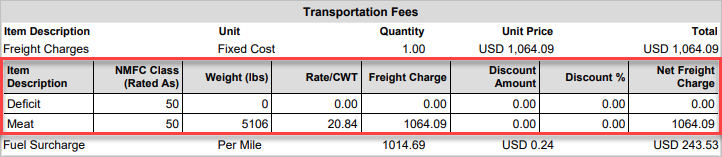
SMC3 Rate Entry
Note: The column “Rate/CWT” includes the “CWT” because the Freight Charge Applied field in the Customer Quote record has a value. Only SMC3 Rate Entries populate this field. If the field is blank, the column is labeled as “Rate.”
For Billings that use a deficit rating without the SMC3 integration, the two items are Deficit and Load Weight. Load Weight is based on the Total Weight of the Load or, if it is a billable weight-based Rate Entry, the Billable Weight of the Customer Quote.
A dynamic Freight Charges Note is included in the Transportation Fees section.
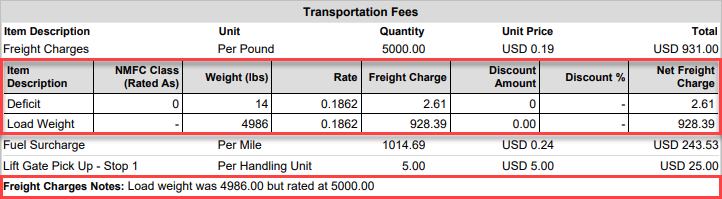
Deficit Rating without SMC3