When the Rate Method in a Rate Entry is Per Pound (Billable) or Per Kilogram (Billable), the DIM Factor and Volume Units become available and are required.
.png)
DIM Weight
The DIM Factor field is used to calculate the (Dimensional) DIM Weight. The DIM Weight field in Customer and Carrier Quotes is the amount of space that Line Items occupy compared to their weight. The TMS calculates the DIM Weight by multiplying the Total Volume of the Load by the DIM Factor.
Calculation Note: The DIM Factor should be set as a decimal value, not a whole number. For example, if the DIM Factor is 139, then the value in the Rate Entry should be set as 0.007194.
Volume
All Line Items with a Volume value in the Load are added together to get the Total Volume of the Load.
Note: The Line Item and Load Volume fields must be populated when the volume is required for quoting.
The Line Item dimensions (Length/Width/Height) and (Handling Unit) HU Count fields are used to calculate the Volume for the Line Item.
The Volume Units should be set to the cubic units (Cubic Inches, Cubic Centimeters, Cubic Feet, Cubic Meters) of the Dimension Units (in, cm, ft, m).
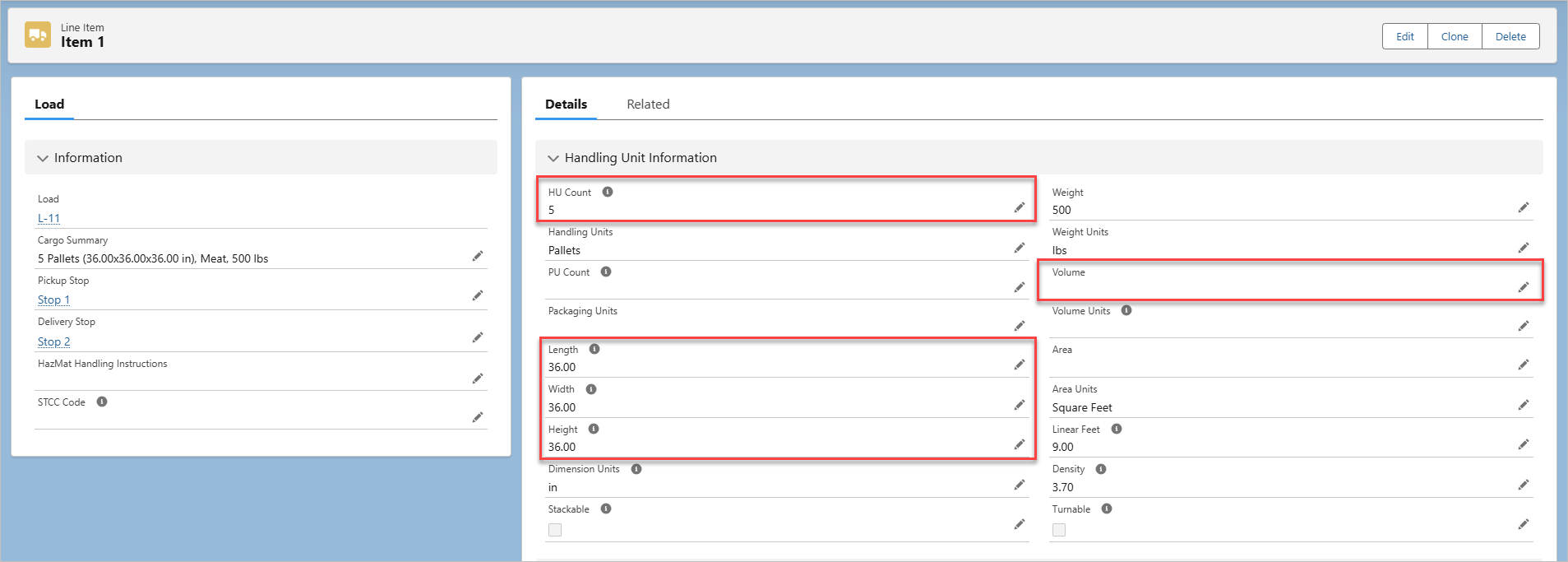
If the Volume is known in gallons or liters, enter the Volume and appropriate Volume Units (Gallons or Liters) for the Line Item.
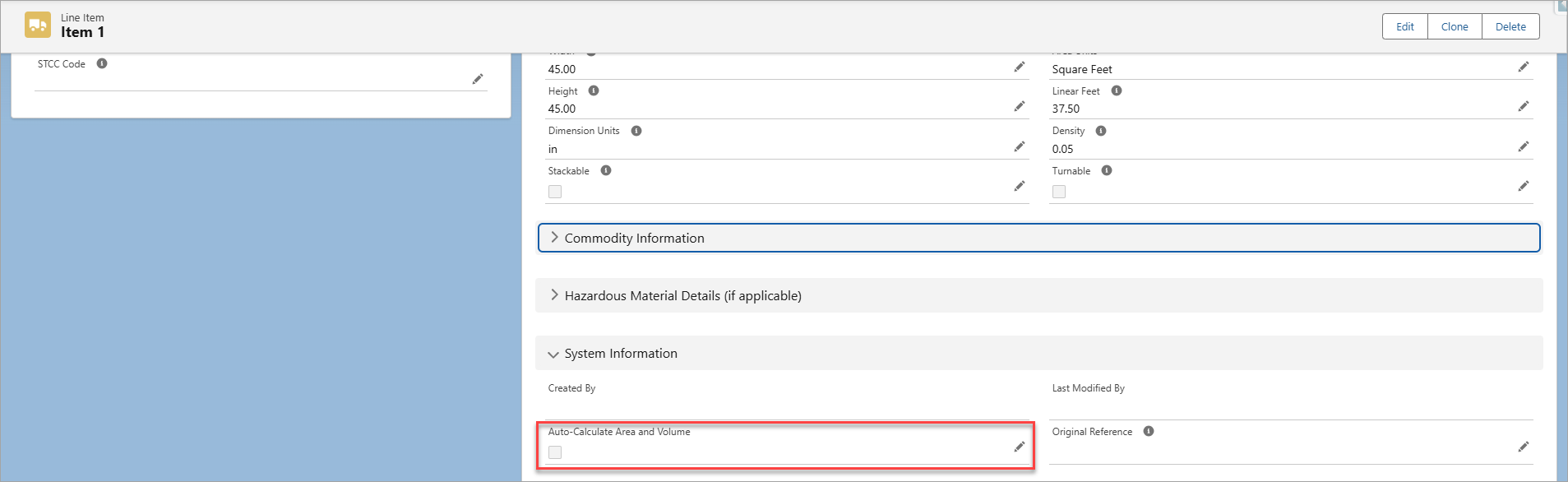
Auto-Calculate Area and Volume
When the Auto-Calculate Area and Volume field in a Line Item record is checked, the TMS automatically calculates the volume with the HU Count field and dimensions. If this field is not checked, the TMS doesn’t calculate the Volume for the Line Item or add it to the Total Volume of the Load.
The TMS converts the Dimension Units measurements to feet before auto-calculating the Volume of the Line Item.
For example, if the Length, Width, and Height of 5 pallets are all 36 inches (36×36×36), the TMS converts it to feet (3×3×3) and then multiplies it by the HU Count. The volume would be calculated as (3×3×3×5) = 135 cubic feet.
The Auto-Calculate Area and Volume field will auto-calculate the Volume Units in Cubic Feet.
Line Item Field Sets
To auto-calculate the area and volume of Line Items during Load creation instead of after creation, add the Auto-Calculate Area and Volume field to the appropriate Line Item field set:
For the Line Item Detail LWC part of the Load Configuration, add the field to the Line Item TMS1 field set.
For the Quote Wizard LWC in the Customer Portal, add the field to the Line Item TMS6 field set.
Billable Weight (Cube vs. Actual)
The DIM Weight and the Billable Weight are on the Customer Quote and Carrier Quote records and are populated by Billable Weight-Based Rate Entries. These fields use the same Weight Units as the Load.
.png)
The Billable Weight is the greater value of either the DIM Weight or Total Weight on the Load. For example, if the DIM Weight is 80 and the Total Weight is 120, the Billable Weight is set to 120.
Deficit Rating
When a Rate Entry that uses the Per Pounds (Billable) or Per Kilograms (Billable) Rate Method and has the Enable Deficit Rating box checked, the Billable Weight is used to calculate the deficit rate instead of the Total Weight of the Load.
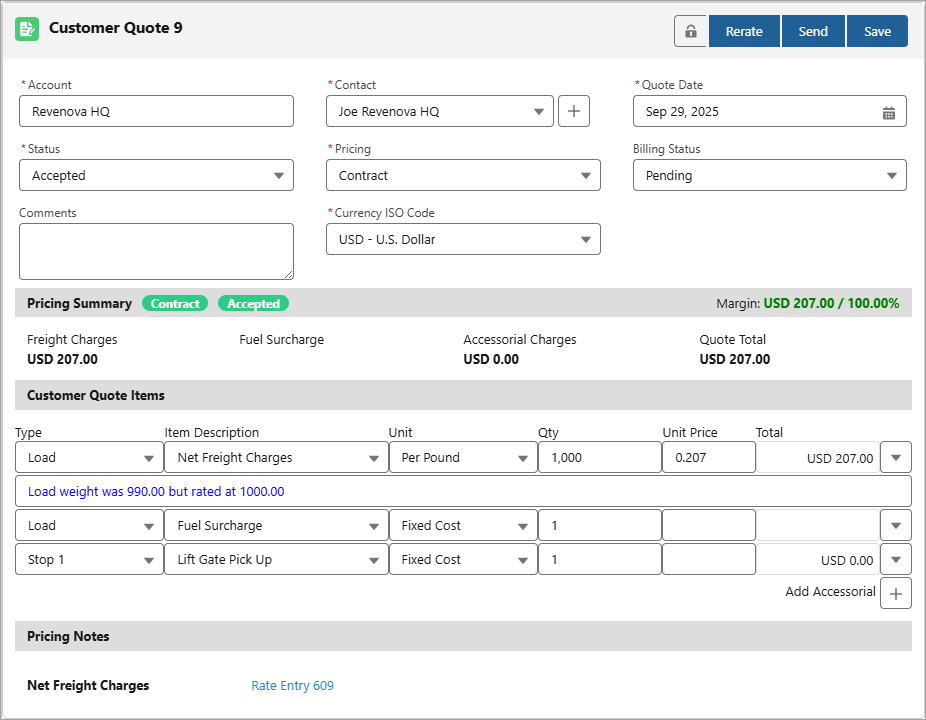
If a deficit rating is applicable, the Billable Weight is rated at the next weight tier and is indicated by the note for the charge on the quote, using the following format:
“Load weight was {Billable Weight of the quote} but rated at {minimum weight of tier used in the Rate Entry}”
Rerate/Refresh Note: To add the red ‘Rerate’ or ‘Refresh’ pill in the Customer or Carrier Quote LWC when the Total Volume or Total Weight changes—and thus may affect a change for the Billable Weight—add the Total Volume and Total Weight fields in the Load TMS11 field set. This pill will help indicate if a Customer or Carrier Quote with a deficit rate for the Billable Weight needs to be updated.
See the Rerate/Rebill article for more setup information.
Deficit Rate Example
If the Total Weight of the Load is 530 lbs and the Total Volume is 99 Cubic Feet, and the DIM Factor in the Rate Entry is 0.1, the DIM Weight is calculated to be 990.00 lbs
The deficit rating applies to the Billable Weight when it would charge the customer or carrier less to rate it at the next weight tier. This is calculated by multiplying the weight by the rate set in the Rate Entry Axis Calculation.
The following image illustrates the weight tiers for a Billable Weight-Based Rate Entry with the deficit rating feature enabled.
.png)
Suppose the Billable Weight is rated as USD 0.2126 per pound at 990 lbs. This would have the freight charge set as USD 210.47
Suppose the next weight tier is rated as USD 0.2070 per pound, but must be at least 1,000 lbs. This would have the freight charge set as USD 207.00
To charge the customer or carrier less, the deficit rate is applied by rating the weight at 1,000 lbs instead of the actual 990 lbs.