Note: The Carrier Remit To Admin LWC cannot be placed on the Account Lightning Record page. Adding the LWC generates an error.
Field Sets
Add fields to Load field set TMS21 to include additional fields for Loads With No Vendor Invoices column headers. Vendor Invoice field set TMS1 includes additional fields to the Loads With Vendor Invoices column headers.
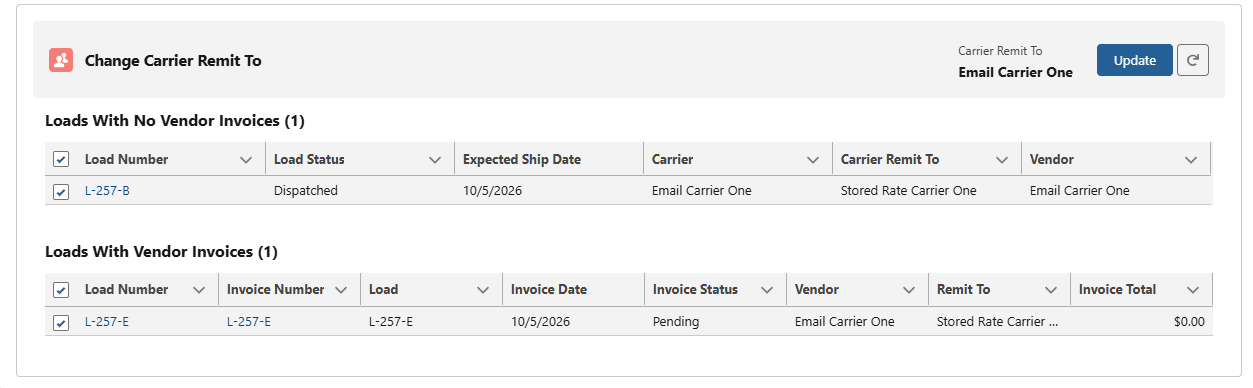
Carrier Remit To Admin
If the Carrier Remit To changes in the Carrier Transportation Profile, this LWC displays allows mass updates of Loads and Vendor Invoices with a different Carrier Remit To assignment.
Loads with no Vendor Invoices shows Loads with zero vendor invoices with a Load Status of one of the following:
Assigned
Dispatched
In-Transit
Delivered
Completed
Vendor Invoices show Vendor Invoices with an Invoice Status not equal to the following values:
Paid
Short-Paid
The LWC banner displays the value of the current Carrier Remit To next to the Update and Refresh buttons.
In the TMS Admin → Configuration → Global Settings, check the box to automatically update the Carrier Remit To field from MyCarrierPortal or RMIS.
The Loads and Vendor Invoices are automatically selected. The user can review the list and deselect any record(s). Pressing the Update button submits a batch job that updates the selected Loads and Vendor Invoices.
Note: While the CarrierMonitorRMISJob is running the Update button is restricted.
Transportation Profile
On the Carrier Transportation Profile, configure the Carrier Remittance Information section to include or populate the following information:
Remit To Option
Indicates the method that the payment should be remitted, either directly through the Carrier or through a Factoring Company. Options include Direct or Factor.
Carrier Remit To
Indicates the Account responsible for remitting payment.
Carrier Remit To As Of
Updates with the current date and time each time when the field changes.
Carrier Payment Terms
Indicates the amount of time and discounts applied for the Carrier/Vendor Invoice.
RMIS Carrier Payment Option
Informational field indicating the payment terms for the Carrier if information was provided when onboarding a Carrier via RMIS.
Carrier Pay To Name
Indicates the alias name of the Carrier if applicable.