Overview
Rerate/Rebill
Be notified to changes in loads that require requoting or re-invoicing. This feature is enabled on TMS Admin → Modes with the Rerate Notification field.
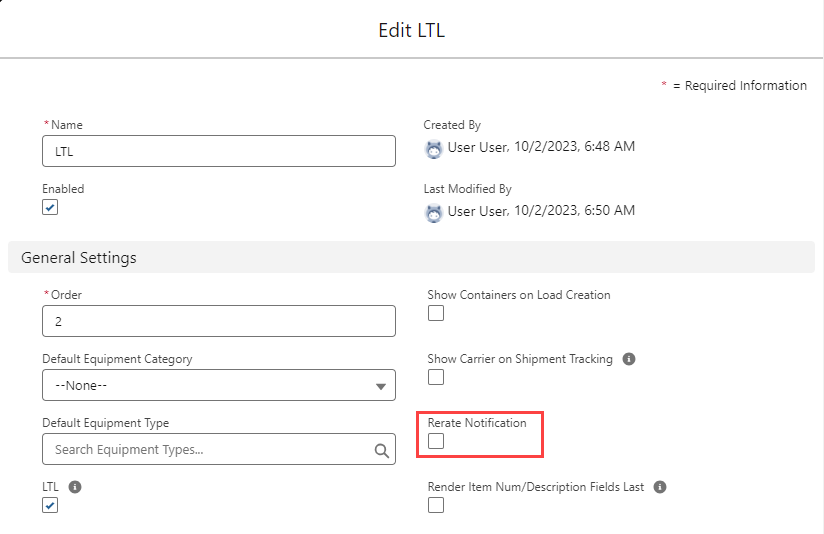
Three fields on the load object manage this information:
Carrier Rerate Notification – “true” if a change has occurred requiring rerating.
Customer Rerate Notification – “true” if a change has occurred requiring rerating.
Rerate Fingerprint – stores the most recent hash of the load configuration.
Three field sets control which fields are monitored for changes to the load “fingerprint”:
Load TMS11
Stop TMS5
Line Item TMS2
The customer quote portion of the Freight Quote Assistant has new components to support rerate/rebill:
Refresh Quote/Rerate Quote Pill – visible when a change has occurred requiring rerating.
Rerate Button – visible when a quote can be rerated/refreshed and the user has rights to this button. This button only displays when a rate entry matches on the customer quote or when a Freight markup is applied. Accessorial markups do not trigger the Rerate button.
Update Invoice Button – visible when a pending invoice exists for this quote and the user has rights to this button.
Lock Button – visible if user has lock rights to this button.
The user object Rerate/Rebill Permissions field controls which users have access to these added buttons.
The Carrier quote portion of the Freight Quote Assistant has new components to support rerate/rebill:
Refresh Quotes/Rerate Quote Badge – visible when a change has occurred requiring rerating.
Only Stored Rate and Marked-Up Quotes may be auto-rated. Spot quotes are not eligible for Rerate/Rebill.
A new customer quote field, Billing Status, may be used to auto-create the customer invoice. Set the field to Approved and save the customer quote.