Overview
Fuel Surcharge Setup
Fuel surcharges can be automatically applied to Customer Quotes, Customer Invoices, Carrier Quotes, and Carrier Invoices. They can be applied via Rate Entries when setting up stored rates for customer and global transportation profiles. To create a Fuel Surcharge schedule, go to TMS Admin → Fuel Surcharges.
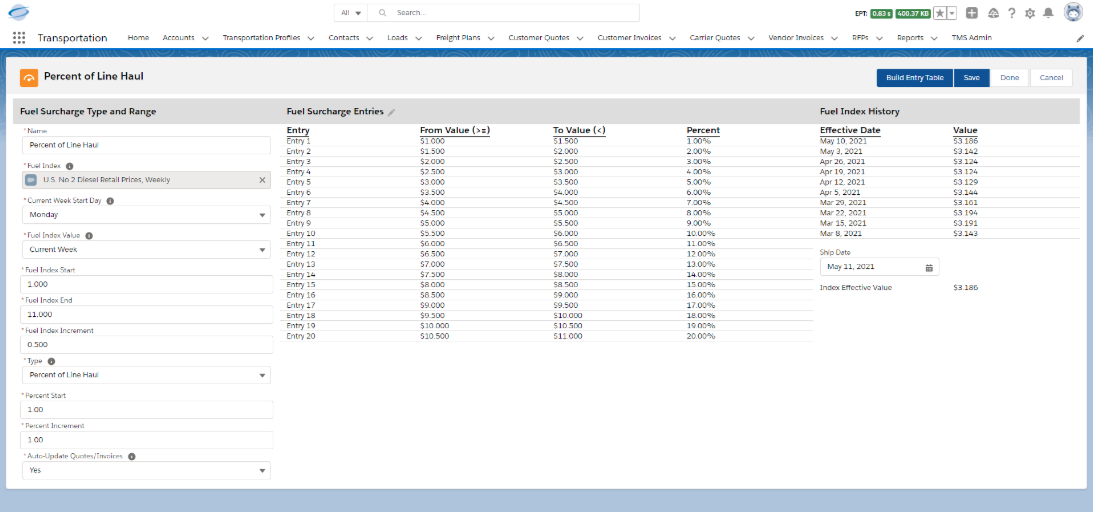
Select the Fuel Index the surcharge should be based on. The Fuel Index Value field determines which value of the index is used in the calculation:
Current Week
Prior Week
Two-Week Average
Three-Week Average
Four-Week Average
Prior Calendar Month
The Current Week Start Day determines how a week is defined for purposes of selecting the “current” index. For example, a Current Week Start Day of Tuesday means that the index available next Monday is considered current for Tuesday through Monday. This value is typically Sunday or Monday.
Warning:
Schedule the FuelIndexUpdateJob daily to enable automatic index and fuel surcharge refreshes.
The load's Expected Ship Date determines the starting date for fuel surcharge calculations.