---
title: "Spring '25 Falvey Insurance"
slug: "spring-25-falvey-insurance"
tags: ["Falvey", "TMS Admin", "Admin", "End User", "Expanded Content", "LWC", "Customer Portal"]
updated: 2025-06-09T16:35:31Z
published: 2025-08-08T18:57:50Z
canonical: "documents.revenova.com/spring-25-falvey-insurance"
---
> ## Documentation Index
> Fetch the complete documentation index at: https://documents.revenova.com/llms.txt
> Use this file to discover all available pages before exploring further.
# Spring '25 Falvey Insurance
## **Overview**
Add incidental cargo insurance to loads with the Falvey integration. This integration:
- Obtains pricing for cargo insurance
- Applies insurance premiums to quotes
- Authorizes insurance
- Voids insurance for loads
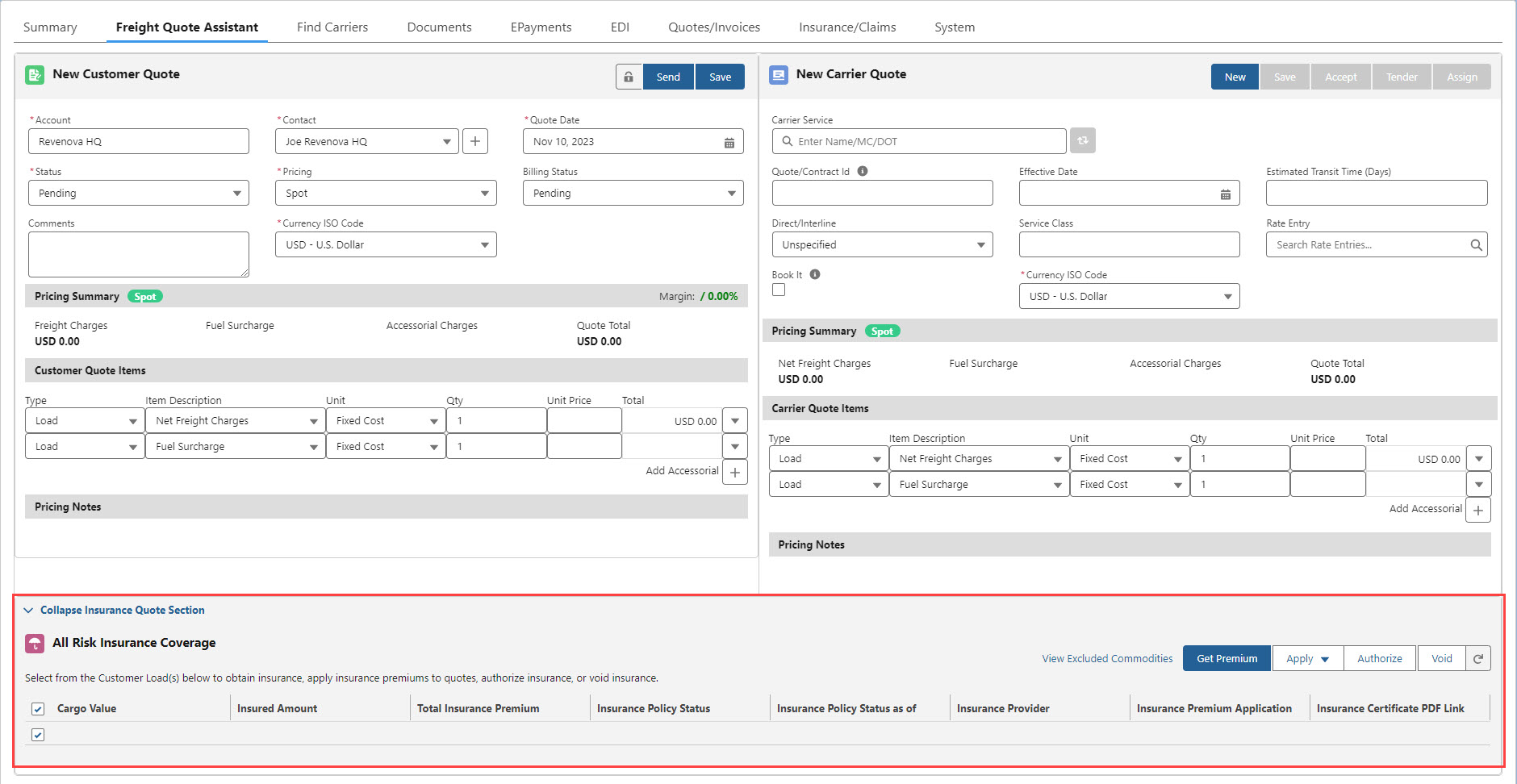
The Falvey insurance API is accessible by internal users in the TMS on the Insurance Lightning Web Component (LWC) and also to Customer Portal users when creating loads. Falvey provides the option to purchase additional cargo insurance for transporting loads. The Insurance LWC is below the Customer and Carrier Quote sections of the Insurance LWC. See the Insurance article linked above for instructions to show or hide the LWC.
## **Setup**
### **Enter Credentials**
Enable the Falvey integration by completing the following steps.
1. Navigate to **TMS Admin**.
2. Select **Credentials**.
3. Choose the **Global Services** tab.
4. Find Falvey in the list and open the record.
5. Check the **Enabled** box and
6. Enter the User ID, Password 1, and Password 2 into the text fields.
7. Click the **Save** button when finished.
From **TMS Admin**, **Configuration**, confirm that the **Use Platform Events For** *Insurance* box is checked.
| **User ID** | **Password 1** | **Password 2** | **Customer Number** |
| --- | --- | --- | --- |
| Required | Required | API Key | |
### **Remote Site Settings**
If upgrading from a previous release of the TMS, check that the Remote Site Settings for the Falvey integration URL are current.
1. Click the **Setup** gear icon in the top Right corner.
2. From the drop-down, click **Setup**.
3. In the Quick Find Toolbar type *Remote Site Settings* and click the link.
4. From the list of remote sites find *Falvey* and click the **Edit** link.
5. Update the Remote Site URL to match the *Service URL* below:
Service URL: https://shipassured.falveyshippers.com/
Test Service URL: https://sandbox.falveycargo.com/ (Falvey_Test remote site)
## **API Insurance for Loads**
> [!WARNING]
> To generate an insurance quote or authorize a policy from Falvey, the **Cargo Value** field must be set on the Load. It is recommended that the **Cargo Value** field be set as required when using the Falvey integration. Add the **Cargo Value** field to the Load TMS1 field set to include the field when creating Loads. The **Save & Rate** feature requires the **Cargo Value** field to retrieve an insurance rate from Falvey.
>
> If a Cargo Value is not present on the load, requesting a premium generates an error.
Falvey only accepts load currencies in USD or CAD. Attempting to request insurance for other currencies generates an error.
Falvey calculates insurance premium and fee exchange rates. Contact Falvey for additional exchange rate information. In multi-currency organizations, the Cargo Value currency field is controlled by the Default Load Currency under TMS Admin, Configuration in Multi-Currency Settings.
After creating a load, the Insurance LWC allows for adding supplementary cargo insurance to a load. Six buttons provide additional actions for adding cargo insurance to a load.
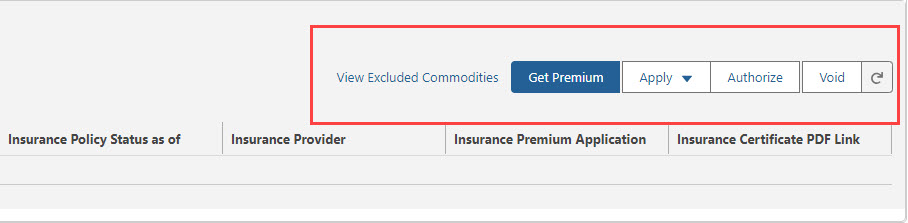
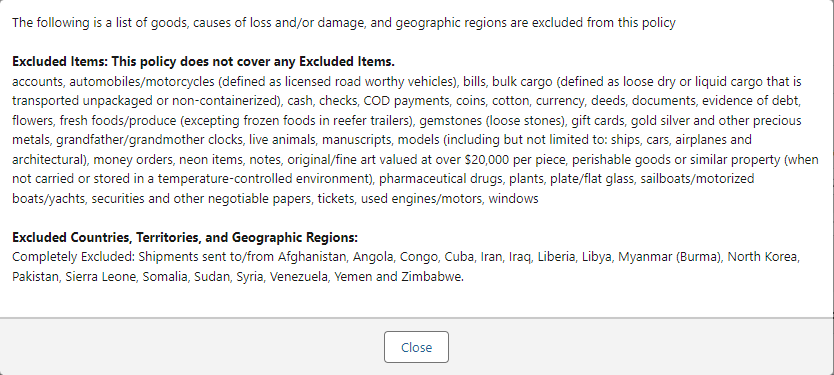
The Insurance LWC links to "View Excluded Commodities," a modal listing any restricted commodities or countries.
> [!WARNING]
> Warning:
>
> It is crucial that the **Cargo Insurance Excluded Commodities** and **Cargo Insurance Authorization** fields are configured properly so users are aware of the restrictions.
>
> The TMS does not enforce these item or country exclusions. Contact Falvey for a list of commodities not covered by their cargo insurance.
Navigate to **TMS Admin**, **Configuration** to the Customer Portal Configuration section. Click the pencil on the right to open the Rich Text Editor for the **Cargo Insurance Excluded Commodities** field.
> [!NOTE]
> Information entered in the Cargo Insurance Excluded Commodities field displays on the Insurance LWC and the Customer Portal.
Sample Excluded Commodities:
### **Get Premium**
1. Calls the Falvey API to request an insurance quote for the selected load.
2. Returns insurance quote information and display it on the Insurance LWC.
3. Sets the **Insurance Policy Status** field to "Pending."
4. Sets the **Insurance Policy Status as of** field to the current date/time.
> [!WARNING]
> The load **Cargo Value** field must have a value in order to request an insurance quote from Falvey. Falvey supports cargo insurance policies:
>
> - Up to $500,000 USD for LTL loads.
> - Up to $1,000,000 USD for FTL loads.
> - Attempting to get a premium or authorize cargo insurance greater than these values generates an error.
> - Contact Falvey for insuring loads with cargo values greater than these limits.
>
> If the **Cargo Value** field is greater than these policy limits, no insurance policy is returned from Falvey. The load is NOT insured.
#### **Get Price Operation**
Two values are sent to Falvey in the Get Price Operation call. The value of the cargo and a description of that cargo. When received, Falvey calculates the Insurance Premium amount. A search for any excluded item words is also completed. The insurance premium amount is returned along with any excluded items in a list.
> [!NOTE]
> The customer Account SFID is sent in the Get Price operation to return customer-specific pricing. The first time a customer is sent to Falvey to create the customer in the Falvey system, the standard pricing is returned. After the first Load, Falvey returns the customer-specific pricing negotiated with the customer.
| **TMS Operation** | **Falvey Endpoint** |
| --- | --- |
| Get Price Operation | FAPI - Price |
Sample **Get Price Operation** XML Request Payload
```xml
[UserName]
[Password]
[Key]
[CompanyName]
BSU
1002
20000.00
USD
fishing pole
123456789101112
```
Sample **Get Price Operation** XML Response Payload
```xml
Successful
None
1,000.00
0.00
0.00
fish
195
1002
20000.00
USD
fishing pole
```
**TMS Field Updates from the Get Price Operation**
| **Object** | **Field** | **Type** | **Value** |
| --- | --- | --- | --- |
| Load | Insurance Premium Amount | Currency(16, 2) | Monetary cost of cargo insurance. |
#### **Apply**
The Apply button provides the option to "Add Premium to customer quote" or "Deduct premium from carrier quote."
- Select **Add Premium to customer quote** to add an accessorial to the customer quote.
- The Total Insurance Premium amount is added to the customer quote.
- The Insurance Policy Status field changes to "Offered."
- Select **Deduct premium from carrier quote** to add an accessorial to the carrier quote.
- The Total Insurance Premium amount is subtracted from the carrier quote.
- When multiple loads are available in the Insurance LWC (for example, a combined Carrier load in a Freight Plan) only **Deduct premium from carrier quote** is available. There is no customer quote with the combined Carrier load.
### **Authorize**
After receiving the premium quote, clicking the **Authorize** button calls the Falvey API to complete the following actions.
1. Accept the insurance quote.
2. Apply the insurance to the load.
3. Set the **Insurance Policy Status** field to "Authorized."
4. Set the **Insurance Policy Status as of** field to the date/time of authorization.
5. Return the **Insurance Certificate Number** from Falvey and displays on the Insurance LWC.
6. Return the **Insurance Certificate PDF Link** from Falvey and stored on the load record.
1. On a default lightning record page layout, the link is found on the Insurance/Claims tab.
A banner displays a success message or any errors.
> [!NOTE]
> The *Get Premium* action does not need to be separate from or occur before the *Authorize* action. Click **Authorize** to both Get Premium and Authorize in one action.
> [!WARNING]
> Warning:
>
> If the **Cargo Value** on the load changes, perform the following actions.
>
> - For loads where the **Get Price** call has returned a premium amount: Press the *Get Premium* button to receive another quote from Falvey.
> - For loads where the **Authorize** call has returned an insurance certificate: Press the *Void* button to remove the current policy. Press the **Get Premium** button to receive a new quote from Falvey.
#### **Commit Insurance Operation**
Information sent during the Commit Insurance Operation request:
1. Company and Contact information.
2. Shipment information including origin and destination.
3. Carrier ID and Carrier Name.
4. Insured Amount.
| **TMS Operation** | **Falvey Endpoint** |
| --- | --- |
| Commit Insurance Operation | FAPI - Commit |
Sample **Commit Insurance Operation** XML Request Payload
```xml
[UserName]
[Password]
[Key]
[CompanyName]
BSU
123456789101112
Testing Company 001
789 Business Lane
Suite 202
Wakefield
Rhode Island
02879
United States
email@companyName.com
9876
002
Tester_FirstName
Tester_LastName
789 Business Lane
Suite 202
Wakefield
Rhode Island
02879
United States
tester_email@companyName.com
003
Testing_003
1001
04/17/2008
Testing
50000
Testing
CAD
9016
1/4/2016
263,268,267
123 Any Street
Suite 101
Providence
Rhode Island
02913
United States
456 Anywhere Road
Boston
Massachusetts
02101
United States
Testing_004
Testing_004
```
Sample **Commit Insurance Operation** XML Response Payload
```xml
Successful
Testing_003
1014
04/17/2008
50000
Fifty Thousand Dollars and Zero Cents
USD
2,020.50
0.00
0.00
…
123456
(URL to download certificate)
(base64 QR Code to download certificate)
123456
5.00
111000101
```
**TMS Field Updates from the Commit Insurance Operation**
| **Object** | **Field** | **Type** | **Value** |
| --- | --- | --- | --- |
| Load | Insurance Premium Amount | Currency(16, 2) | Monetary cost of cargo insurance. (Includes Provider Fee & Service Fee) |
| Load | Insurance Certificate Number | Text(50) | The insurance certificate number provided by the insurance API. |
| Load | Insurance Certificate PDF Link | URL(255) | The URL to the insurance certificate. |
| Load | Insurance Policy Status | Picklist | Current status of the insurance policy. (Authorized) |
| Load | Insurance Policy Status as of | Date/Time | Most recent Insurance Policy Status update. |
| Load | Insurance Provider | Text(80) | The name of the company providing the insurance policy (Falvey). |
| Load | Insurance Provider Fee | Currency(16, 2) | Technology fee for using the integration. |
| Load | Insurance Service Fee | Currency(16, 2) | Customer fee added to the insurance premium. |
| Load | Insurance Shipment Id | Text(80) | The shipment ID returned from Falvey. |
### **Void**
The **Void** button calls the Falvey API to void the authorized policy commitment. A banner displays success or any errors.
When the policy is successfully voided the following occurs.
1. **Insurance Policy Status** changes to “Voided.”
2. **Insurance Certificate Number** is removed.
3. **Insurance Service Fee** and **Insurance Provider Fee** fields are reset.
4. Any Customer Quote application or Carrier Quote deduction for the policy is removed.
If a load is cancelled and the **Insurance Policy Status** is set to *Authorized*, the Void call is made automatically. Use the **Refresh** button on the Insurance LWC to update field information displayed.
> [!NOTE]
> When a load has a **Load Status** of *In Transit*, *Delivered*, or *Completed*, the cargo insurance cannot be voided.
#### **Void Insurance Operation**
The shipment information is sent to Falvey in the Void Insurance Operation call. A response is returned with a confirmation of the shipment information.
> [!CAUTION]
> Warning:
>
> Falvey prevents voiding any authorized insurance policies of the previous month on the 1st day of the new month. To void an authorized policy at the beginning of the month, contact Falvey support. The following error banner displays:
>
> 
| **TMS Operation** | **Falvey Endpoint** |
| --- | --- |
| Void Insurance Operation | FAPI - Void |
Sample **Void Insurance Operation** XML Request Payload
```xml
[UserName]
[Password]
[Key]
[CompanyName]
BSU
14168
Testing_003
201720201701
5C62C474-EEED-4520-A44F-6D5D51901747
123456789101112
```
Sample **Void Insurance Operation** XML Response Payload
```xml
Successful
None
14168
Testing_003
201720201701
5C62C474-EEED-4520-A44F-6D5D51901747
```
**TMS Field Updates from the Void Insurance Operation**
| **Object** | **Field** | **Type** | **Value** |
| --- | --- | --- | --- |
| Load | Insurance Premium Amount | Currency(16, 2) | Monetary cost of cargo insurance. (null) |
| Load | Insurance Certificate Number | Text(50) | The insurance certificate number provided by the insurance API. (null) |
| Load | Insurance Policy Status | Picklist | Current status of the insurance policy. (Voided) |
| Load | Insurance Policy Status as of | Date/Time | Most recent Insurance Policy Status update. |
| Load | Insurance Provider | Text(80) | The name of the company providing the insurance policy (none). |
| Load | Insurance Provider Fee | Currency(16, 2) | Technology fee for the insurance integration. (null) |
| Load | Insurance Service Fee | Currency(16, 2) | Customer fee added to the insurance premium. (null) |
| Load | Insurance Shipment Id | Text(80) | The shipment ID returned from Falvey. (null) |
> [!NOTE]
> Errors generated from a missing **Cargo Value** field or an invalid currency are sent to the Customer Sales Rep. on the load by email. If there is no Customer Sales Rep. associated with the load, the user that edited the customer quote is sent the email. If no internal user edited the customer quote, the owner of the load is sent the email. Correct any errors and manually request or authorize insurance on the Insurance LWC. Adding cargo insurance to loads may be automated. See the section regarding automation for more information. Errors that occur during the automation process (including invalid credentials) are also sent via email.
>
> Emails are sent via the Queued Transactions job.
## **API Insurance in the Customer/Community Portal**
When the Falvey API Insurance integration is enabled, Customer Portal users can request and authorize additional cargo insurance on the Quote Wizard LWC.
### **Portal Text** **Configuration**
There are four settings under **TMS Admin**, **Configuration** that each provide additional text to Customer Portal users.
Cargo Insurance Overview: Text displayed when the "Learn More" link on the Quote Wizard LWC load entry page is clicked.
View excluded Commodities: Text displayed when the "View Excluded Commodities" link on the Quote Wizard LWC load entry page and on the Quote Wizard LWC tender page.
Cargo Insurance Opt Out: Text displayed when **Show Cargo Insurance Options** is not checked on the Quote Wizard LWC load entry page of the Customer Portal.
Cargo Insurance Authorization: Text displayed on the Quote Wizard LWC tender page of the Customer Portal.
> [!WARNING]
> **Restricted Cargo**
>
> Some insurance APIs (including Falvey) have restricted cargo that is not covered. ***This is NOT enforced by the TMS***. It is crucial that the **Cargo Insurance Excluded Commodities** and **Cargo Insurance Authorization** fields are configured properly so users are aware of any restrictions.
Customer **Transportation Profile** record settings:
- Hide: The cargo insurance option section does not appear in the portal.
- Opt In: **Show Cargo Insurance Options** is checked by default.
- Opt Out: **Show Cargo Insurance Options** is not checked, but available in the portal.
By default, the cargo insurance displays below the Load Accessorials section of the Quote Wizard LWC. The Transportation Profile record of each customer contains settings for more control of Portal users purchasing cargo insurance.
When a Portal user chooses the insurance, an additional panel is displayed on the Quote Wizard LWC Tender page with a check box that must be checked before tendering the load.
When a user creates a load and checks the **Show Cargo Insurance Options**:
1. The **Cargo Value** field is required before getting quotes or saving the load,
2. The **Cargo Insurance Offered** field on the load is checked,
3. and (when getting quotes) the price of the insurance is listed on the quote.
When insurance is authorized and a load is successfully tendered, the following occurs:
- The **Cargo Insurance Authorized** field on the load is checked.
- An accessorial for the price of the insurance is added to the customer quote. The accessorial is determined by the **Cargo Insurance Accessorial** field under TMS Admin, Configuration.
- An insurance certificate link is generated and returned from Falvey and added to the load.
If the insurance authorization fails, an email with the error is sent to the designated email and the **Cargo Insurance Authorized** field remains checked.
> [!NOTE]
> The insurance authorization can still proceed even if tendering to the Carrier fails.
When the load is tendered, an accessorial for the price of the insurance is added to the customer quote. This accessorial is determined by the **Cargo Insurance Accessorial** field in TMS Admin.
## **API Field Mapping Table**
The table below contains the request and response fields involved in the Falvey API integration:
| **TMS Object** | **TMS Field** | **Data Type** | **Falvey Fields** |
| --- | --- | --- | --- |
| | User ID* | varchar | AuthorizationUserName |
| | Password 1* | varchar | AuthorizationPassword |
| | Password 2* | varchar | AuthorizationKey |
| Account | Billing Address | Address | CompanyStreet1 |
| Account | Billing Address | Address | CompanyState |
| Account | Billing Address | Address | CompanyZip |
| Account | Billing Address | Text(3) | Company Country |
| Account | Billing Address | Text(3) | CompanyContactCountry |
| Account | Currency | CurrencyIsoCode | SI_Currency, ShippingCurrency |
| Account | Name (Customer) | Text(255) | CompanyName |
| Account (Customer) | SFID | SFID | CompanyUUID |
| Carrier Service | VLTL | Checkbox (139015, 139018 - LTL, VLTL) | ShippingTypeID, SI_ShipmentTypeID |
| Commodity | Description | Text Area(255) | ShippingMerchandiseDescription |
| Contact | Name (First Name) | Text(40) | CompanyContactFirstName |
| Contact | Contact Name (Last Name) | Text(80) | CompanyContactLastName |
| Contact | Contact Email | Email | CompanyContactEmail |
| Load | Cargo Value | Currency(16, 2) | SI_InsuredAmount, ShippingSumInsured |
| Load | Expected Ship Date | Formula (Date) | ShippingDate |
| Load | Insurance Premium | Currency(16, 2) | InsurancePremium, Premium |
| Load | Load Number* | Text(80) | SI_ShippingUUID |
| Load | Insurance Certificate Number* | Text(50) | SI_CertificateNumber |
| Load | Insurance Certificate PDF Link | URL(255) | CertificatePDFLink |
| Load | Insurance Policy Status | Picklist | |
| Load | Insurance Policy Status as of | Date/Time | |
| Load | Insurance Provider | Text(80) | |
| Load | Insurance Provider Fee | Currency(16, 2) | ProviderFee |
| Load | Insurance Service Fee | Currency(16, 2) | ServiceFee |
| Load | Insurance Shipment ID* | Text(80) | SI_FalveyShipmentID |
| Load | Insured Amount | Currency(16, 2) | SI_InsuredAmount, ShippingSumInsured |
| Load | Load Number | Text(80) | ShippingUUID, ShippingTrackingNumber, FalveyShipmentID, BOL |
| Load | Total Insurance Premium | Currency(16, 2) | InsurancePremium + ProviderFee + ServoceFee |
| Stop | Address | Address | OriginStreet1 |
| Stop | Address | Address | OriginCity |
| Stop | Address | Address | OriginState |
| Stop | Address | Address | OriginZip |
| Stop | Country | Text(3) | OriginCountry |
| Stop | Address | Address | DestinationStreet1 |
| Stop | Address | Address | DestinationCity |
| Stop | Address | Address | DestinationState |
| Stop | Address | Address | DestinationZip |
| Stop | Country | Text(3) | DestinationCountry |
| (Carrier) Transportation Profile | Name* | Text(80) | AuthorizationCompany, CarrierUUID, CarrierName |
** Fields with an asterisk are required.*
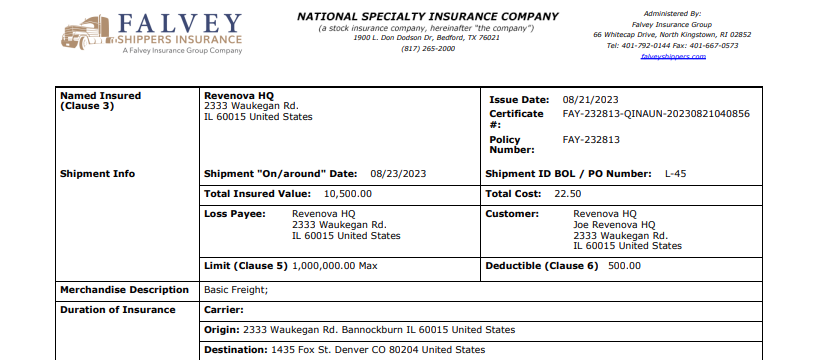
### **Sample Insurance Certificate**
> [!NOTE]
> Insurance coverage policies vary by company. Check the **Insurance Certificate PDF Link** field for specific policy information.
For more information on Falvey insurance, see the [Falvey Support Page](https://falveyinsurancegroup.com/insurance/shippers-interest/).
A feature in Salesforce that enhances the user experience by providing interactive and customizable components within Salesforce applications. Revenova uses Lightning Web Components to deliver features that can be tailored to suit your specific needs and preferences.
The Salesforce ID, a record identifier comprised of 15 or 18 characters.