---
title: "SMC3"
slug: "smc3"
tags: ["Admin", "SMC3 RateWare - CarrierConnect", "Carrier Quoting", "Expanded Content"]
updated: 2026-10-15T13:58:42Z
published: 2026-10-15T13:58:42Z
canonical: "documents.revenova.com/smc3"
---
> ## Documentation Index
> Fetch the complete documentation index at: https://documents.revenova.com/llms.txt
> Use this file to discover all available pages before exploring further.
# SMC3
The SMC3 integration contains two components, CarrierConnect and RateWare. The SMC CarrierConnect component provides transit times and terminal information. SMC3 RateWare provides tariff-based LTL quoting capabilities. The SMC3 integrations may be used individually or together for full functionality.
Revenova also supports Load quoting with SMC3 RateWare and tendering, tracking, and document retrieval, with the [SMC3 EVA](/v1/docs/smc3-eva) integration. See SMC3 EVA information for additional setup information including creating [hybrid Carrier Services](/v1/docs/smc3-eva#rateware-quoting-tenderingtracking-with-eva3).
## Setup
### **Tariff Codes**
Obtain the API codes for all tariff licenses from SMC3 - the name and code.
- **Tariff Name**
- **API Code**
Document all tariff settings for Carrier relationship by lane.
1. Carrier
2. Lane
3. Tariff Settings
4. Discounts by weight breaks
5. Surcharges
6. Floor
7. FAK Settings
Once all of the licensed tariffs and Carrier information is acquired, proceed with the remaining setup.
### **Enter Credentials**
Enable the SMC3 CarrierConnect and RateWare integrations by completing the following steps.
1. Navigate to **TMS Admin**.
2. Select **Credentials**.
3. Select the **Global Services** tab.
4. Find SMC3 CarrierConnect in the list and open the card. Repeat the following steps with SMC3 RateWare.
5. Check the **Enabled** box.
6. Enter the **User ID, Password 1**, and **Password 2** into the text fields.
7. Click the **Save** button when finished.
An organization's license key is sent in the [AvailableTariffs](/v1/docs/smc3#availabletariffs) API call. A list of accessible tariffs is returned based on the license key.
Valid credentials are required from an SMC3 subscription. See examples in the table below.
| User ID | Password 1 | Password 2 | Customer Number |
| --- | --- | --- | --- |
| Username | Password | License Key (alphanumeric) | |
### **Remote Site Settings**
The SMC3 integration requires Salesforce Remote Site Settings to communicate data into and out of the TMS.
Confirm that the Remote Site Settings for both the CarrierConnect and RateWare integration URLs match the URLs provided below.
1. Click the **Setup** gear icon in the top right corner.
2. From the drop-down, select **Setup**.
3. In the Quick Find Toolbar type *Remote Site Settings* and click the link.
4. From the list of remote sites find SMC3 Carrier Connect and *SMC3 RateWare*. Click the **Edit** link.
5. Confirm the **Remote Site URL** values match the *Service URL* values below.
**Service URL** (SMC Carrier Connect)
```xml
https://ccxl.smc3.com/
```
**Service URL** (SMC3 RateWare)
```xml
https://applications.smc3.com
```
Complete the steps above in a sandbox org for testing the integrations with the **Test Service URL** values below.
**Test Service URL** (SMC3 Carrier Connect)
```xml
https://ccxl.smc3.com/CarrierConnectXL
```
**Test Service URL** (SMC3 RateWare)
```xml
https://applications.smc3.com/RateWareXL/services/soap/v2
```
### **Additional Setup**
Add the Freight Charge Applied field to the Carrier Quote TMS3 [field set](/v1/docs/field-set-summary#carrier-quote-field-sets) to view the rate type (Floor (F)/Minimum (M)/Tariff Rate (R)) returned from SMC3.
**Tariff Names**
Create a Picklist Value for each *licensed tariff* to use.
1. From **Setup** → **Object Manager**, select the **Rate Entry** object.
2. Click the **Fields & Relationships** tab.
3. Search and select the **Tariff Name** field.
4. In the Values section, click **New.**
5. Enter a descriptive name for the Tariff. This name appears in the Rate Entry **Tariff Name** field picklist.
6. Enter the API Name to the exact **API Code** for the tariff received from SMC3.
7. Click **Save.**
Example Tariff Field Names and API Names:
| Field Value (Field Name) | API Name |
| --- | --- |
| CzarLite, US/US | LITECZ02 |
| RDWY 507, Sec. 3, US/US | RDW50703 |
| Ryder US/US | RYDLIT96 |
Edit the newly created Tariff Value and change the API Name to the **exact** API code for the tariff received from SMC3.

**Carrier Services**
Create Carrier Services that retrieve quotes from SMC3 RateWare.
See [Carrier Service Setup](/v1/docs/carrier-service-setup) to create SMC3 RateWare Carrier Services.
Hybrid API [Carrier Services](/v1/docs/carrier-service-setup) may use SMC3 for quoting and [Banyan](/v1/docs/banyan), [Project44](/v1/docs/project44-carrier-aggregator), or [SMC3 EVA](/v1/docs/smc3-eva) for tendering, tracking, and image retrieval. These Carrier Services should be created with the **SMC3 RateWare** Credentials Id. Set the Quote, Tender, and Tracking methods to *API*. Enter valid credentials for the preferred Banyan, Project44, or SMC3 EVA for tendering/tracking service in TMS Admin → [Credentials](/v1/docs/credentials-1).
**Rate Entries**
Create Rate Entries for each Carrier Service/Tariff/Lane combination. See [Rate Entry](/v1/docs/rate-entry-detail) documentation for additional Rate Entry setup information.
1. Create Rate Entries from TMS Admin **→** Rate Entries **→** New Rate Entry.
1. Link the appropriate Customer Transportation Profile or the Company Default Transportation Profile.
2. The Rate Type for SMC3 Rate Entries is *Freight* or *Freight + Fuel*.
> [!NOTE]
> SMC3 provides Line Haul (only) via their integration. Carrier **Accessorial** charges and **Fuel Surcharges** must be added as separate stored Rate Entries to incorporate accessorial charges and fuel surcharges.
3. Pricing Notes display on the [FQA](/v1/docs/freight-quote-assistant-1).
4. SMC3 Rate Entries always have a Base Rate Calculation type *Base* and an *API* Rate Method.
5. If a Carrier Service is not linked to SMC3, the Tariff Name lookup is not visible.
6. Select the **Tariff Name** from the picklist values that were previously created.
7. Enter the **Tariff Effective Date** for all SMC3 Rate Entries.
8. Enter all Minimum, Discount, and Surcharge values as appropriate.
9. Check *Prevent Deficit Rating* if appropriate.
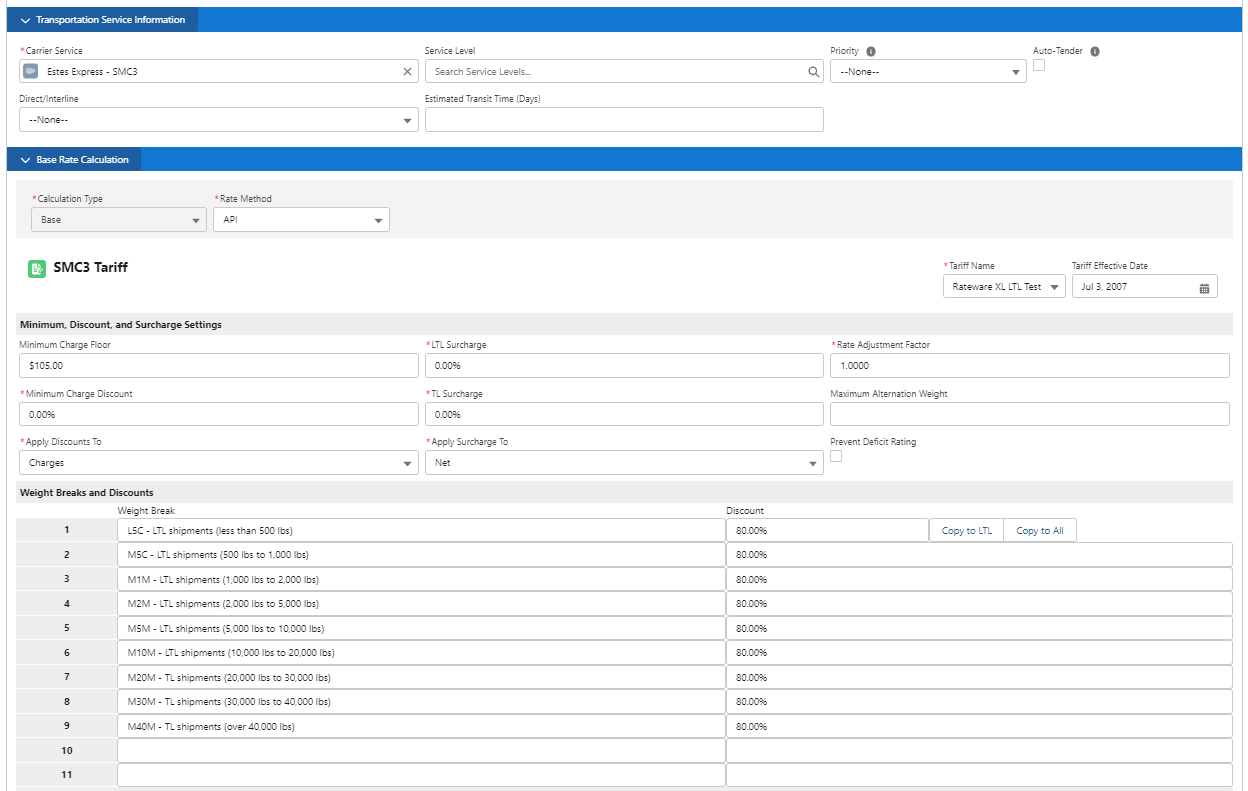
The SMC3 RateWare integration does not include accessorial charges as part of the rating process. Add accessorial charges to Loads by creating Accessorial [Rate Entries](/v1/docs/rate-entry-detail) to match on applicable Loads.
**Negative Discounts**
This feature allows Rate Entry Discounts to behave as Surcharges. Ordinary discounts reduce Freight Charges. Negative Discounts increase Freight Charges. SMC3 Rate Entries with **Apply as Negative Discounts** *Checked* requests freight rates without Discounts.

The TMS confirms the Freight Charges returned from SMC3 based on the Weight Breaks and Discounts table.

## **SMC3 Rating**
Troubleshoot mismatched Carrier Quotes and Rate Entries with the following components.
- [API Quote Audit Log (Quotes)](/v1/docs/api-quote-audit-log)
- [Load Match Test (Rate Entries)](/v1/docs/load-match-test)
> [!NOTE]
> Each Load Line Item must have an NMFC Class and Weight to return rates from SMC3.
Configure [Rate Entries](/v1/docs/rate-entry-detail) to specify and filter quotes returned from SMC3. Rate Entries for both Carriers and Customers may be created for SMC3 rating.
1. Load and Line Item information is sent to the SMC3 [RateWare](/v1/docs/smc3#rateware-xl-web-service) integration. The following fields are required to return rates.
1. Weight
2. HU Count
3. NMFC Class
2. One of three Freight Charges are returned from SMC3.
1. Rate
2. Tariff Minimum
3. Minimum Charge Floor
3. Freight Charges are compared to the Rate Entry *Minimum Charge Calculation* and Rate Entry *Maximum Charge Calculation*.
4. The Carrier quote is created with the Freight Charges and available in the [Freight Quote Assistant](/v1/docs/freight-quote-assistant-1) LWC or [Carrier Quote List](/v1/docs/carrier-quote-list) LWC. Customer quotes are available on the Freight Quote Assistant LWC.
Freight Charges, discounts, and other tariff information returned from SMC3 are included on the generated Carrier and/or Customer quotes.
**SMC3 performs the following calculations:**
SMC3 uses the Origin and Destination Postal Codes to determine the Lane for a Load. Using that Lane, SMC3 finds the Rate Table. The Rate Entry **Apply Discounts To** field determines which values SMC3 applies any discounts to *Rates* or *Charges*.
The “actual” weight and NMFC class determines the per 100 lb. rate. The rate for that Line Item (or shipment) is calculated, resulting in the gross Freight Charges.
For example, a per 100 rate of 86.90 for a shipment of 800 lbs. is $695.20 (86.90 × 8).
$Freight\ Charge\ A\ + Freight\ Charge\ B\ + (...) = Gross\ Freight\ Charges$
SMC3 then subtracts the **Discount Amount** from the Gross Freight Charges. The Discount Amount is calculated based on the **Discount Percentage** field on the Rate Entry sent to SMC3. The result is the **Freight Charges Net of Discounts**.
$Gross\ Freight\ Charges\ - Discount\ Amount\ = Freight\ Charges\ Net\ of\ Discounts$
SMC3 then compares the **Freight Charges Net of Discounts** and the **Tariff Minimum**. When the Freight Charges Net of Discounts is greater than the Tariff Minimum, the Surcharge is added to calculate the **Net Freight Charges**.
$Freight\ Charges\ Net\ of\ Discounts\ > Tariff\ Minimum,$
$Freight\ Charges\ Net\ of\ Discounts\ + Surcharge\ = Net\ Freight\ Charges$
When the Tariff Minimum is greater than the Freight Charges Net of Discounts, the **Minimum Charge Discount Amount** is subtracted to calculate the **Tariff Minimum After Discount**. The Minimum Charge Discount Amount is a Rate Entry field sent to SMC3.
$Tariff\ Minimum\ > Freight\ Charges\ Net\ of\ Discounts,$
$Tariff\ Minimum\ - Minimum\ Charge\ Discount\ Amount\ = Tariff\ Minimum\ After\ Discount$
The Tariff Minimum After Discount is compared to the Freight Charge Floor. The field with the greater value is returned as the **Net Freight Charges** and applied on the Carrier or Customer quote.
$Tariff\ Minimum\ After\ Discount\ > Freight\ Charge\ Floor,$
$Tariff\ Minimum\ After\ Discount\ + Surcharge\ Amount\ = Net\ Freight\ Charges$
When:
$Freight\ Charge\ Floor\ > Tariff\ Minimum\ After\ Discount,$
$Freight\ Charge\ Floor\ = Net\ Freight\ Charges$
**Prevent Deficit Rating**
As part of the rating process, the Load weight is sent to SMC3. Depending on the Weight Break structure of the tariff, SMC3 responds noting that the cost is less for moving a Load at a greater Weight Break. The Rate and Minimum for the new weight is returned to the TMS (even though it’s not the actual weight) - as part of the [LTLRateShipment](/v1/docs/smc3#ltlrateshipment) response. The Deficit Weight is stored on both the Carrier and Customer quotes. SMC3 sends the Deficit Weight as an additional Line Item with the minimum amount of weight necessary to enter the next Weight Break. This is added to both the Carrier and Customer quotes as a Freight Charge Item.
Example:
1. The original Load weight is 100 lbs.
2. The next Weight Break is at 150 lbs.
3. The Deficit Weight returned from SMC3 is 50 lbs.
Check **Prevent Deficit Rating** to stop this process.
### **Rate**
A *Rate* Freight Charge returned from SMC3 is a typical response. The following flow describes the process for returning a Rate Freight Charge.
1. SMC3 receives the Load information and calculates the gross Freight Charges.
2. Discounts are applied to the gross Freight Charges.
3. Gross Freight Charges are sent from SMC3 to the TMS.
4. The calculated gross Freight Charges fall within any minimum or maximum values of the SMC3 tariff or the Rate Entry.
5. The Freight Charges field on the Carrier quote populates with the gross Freight Charges returned from SMC3.
6. Any discounts applied by SMC3 are included on the Carrier quote.
7. The Freight Charges are compared to the Minimum Charge Floor on the Rate Entry. The Freight Charges are greater than the Minimum Floor Charge.
8. Any Rate Entry surcharges and/or deficit charges are added to calculate the total Net Freight Charges.
When the Rate is applied on a Carrier quote, the **Freight Charge Applied** field is *R*.

### **Tariff Minimum**
The *Tariff Minimum* is a tariff-by-tariff value is set by the Carrier and stored by SMC3. The TMS receives this value from SMC3 with the Freight Charges.
1. SMC3 receives the Load information and calculates the gross Freight Charges.
2. Discounts are applied to the gross Freight Charges.
3. The value of the gross Freight Charges with Discounts applied is less than the minimum of the tariff.
4. The Tariff Minimum is returned from SMC3 as the Freight Charges.
5. Any discounts applied by SMC3 are included on the Carrier quote.
The TMS completes several steps when Freight Charges are returned from SMC3.
1. Any matching Rate Entry **Minimum Charge Discount** is subtracted from the Freight Charges as the Discount.

2. The Freight Charge less any Minimum Charge Discount is compared to the Minimum Charge Floor.
> [!WARNING]
> A **Minimum Charge Discount** percentage value must be entered on the Rate Entry to properly calculate net freight charges.
3. When the Minimum Charge Floor is greater than the calculated Freight Charges, the Floor added to the Carrier quote as the Freight Charges.
4. Any Rate Entry Minimum Surcharges are added to the Freight Charges to calculate the final net Freight Charges.
.png)
When the Tariff Minimum is applied to a Carrier quote, the **Rate Application** field is *M*.

### **Minimum Charge Floor**
The *Minimum Charge Floor* is a Rate Entry field sent with Load information during the SMC3 RateWare request. This value is the lowest charge allowed for a Carrier quote.
1. SMC3 receives the Load information and calculates the gross Freight Charges.
2. The gross Freight Charges are compared to the Tariff Minimum.
3. Discounts are not applied to the Tariff Minimum.
1. The Discount is displayed on the Carrier Quote/FQA but is not used in the calculation.
4. The calculated gross Freight Charges and/or Tariff Minimum are less than the value of the Minimum Charge Floor.
5. The Minimum Charge Floor is added to the Freight Surcharge and applied to the Carrier quote as the Net Freight Charges.
When the Minimum Charge Floor is applied to a Carrier quote, the **Rate Application** field is *F*. SMC3 does not send the Minimum Charge Floor value back in the response.

### Minimum/Maximum Charge Calculation
When the Net Freight Charges are calculated, two final checks are completed in the TMS. The first is to compare the Net Freight Charges with the *Minimum Charge Calculation*. The Minimum Charge Calculation provides a lower boundary to the Net Freight Charges returned from SMC3 RateWare. The TMS applies whichever value is greater as the Net Freight Charges on the Carrier quote.
The *Maximum Charge Calculation* provides an upper boundary to the Net Freight Charges returned from SMC3 RateWare. The TMS applies whichever value is lower as the Net Freight Charges on the Carrier quote.
$Rate\ Entry\ Minimum\ Charge\ Calculation\ > Net\ Freight\ Charges\ > Rate\ Entry\ Maximum\ Charge\ Calculation$
> [!NOTE]
> Minimum and Maximum Charge Calculations are not required. If the matching Rate Entry does not have values these comparisons are skipped. The Net Freight Charges are not compared.

## **Integration Calls**
The TMS searches for all Carrier Services that contain SMC3 RateWare credentials and are set to **Enabled**. The SCAC fields associated with the Carriers are collected and included in the CarrierConnect Transit call. If no SCAC codes are included in the call, all Carriers associated with the tariff license are returned.
The TMS calls the SMC3 RateWare and Carrier Connect endpoints in this order.
1. The CarrierConnect [Transit](/v1/docs/smc3#transit) endpoint returns Service Detail and transit time information.
1. The TMS filters the returned Origin and Destination Service Details based on matching the Rate Entry Dual-Value **Direct/Interline** field. The remaining Accepted Rate Entries are further filtered based on Mode, Lane, Status, and Effective & Expiration Date. Any Carrier Exclusions or Accessorial Exclusions from the customer Transportation Profile are also respected.
2. The RateWare [AvailableTariffs](/v1/docs/smc3#availabletariffs) endpoint provides the available SMC3 tariffs.
3. The RateWare [LTLRateShipment](/v1/docs/smc3#ltlrateshipment) endpoint rates the Load based on the tariff.
4. The CarrierConnect [TerminalsByPostalCode](/v1/docs/smc3#terminalsbypostalcode) endpoint returns address and contact information for each Stop terminal.
### **Rate Entry Matching**
Rate Entry **Direct/Interline** fields of a single value (Direct/Interline/Partner/Unspecified) are not filtered by the TMS. Matching based on Mode, Lane, Effective & Expiration Date, etc. is used to determine which Rate Entries are sent for rating. The following scenarios determine Rate Entry matching and filtering.
> [!WARNING]
> Matching rate entries on the Origin and Destination Movement Types (Direct/Interline) requires **both** the SMC3 Rateware and Carrier Connect integrations enabled. Rating without Carrier Connect does not allow filtering rate entries based on the dual-value Direct/Interline field.
- SMC3 returns an Origin Service Detail of *Direct, Interline,* or *Partner.* SMC3 returns a Destination Service Detail of *Direct, Interline,* or *Partner.*
- Rate Entries are matched based on the **Direct/Interline** field pair and the Origin & Destination Service Detail.
- SMC3 returns an Origin Service Detail of *Direct* & Destination Service Detail of *Interline*.
- Rate Entries with a Single-Value **Direct/Interline** field of *Direct*, *Interline*, *Partner*, or *Null* are sent.
- Rate Entries with a matching Dual-Value **Direct/Interline** field are sent.
- If the response from the Transit call fails, SMC3 sends blank values for the Origin and Destination Service Detail fields.
- The TMS filters **out** any Rate Entries with Dual-Value **Direct/Interline** fields.
- All Rate Entries with Single-Value **Direct/Interline** fields are sent to SMC3.
- SMC3 returns an Origin AND Destination Service Detail of *Custom*.
- All Rate Entries with a Dual-Value (example: Direct-Direct) **Direct/Interline** field are filtered **out**.
- SMC3 returns an Origin OR Destination Service Detail of *Custom*.
- All Rate Entries with a Dual-Value (example: Direct-Direct) **Direct/Interline** field are filtered **out**.
| SMC3 Origin Service Detail | SMC3 Destination Service Detail | Rate Entry Direct/Interline Field |
| --- | --- | --- |
| Direct | Direct | Direct-Direct |
| Direct | Indirect | Direct-Interline |
| Direct | Partner | Direct-Partner |
| Indirect | Direct | Interline-Direct |
| Indirect | Indirect | Interline-Interline |
| Indirect | Partner | Interline-Partner |
| Partner | Direct | Partner-Direct |
| Partner | Indirect | Partner-Interline |
| Partner | Partner | Partner-Partner |
- *Direct*: The originating Carrier is in control of a Load for the entire transit time.
- *Interline*: The Load is transferred to another Carrier in transit.
- *Partner*: The Load is transferred to a Partner Carrier in transit.
- *Unspecified*: The default field value or when the service level is not returned from SMC3.
> [!NOTE]
> Rate Entry matching does not occur if:
>
> - The Rate Entry does not have a Carrier Service.
> - The Rate Entry Carrier Service linked to the Transportation Profile does not have a SCAC. The SMC3 Transit call requires a SCAC.
The filtered matched Rate Entries are included in the [LTLRateShipment](/v1/docs/smc3#ltlrateshipment) call for rating.
### **CarrierConnect XL Web Service**
The CarrierConnect XL application provides Carrier transit time and terminal information.
The TMS contacts the SMC3 CarrierConnect XL web service for two API calls. The first is the Transit API call, and the second is the TerminalsByPostalCode call.
> [!WARNING]
> The SMC3 CarrierConnect integration only supports 2 Stop Loads. If more than 2 Stop locations are included on a Load, no information returns.
#### Transit
The TMS searches for SMC3 Carrier Services and caches all available SCAC values associated with those Carrier Services. The SCAC field is located on Carrier Transportation Profiles. All applicable SCAC fields are sent in the Transit call to SMC3.
The Transit call provides the following information.
- The transit time for each Carrier Service in calendar days.
- The origin and destination Service Details (Direct, Indirect, Partner, and Unspecified).
- Estimated delivery dates from a specific pickup date.
The returned Service levels are used to filter Rate Entries before requesting rate information.
| TMS Operation | SMC3 RateWare Endpoint | Request Type | Response |
| --- | --- | --- | --- |
| Load Rating | Transit | POST | 200: Success 4XX: Error |
**TMS Fields Sent in Request**
| Object | Field | Type | SMC3 Field |
| --- | --- | --- | --- |
| Stop | Address | Formula (Text) | destination → address1 |
| Stop | City | Text(40) | destination → city |
| Stop | Country | Picklist | destination → countryCode |
| Stop | Postal Code | Text(20) | destination → postalCode |
| Stop | Address | Formula (Text) | origin → address1 |
| Stop | City | Text(40) | origin → city |
| Stop | Country | Picklist | origin → countryCode |
| Stop | Postal Code | Text(20) | origin → postalCode |
| Stop | Expected Date | Date | pickupDate |
| Transportation Profile | SCAC | Text(4) | SCAC |
| | | "LTL" or "TL" | terminals → serviceMethod |
| | | “ALL_AVAILABLE” | terminals → serviceType |
Sample **Transit** SOAP Request Payload
```xml
V3_2
iKWMI09YN5GS
demosmc3
demo@smc3.com
SMCA
PTP_City_Zip
LTL
STANDARD
USA
30269
USA
40401
2021-12-27
```
Sample **Transit** SOAP Response Payload
```xml
SMC3 Alpha
SMCA
PTP_City_Zip
LTL
STANDARD
9999-12-30
All
2021-11-30
LH0G0
LANE
This lane is only serviced on Monday, Wednesday and Friday.
2021-11-30
PICKUP
2021-12-30
EMBARGO
Terminal closed
PASS
DIRECT
DIRECT
DIRECT
PTC01
LOU01
4
2022-01-04
2021-12-31
2
USA
30269
PASS
USA
40401
2021-12-27
```
**TMS Field Updates**
| Object | Field | Type | SMC3 Field |
| --- | --- | --- | --- |
| Carrier Quote | Destination Movement Type | Picklist | serviceDetail → destination |
| Carrier Quote | Direct/Interline | Picklist | serviceDetail → service |
| Carrier Quote | Estimated Delivery Date | Date | transitCalendar → estimatedDeliveryDate |
| Carrier Quote | Estimated Pickup Date | Date | transitCalendar → pickupDate |
| Carrier Quote | Estimated Travel Time (Days) | Number (3,0) | carriers → transitDays |
| Carrier Quote | Origin Movement Type | Picklist | serviceDetail → origin |
> [!NOTE]
> - The Transit API call can return an estimated travel time of 99 days. When 99 days returns, the Carrier provides service but the transit time is variable and cannot be calculated.
> - SMC3 uses an estimated delivery calculation logic to compare the requested pickup date with Carrier's available pickup dates. Note the **Estimated Pickup Date** field on the generated Carrier Quotes for any changes from the original pickup date.
#### TerminalsByPostalCode
Stop Postal Code and SCAC fields are sent to SMC3 and terminal address information is returned.
| TMS Operation | SMC3 RateWare Endpoint | Request Type | Response |
| --- | --- | --- | --- |
| Load Rating | TerminalsByPostalCode | POST | 200: Success 4XX: Error |
Before calling TerminalsByPostalCode, the TMS checks that the Load has an **Expected Ship Date**. If the Expected Ship Date is missing, an error displays and the call is not made.
Terminal information is returned and stored on the Carrier quote and Stop records.
**TMS Fields Sent in Request**
> [!NOTE]
> Multiple terminals may be sent in a single request.
| Object | Field | Type | Value | SMC3 Field |
| --- | --- | --- | --- | --- |
| Stop | City | Text(40) | Origin and Destination city names. | terminals → city |
| Stop | Country | Picklist | Origin and Destination Country codes. | terminals → countryCode |
| Stop | Expected Date | Date | Date the Carrier is expected at the stop. (YYYY-MM-DD) | terminals → shipmentDate |
| Stop | Postal Code | Text(20) | Origin and Destination Postal Codes. | terminals → postalCode |
| Stop | State/Province | Picklist | Origin and Destination state/province names. | terminals → stateProvince |
| Transportation Profile | SCAC | Text(4) | 4 character identifier | terminals → SCAC |
| | Not a TMS field | String | “LTL” or “TL” | terminals → serviceMethod |
| | Not a TMS field | String | “ALL_AVAILABLE” | terminals → serviceType |
| | Not a TMS field | String | “PICKUP” or “DELIVERY” | terminals → terminalType |
Sample **TerminalsByPostalCode** SOAP Request Payload
```xml
V3_2
e3TLI64YNSHV
demosmc3
demo@smc3.com
USA
40213
SMCA
ALL_AVAILABLE
ALL_AVAILABLE
2018-07-10
BOTH
```
Sample **TerminalsByPostalCode** SOAP Response Payload
```xml
SMC3 ALPHA
PASS
ALL_AVAILABLE
SMCA
200 HIGH RISE DRIVE
200 HIGH RISE DRIVE
LOUISVILLE
LOU01
LOU-01@SMCA.CC
502-962-0939
LOUIS VILLE
888-342-6484
MANAGER
888-342-6484
USA
9999-12-30
All
2015-01-01
ZJWVQ
LTL
40213
Standard-LTL
STANDARD
KY
LOUISVILLE DEMO
PICKUP
200 HIGH RISE DRIVE
200 HIGH RISE DRIVE
LOUISVILLE
LOU01
LOU-01@SMCA.CC
502-962-0939
LOUIS VILLE
888-342-6484
MANAGER
888-342-6484
USA
9999-12-30
All
2015-01-01
ZJWVQ
LTL
40213
Standard-LTL
STANDARD
KY
LOUISVILLE DEMO
DELIVERY
PASS
```
When information returns successfully from the API, the following fields are updated.
**TMS Field Updates**
| Object | Field | Type | Value | SMC3 Field |
| --- | --- | --- | --- | --- |
| Carrier Quote | Destination Terminal Code | Text(50) | Read-Only terminal code field. | terminalDetails → code |
| Carrier Quote | Destination Terminal Email | Email | Read-Only terminal email address. | contact → email |
| Carrier Quote | Destination Terminal Location | Text(255) | Read-Only terminal location field. | terminalName, address1, city, stateProvince, postalCode, country |
| Carrier Quote | Destination Terminal Phone | Phone | Read-Only terminal phone number. | contact → phone |
| Carrier Quote | Origin Terminal Code | Text(50) | Read-Only terminal code field. | terminalDetails → code |
| Carrier Quote | Origin Terminal Email | Email | Read-Only terminal email address. | contact → email |
| Carrier Quote | Origin Terminal Location | Text(255) | Read-Only terminal location field. | terminalName, address1, city, stateProvince, postalCode, country |
| Carrier Quote | Origin Terminal Phone | Phone | Read-Only terminal phone number. | contact → phone |
| Stop | Terminal Email | Email | Terminal Email Address. | contact → email |
| Stop | Terminal Location | Text(255) | Terminal address location | terminalName, address1, city, stateProvince, postalCode, country |
| Stop | Terminal Phone | Phone | Terminal phone number. | contact → phone |
> [!NOTE]
> Terminal information returned from SMC3 is stored on the Carrier quote and Stop records. This information is not stored in the TMS as Account, Transportation Profile, or Contact records.
### **RateWare XL Web Service**
The TMS contacts the SMC3 RateWare XL web service for three API calls to determine tariff pricing for Customer and Carrier quotes.
> [!WARNING]
> - The SMC3 RateWare integration only supports 2 stop Loads. If more than 2 Stop locations are included on a Load, no quotes return.
> - The RateWare integration does not support the same location for Pickup and Delivery Stops. If the same location is used as a Pickup and Delivery, users receive an error.
Loads must contain a city, state, and postal code values for all stops. Each Load Line Item must have a weight and NMFC Class. Stops with missing information display an error.
Loads are rated when:
1. A user navigates to the [Freight Quote Assistant](/v1/docs/freight-quote-assistant-1) for the first time.
2. A user refreshes quotes on the [Carrier Quote Builder](/v1/docs/carrier-quote) portion of the FQA.
3. A user clicks the Rerate action on the [Customer Quote Builder](/v1/docs/customer-quote) portion of the FQA.
4. A user refreshes quotes on the [Carrier Quote List](/v1/docs/carrier-quote-list) LWC.
5. Users create loads with the [Quote Wizard](/v1/docs/quote-wizard) in the Customer Portal.
6. Creating loads with the [LTL Pricing Workbench](/v1/docs/ltl-pricing-workbench).
7. Saved with the Save & Rate feature enabled.
When Save & Rate is enabled, Loads are rated:
1. By clicking **Save & Rate** as part of new Load creation.
2. When loads are cloned and **Save & Rate** is *Checked*.
3. When inbound EDI 204 LTL Load Tenders are received.
#### AvailableTariffs
An organization's license key is sent in the AvailableTariffs API call. A list of accessible tariffs is returned based on the license key.
| TMS Operation | SMC3 RateWare XL Endpoint | Request Type | Response |
| --- | --- | --- | --- |
| Load Rating | AvailableTariffs | POST | 200: Success 4XX: Error |
Sample **AvailableTariffs** SOAP Request Payload
```xml
V2_0
pCl9dNJws1Rt
demosmc3
demo@smc3.com
```
Sample **AvailableTariffs** SOAP Response Payload
```xml
PASS
RatewareXL Density Demo
20070703
12007-RWD
01
DEMODENA
Rateware XL LTL Demo
20070703
11990-RWM
01
DEMOLTLA
Small Package Demo
20170804
22360-RWP
01
DEMOSPKG
```
**No TMS fields are updated.**
#### LTLRateShipment
The **LTLRateShipment** API call sends Load and Rate Entry information to SMC3 and returns rates based on the licensed tariff. The TMS performs verification checks on the fields returned and creates a single Customer quote and Carrier quotes.
The **LTLRateShipment** call returns from SMC3 and the Customer quote is created based on the values returned. Only one customer quote is generated.
The TMS completes the following steps once the Customer quote is generated.
1. Sets the Customer quote **Currency**.
2. Add the Customer quote to the Load.
3. The **Status** field is set to *Accepted*.
4. The **Pricing** field set to *Contract*.
5. The **Quote Date** field is set to today’s date.
6. The *Rate Entry* is linked on the Customer quote.
7. Compare the returned Freight Charges with the Rate Entry Minimum and Maximum Charge Calculations.
8. Apply any applicable Rate Entry Minimum or Maximum Calculations as Freight Charge Items.
9. If *Checked*, **Apply as Negative Discounts** are calculated and applied on the Customer quote.
> [!NOTE]
> Customer quotes created from SMC3 tariffs generate invoices that contain the SMC3 Minimum Charge, SMC3 Floor Charge, and the TMS Rate Entry Minimum and Maximum fields.
The **LTLRateShipment** call returns from SMC3 and a Carrier quote(s) is created based on the values returned.
The TMS completes the following steps for each Carrier quote generated.
1. Adds the Carrier quote(s) to the Load.
2. Sets the **Accepted** field to NOT *Checked*.
3. Adds the **Carrier Service** to the Carrier quote.
4. Sets the Carrier quote **Currency**.
5. The *Rate Entry* is linked on the Carrier quote.
6. Compare the returned Freight Charges with the Rate Entry Minimum and Maximum Charge Calculations.
7. Apply any applicable Rate Entry Minimum or Maximum Calculations as Freight Charge Items.
8. If *Checked*, **Apply as Negative Discounts** are calculated and applied on the Carrier quote(s).
> [!NOTE]
> Customer and Carrier quotes are only generated when each are matched to a Rate Entry.
| TMS Operation | SMC3 RateWare XL Endpoint | Request Type | Response |
| --- | --- | --- | --- |
| Load Rating | LTLRateShipment | POST | 200: Success 4XX: Error |
> [!NOTE]
> Control the Carrier quotes visible to Customer Portal users with the **Portal Quote Direct/Interline Filter** field on the [Transportation Profile](/v1/docs/customer-transportation-profile#customer-community-settings-fields). The TMS filters out any Carrier quotes with matching **Direct Interline** field and **Portal Quote Direct/Interline Filter** fields.
Sample **LTLRateShipment** SOAP Request Payload
```xml
USA
30201
77.5
600
50
1000
10.00
98.00
USA
38100
20000
G
20070703
DEMOLTLA
20070703
20.00
Y
59.00
20.00
22.00
33.00
34.00
35.00
36.00
37.00
39.00
39.00
undefined
```
The following fields are sent in the **LTLRateShipment** call.
| **Object** | **Field** | **Type** | **SMC3 Field** |
| --- | --- | --- | --- |
| Carrier Service | Carrier | Lookup(Account) | shipmentID |
| Line Item | *NMFC Class | Picklist | nmfcClass |
| Line Item | *Weight | Number(18, 0) | weight |
| Rate Entry | Apply Discounts To | Picklist | discountApplication |
| Rate Entry | Apply Surcharge To | Picklist | surchargeApplication |
| Rate Entry | LTL Surcharge | Percent(2, 2) | ltlSurcharge |
| Rate Entry | Maximum Alternation Weight | Number(5, 0) | stopAlternationWeight |
| Rate Entry | Minimum Charge Discount | Percent(2, 2) | minimumChargeDiscount |
| Rate Entry | Minimum Charge Floor | Currency(5, 2) | userMinimumChargeFloor |
| Rate Entry | Rate Adjustment Factor | Number(1, 4) | rateAdjustmentFactor |
| Rate Entry | *Tariff Effective Date | Date | tariffEffectiveDate |
| Rate Entry | *Tariff Name | Picklist | tariffName |
| Rate Entry | TL Surcharge | Percent(2, 2) | tlSurcharge |
| Rate Entry | Weight Break (1-11) | Text(100) | weightBreakDiscount |
| Stop | City | Text(40) | destination.city, origin.city |
| Stop | *Country | Picklist | destination.country, origin.country |
| Stop | *Postal Code | Text(20) | destination.postalCode, origin.postalCode |
| Stop | State/Province | Picklist | destination → stateProvince, origin → stateProvince |
| | | “Y” | useDiscounts |
| | | “N” | useSingleShipmentCharges |
**Fields marked with an asterisk are required for the LTLRateShipmentCall.*
Sample **LTLRateShipment** SOAP Response Payload
```xml
PASS
0
1600
2000
USD
United States of America
2
US Dollar
840
66.72
16.68
400
137.16
0
77.5
22.86
600
166.80
0
50
16.68
1000
126.03
34.00
20070703
370.68
0
PASS
181.43
R
00008019
USA
30201
GA
77.5
600
50
1000
C
10.00
98.00
USA
38100
TN
20000
G
20070703
DEMOLTLA
20.00
Y
N
59.00
20.00
22.00
33.00
34.00
35.00
36.00
37.00
39.00
39.00
37.07
10.00
00018
281.72
undefined
```
**TMS Fields Returned**
| **Object** | **Field** | **Type** | **SMC3 Field** |
| --- | --- | --- | --- |
| Carrier Quote | Carrier Service | Lookup(Carrier Service) | shipmentId |
| Carrier Quote | Currency | Picklist | *currencyAlphaCode |
| Carrier Quote | Deficit Charge | Currency(10, 2) | *deficitCharge |
| Carrier Quote | Deficit Rate | Currency(16, 2) | *deficitRate |
| Carrier Quote | Deficit Weight | Number(12, 0) | *deficitWeight |
| Carrier Quote | Discount | Currency(16, 2) | *discountAmount |
| Carrier Quote | Freight Charge Applied | Text(10) | *rateApplication |
| Carrier Quote | Freight Charges | Currency(16, 2) | *lineHaulGrossCharge |
| Carrier Quote | Freight Surcharge | Currency(16, 2) | *surchargeAmount |
| Carrier Quote | Freight Surcharge Application | Text(10) | surchargeApplication |
| Carrier Quote | Freight Surcharge Percentage | Percent(16, 2) | *surchargePercentUsed |
| Carrier Quote | Minimum Freight Charge Floor | Currency(10, 2) | userMinimumChargeFloor |
| Carrier Quote | Net Freight Charges | Currency(16, 2) | *totalCharge |
| Carrier Quote | Tariff Minimum | Currency(10, 2) | *minimumCharge |
| Customer Quote | Currency | Picklist | *currencyAlphaCode |
| Customer Quote | Deficit Charge | Currency(10, 2) | *deficitCharge |
| Customer Quote | Deficit Rate | Currency(16, 2) | *deficitRate |
| Customer Quote | Deficit Weight | Number(12, 0) | *deficitWeight |
| Customer Quote | Discount | Currency(16, 2) | *discountAmount |
| Customer Quote | Freight Charge Applied | Text(10) | *rateApplication |
| Customer Quote | Freight Charges | Currency(16, 2) | *lineHaulGrossCharge |
| Customer Quote | Freight Surcharge | Currency(16, 2) | *surchargeAmount |
| Customer Quote | Freight Surcharge Application | Text(10) | surchargeApplication |
| Customer Quote | Freight Surcharge Percentage | Percent(16, 2) | *surchargePercentUsed |
| Customer Quote | Minimum Freight Charge Floor | Currency(10, 2) | userMinimumChargeFloor |
| Customer Quote | Net Freight Charges | Currency(16, 2) | *totalCharge |
| Customer Quote | Tariff Minimum | Currency(10, 2) | *minimumCharge |
| | | | absoluteMinimumChargeFloor |
| | | | minimumChargeDiscount |
| | | “PASS” or “FAIL” | *status |
**Fields marked with an asterisk always return in the LTLRateShipment responses.*
*The Carrier Quote* ***Contract Id*** *field is set to the value in the Rate Entry* ***Contract Id*** *field.*
#### LTLClassesandWeights
This call provides a list of classes and weights for a particular tariff and effective date. Rate Entries that contain discounts for specific weight breaks trigger this call to confirm the correct weight break information from SMC3. When necessary, this call is included during the quote operation when the TMS calls the [LTLRateShipment](/v1/docs/smc3#ltlrateshipment) endpoint.
The TMS uses the classes and weights from this call to determine the Weight Break Discounts when creating Carrier quotes.
> [!NOTE]
> Some tariffs provided by SMC3 do not have the standard 18 NMFC classes and 9 weight breaks. Confirm all Rate Entry weight break discounts match the specific tariff weight break values.
| **TMS Operation** | **SMC3 RateWare XL Endpoint** | **Request Type** | **Response** |
| --- | --- | --- | --- |
| Load Rating | LTLClassesAndWeights | POST | 200: Success 4XX: Error |
**TMS Fields Sent in Request**
| Object | Field | Value | SMC3 Field |
| --- | --- | --- | --- |
| Rate Entry | Effective Date | Date | effectiveDate |
| Rate Entry | Tariff Name | Picklist | tariffName |
Sample **LTLClassesandWeights** SOAP Request Payload
```xml
V2_0
pCl9dNJws1Rt
demosmc3
demo@smc3.com
20070703
DEMOLTLA
```
Sample **LTLClassesandWeights** SOAP Response Payload
```xml
500
400
300
250
200
175
150
125
110
100
92
85
77
70
65
60
55
50
L5C
M5C
M1M
M2M
M5M
M10M
M20M
M30M
M40M
0
500
1000
2000
5000
10000
20000
30000
40000
20070703
DEMOLTLA
PASS
```
**No TMS fields are updated by the LTLClassesandWeights call.**
### **API Reference**
The following table relates TMS fields with the equivalent SMC3 fields included in SMC3 API calls.
| **Object** | **Field** | **Type** | **SMC3 Field** |
| --- | --- | --- | --- |
| Carrier Quote | Carrier Service | Lookup(Carrier Service) | shipmentId |
| Carrier Quote | Deficit Charge | Currency(10, 2) | deficitCharge |
| Carrier Quote | Deficit Rate | Currency(16, 2) | deficitRate |
| Carrier Quote | Deficit Weight | Number(12, 0) | deficitWeight |
| Carrier Quote | Destination Movement Type | Picklist | serviceDetail → destination |
| Carrier Quote | Destination Terminal Code | Text(50) | terminalDetails → code |
| Carrier Quote | Destination Terminal Email | Email | contact → email |
| Carrier Quote | Destination Terminal Location | Text(255) | terminalName, address1, city, stateProvince, postalCode, country |
| Carrier Quote | Destination Terminal Phone | Phone | contact → phone |
| Carrier Quote | Direct/Interline | Picklist | serviceDetail → service |
| Carrier Quote | Discount | Currency(16, 2) | discountAmount |
| Carrier Quote | Estimated Delivery Date | Date | transitCalendar → estimatedDeliveryDate |
| Carrier Quote | Estimated Pickup Date | Date | transitCalendar → pickupDate |
| Carrier Quote | Estimated Travel Time (Days) | Number (3,0) | carriers → transitDays |
| Carrier Quote | Freight Charge Applied | Text(10) | rateApplication |
| Carrier Quote | Freight Charges | Currency(16, 2) | lineHaulGrossCharge |
| Carrier Quote | Freight Surcharge | Currency(16, 2) | surchargeAmount |
| Carrier Quote | Freight Surcharge Application | Text(10) | surchargeApplication |
| Carrier Quote | Freight Surcharge Percentage | Percent(16, 2) | surchargePercentUsed |
| Carrier Quote | Minimum Freight Charge Floor | Currency(10, 2) | userMinimumChargeFloor |
| Carrier Quote | Net Freight Charges | Currency(16, 2) | totalCharge |
| Carrier Quote | Origin Movement Type | Picklist | serviceDetail → origin |
| Carrier Quote | Origin Terminal Code | Text(50) | terminalDetails → code |
| Carrier Quote | Origin Terminal Email | Email | contact → email |
| Carrier Quote | Origin Terminal Location | Text(255) | terminalName, address1, city, stateProvince, postalCode, country |
| Carrier Quote | Origin Terminal Phone | Phone | contact → phone |
| Carrier Quote | Tariff Minimum | Currency(10, 2) | minimumCharge |
| Carrier Service | Carrier | Lookup(Account) | shipmentID |
| Customer Quote | Currency | Picklist | currencyAlphaCode |
| Customer Quote | Deficit Charge | Currency(10, 2) | deficitCharge |
| Customer Quote | Deficit Rate | Currency(16, 2) | deficitRate |
| Customer Quote | Deficit Weight | Number(12, 0) | deficitWeight |
| Customer Quote | Discount | Currency(16, 2) | discountAmount |
| Customer Quote | Freight Charge Applied | Text(10) | rateApplication |
| Customer Quote | Freight Charges | Currency(16, 2) | lineHaulGrossCharge |
| Customer Quote | Freight Surcharge | Currency(16, 2) | surchargeAmount |
| Customer Quote | Freight Surcharge Application | Text(10) | surchargeApplication |
| Customer Quote | Freight Surcharge Percentage | Percent(16, 2) | surchargePercentUsed |
| Customer Quote | Minimum Freight Charge Floor | Currency(10, 2) | userMinimumChargeFloor |
| Customer Quote | Net Freight Charges | Currency(16, 2) | totalCharge |
| Customer Quote | Tariff Minimum | Currency(10, 2) | minimumCharge |
| Line Item | *NMFC Class | Picklist | nmfcClass |
| Line Item | *Weight | Number(18, 0) | weight |
| Rate Entry | Apply Discounts To | Picklist | discountApplication |
| Rate Entry | Apply Surcharge To | Picklist | surchargeApplication |
| Rate Entry | LTL Surcharge | Percent(2, 2) | ltlSurcharge |
| Rate Entry | Maximum Alternation Weight | Number(5, 0) | stopAlternationWeight |
| Rate Entry | Minimum Charge Discount | Percent(2, 2) | minimumChargeDiscount |
| Rate Entry | Minimum Charge Floor | Currency(5, 2) | userMinimumChargeFloor |
| Rate Entry | Rate Adjustment Factor | Number(1, 4) | rateAdjustmentFactor |
| Rate Entry | *Tariff Effective Date | Date | tariffEffectiveDate |
| Rate Entry | *Tariff Name | Picklist | tariffName |
| Rate Entry | TL Surcharge | Percent(2, 2) | tlSurcharge |
| Rate Entry | Weight Break (1-11) | Text(100) | weightBreakDiscount |
| Stop | Address | Formula (Text) | destination → address1, origin → address1 |
| Stop | City | Text(40) | destination → city, origin → city |
| Stop | *Country | Picklist | destination → country, origin → country |
| Stop | Expected Date | Date | terminals → shipmentDate |
| Stop | *Postal Code | Text(20) | destination → postalCode, origin → postalCode |
| Stop | State/Province | Picklist | destination → stateProvince, origin → stateProvince |
| Stop | Terminal Email | Email | contact → email |
| Stop | Terminal Location | Text(255) | terminalName, address1, city, stateProvince, postalCode, country |
| Stop | Terminal Phone | Phone | contact → phone |
| Transportation Profile | SCAC | Text(4) | terminals → SCAC |
**Fields marked with an asterisk are required for the SMC3 RateWare/CarrierConnect integrations.*